
 Zone 03 · Deliver
Project tracking software for every client, job, session and task — tracked and delivered in one place.
Without you doing all the admin.
One work management platform. Plan the work, organise the actions, schedule the people, manage the team, catch the gaps and keep the client informed. Nothing is held in your head: every day the system tells you what to do next and chases what would otherwise be forgotten.
One full all-in-one small business AI-powered client delivery system.
Watch Alive24 open a client's area, run the project behind it and schedule the people doing the work.
Alive24 Deliver is part of a complete AI-powered small business operating system built for solo operators, coaches, wellness practitioners, trades businesses and professional services. It replaces the admin assistant, the operations manager, the client portal software, the project and job trackers, the team scheduling and timesheet apps and the separate task apps you are currently juggling.
It handles everything after the sale in one place: projects and jobs, tasks and workflows, team scheduling, team management, an AI Operations Manager that finds the delays and overruns, and a Client Management Area holding client onboarding and visible client progress. Work, notes, files and next steps live on the same client record as the quote, booking and invoice — and a quick voice note updates the job, the task or the client without you opening another app.
Be honest
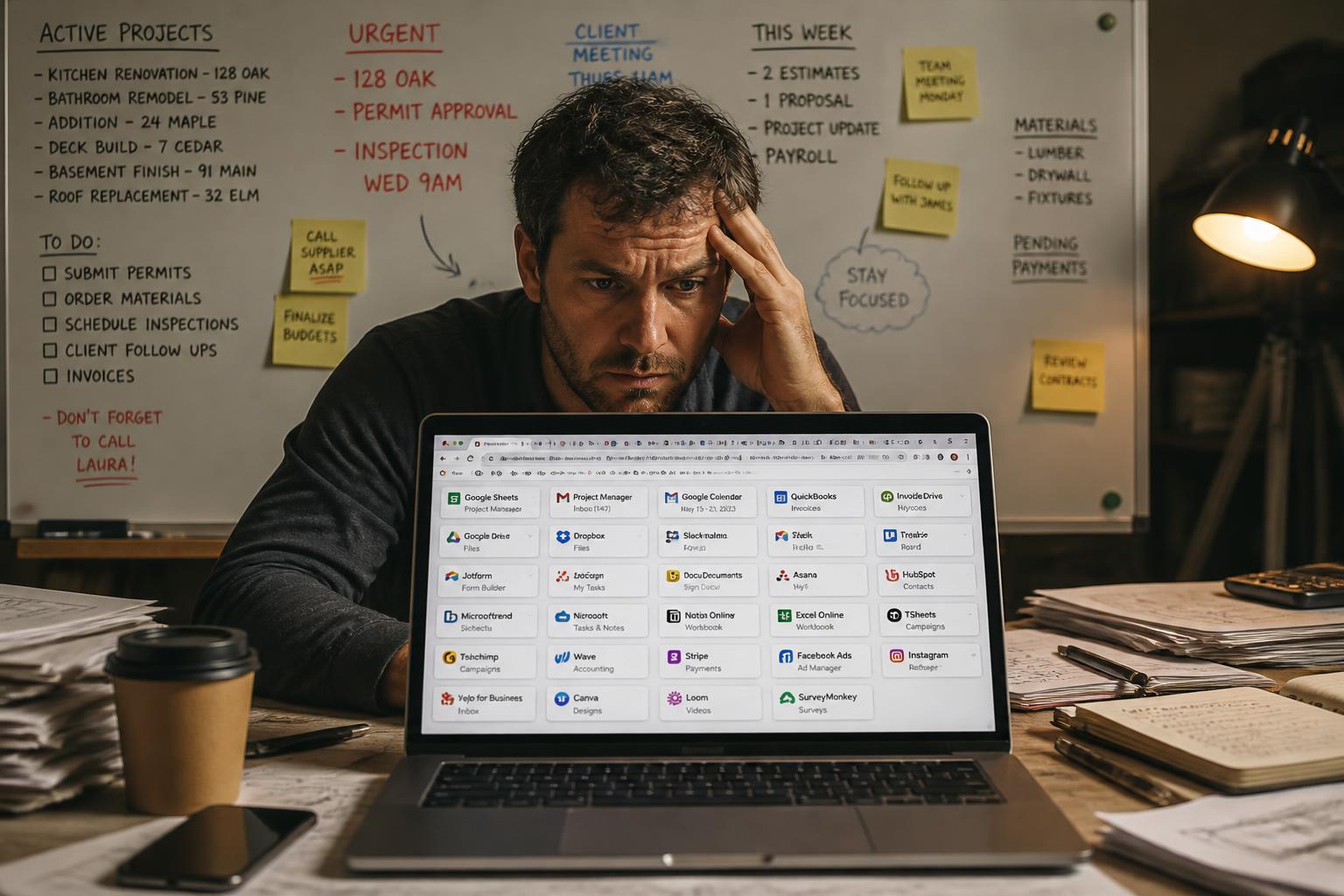
Are you still doing this without a task management app?
Every line below is something you can stop doing today — not manage better, not outsource cheaper. Stop. Separate project tracking tools, staff scheduling software and time tracking softwares don’t fix it on their own — connected work management platforms do.
- Writing the same welcome email every time someone says yes
- Chasing a client for details, consents or documents for the third time
- Rebuilding an agreement from an old Word file you can barely find
- Answering "where are we up to?" five times a week
- Keeping stages, sessions and next steps in your head and hoping nothing slips
- Digging through your phone for the photo or note from last time
- Re-typing client details into a project app, a form and a folder
- Booking a status meeting that could have been a screen they log into
- Paying for cloud storage, a project tool and a scheduling app separately
- Finishing a job or a program and forgetting to send the final invoice for a week
- Doing paperwork at 9pm because the day was for actual work
- Turning down good work because you know the admin will bury you
You can stop all of it now.
Imagine if you could…
From “yes” to delivered — every project, task, person, client and payment connected.
Six connected parts of a delivery and operations department, built and wired together. Here is every one, on its own, so you can see exactly what you get.
You voice-note one thing…
“New client signed — onboard them and send the welcome pack.”
One voice note — the whole job runs itself around it
Every job knows its stage, its dates and its money.
- One record holding stages, milestones, deadlines and the people involved
- Tasks, expected time, notes, photos and files attached in place
- Payment milestones, completion and handover built in
Who is working, when, where — and on exactly what.
- Work blocks and session types with the tasks and notes attached
- How long it should take against how long it actually took
- Hours completed and ready for your approval, never paid automatically
People, access and accountability in one place.
- Onboarding, roles, responsibilities and agreements per person
- Access and permissions you control, and access removal when they leave
- Completed work, approved hours and payment information connected
Clients see progress without another meeting.
- Onboarding, sessions, milestones, tasks and what you need from them
- Invoices, payments, files, completed work and next steps
- Internal rates, team detail and private notes stay out of their view
Ready-built: the website, dashboards, workflows and records already exist
You are not building it. You are moving into it.
The website, records, dashboards, workflows and business areas already exist. You customise the system by voice or text, upload what you already use and follow a guided launch path.
01:00
of 24 hours
You say
“Make the site warm and calm, use my logo colours, and write my About page.”
The system does
Brand, copy and images applied across every page.
Choose the closest industry system
Wellness, trades or business — the structure, pages and records for your kind of work are already in place.
Tell AI about the business
Speak or type. Your services, prices, location, tone and the way you actually work.
Customise brand, services and process
Colours, logo, packages, workflows and documents — changed by voice, applied everywhere.
Connect essential services
Domain, email, payments and calendar, with the launch path walking you through each one.
Import what matters
Clients, services, pricing, templates and current work — upload a spreadsheet or paste your existing website URL.
Go live
Core business operating within 24 hours. Around 8 hrs 18 min of work for a new business, up to about 13 hrs 5 min for a normal migration.
Inside Deliver
Watch it talk to itself.
Deliver is not a folder of admin tools. Plan the work, organise the actions, schedule the people, manage the team, catch the gaps and keep the client informed — one connected system, from “yes” to handed over.
 You, doing
what you love
- Quote accepted → the project or job created with its stages, dates and value
- Project stage starts → tasks and workflows created for the right person
- Work scheduled → who, when, where, the session type and the notes required
- Work completed → actual time and notes go to you for approval, then to the numbers
- Behind, over time or missing notes → the AI Operations Manager tells you first
- Progress, invoices and next steps → the client sees their view, nothing private
See it for real
This is what it runs for a business like yours.
Your board of projects and jobs, your week of tasks, the team schedule, each person's record, the operations view that finds the gaps and the client's own area — all inside your system, all styled from your brand.
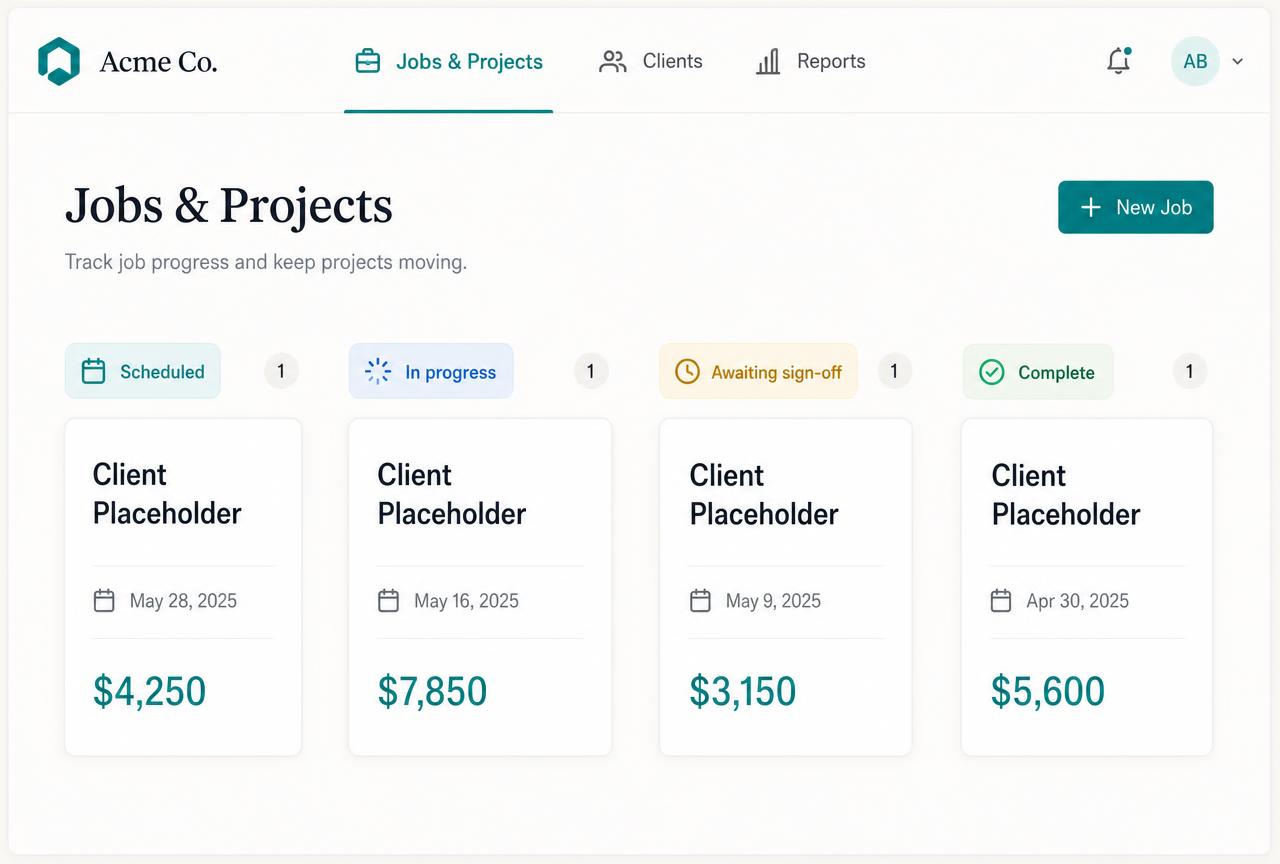 Projects + Jobs
Every job, program and session at a glance
Scheduled, in progress, awaiting sign-off, complete — with stages, deadlines, deliverables and money attached to each record.
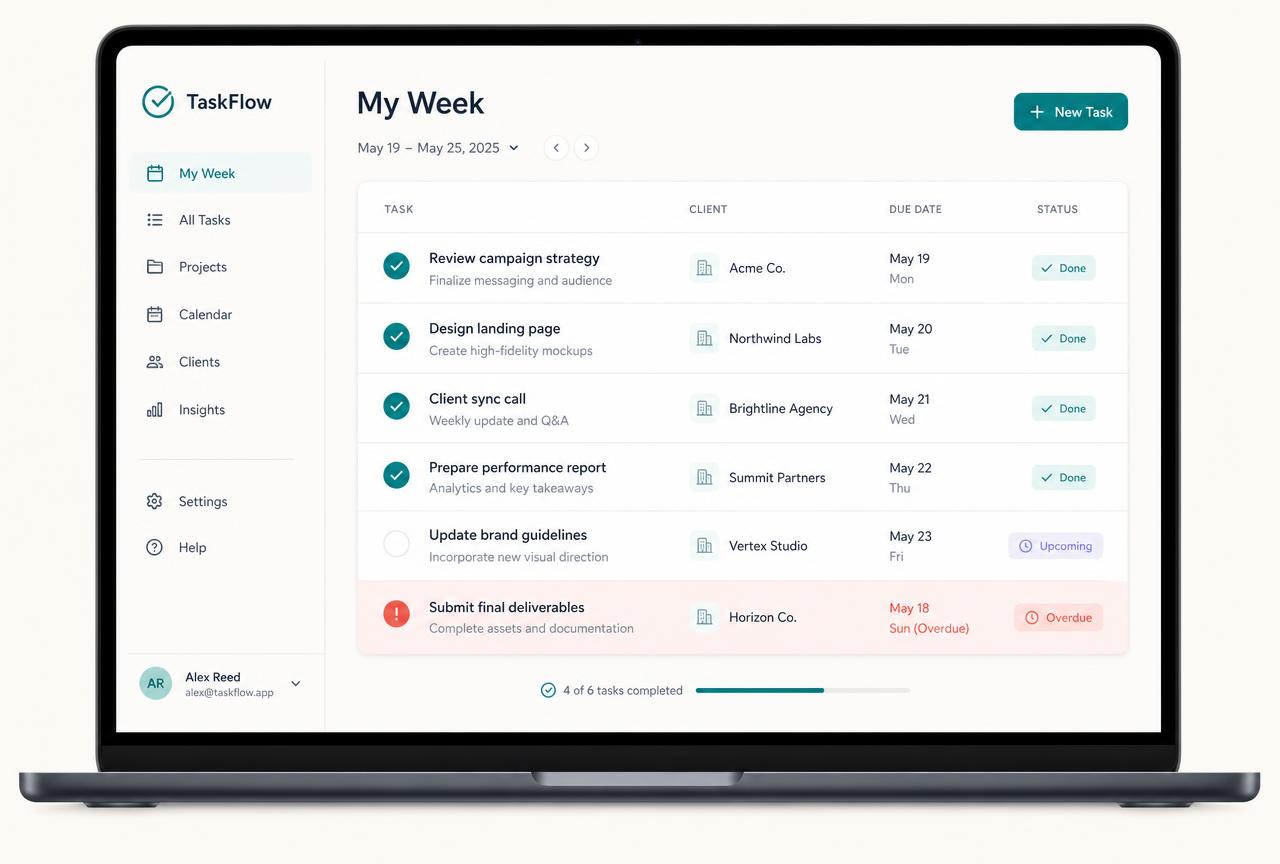 Tasks + Workflows
Your week, already written for you
Tasks created from sales, projects and every stage of the work, with deadlines, expected time and anything overdue flagged before the client notices.
 Team Scheduling
One schedule everybody reads the same way
Who is working, when, where, the session or work-block type, the tasks attached and the notes required — with actual time against expected.
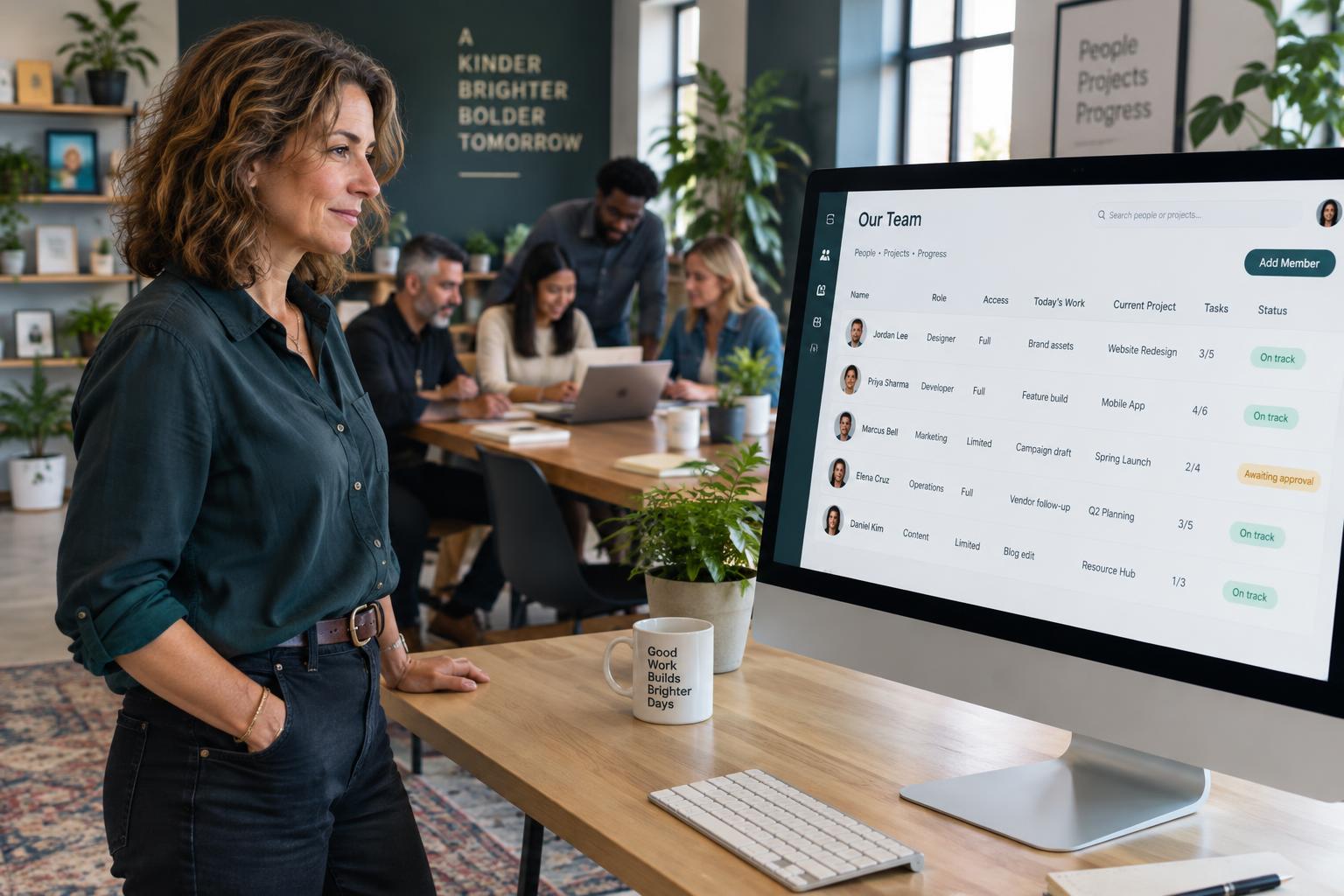 Team Management
One record per person, not five documents
Onboarding, roles, agreements, access, the work they hold, completed hours and the approved pay information that follows.
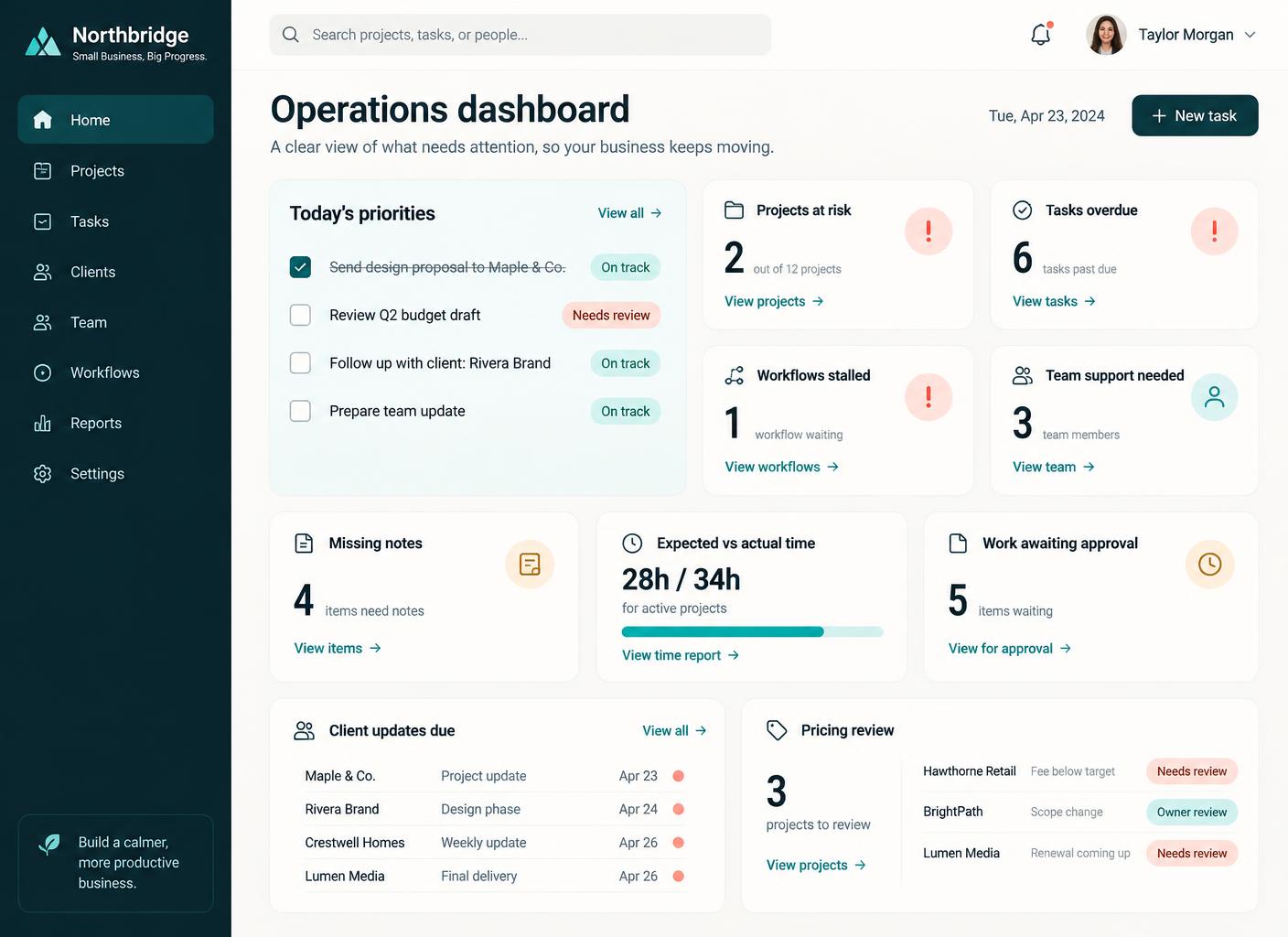 AI Operations Manager
What is late, what is leaking, what needs you
Projects behind, workflows stalled, time running over, missing notes and the decisions waiting on you — in one short view instead of six screens.
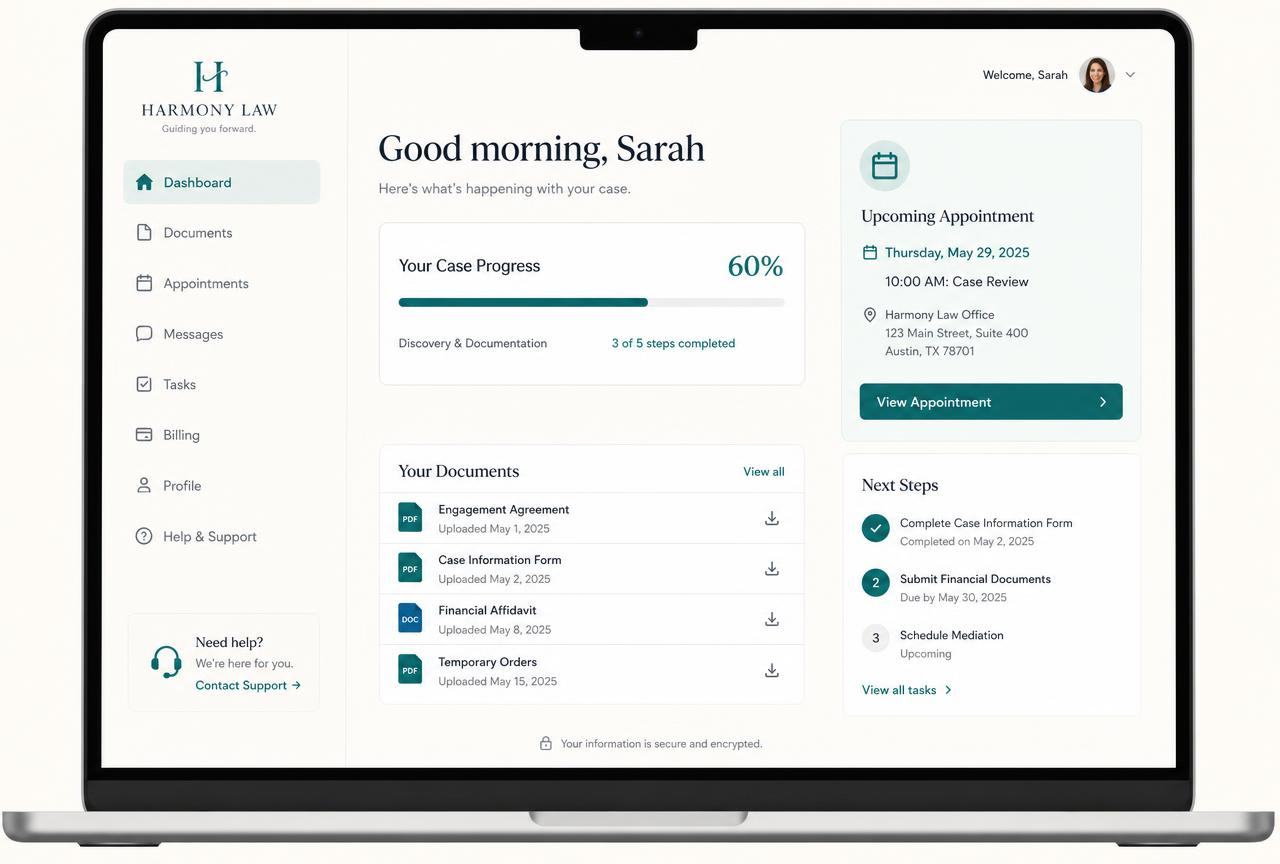 Client Management Area
Their own secure area, branded as you
Onboarding, progress, sessions, milestones, tasks, invoices and next steps in one login — so clients stop emailing you for updates.
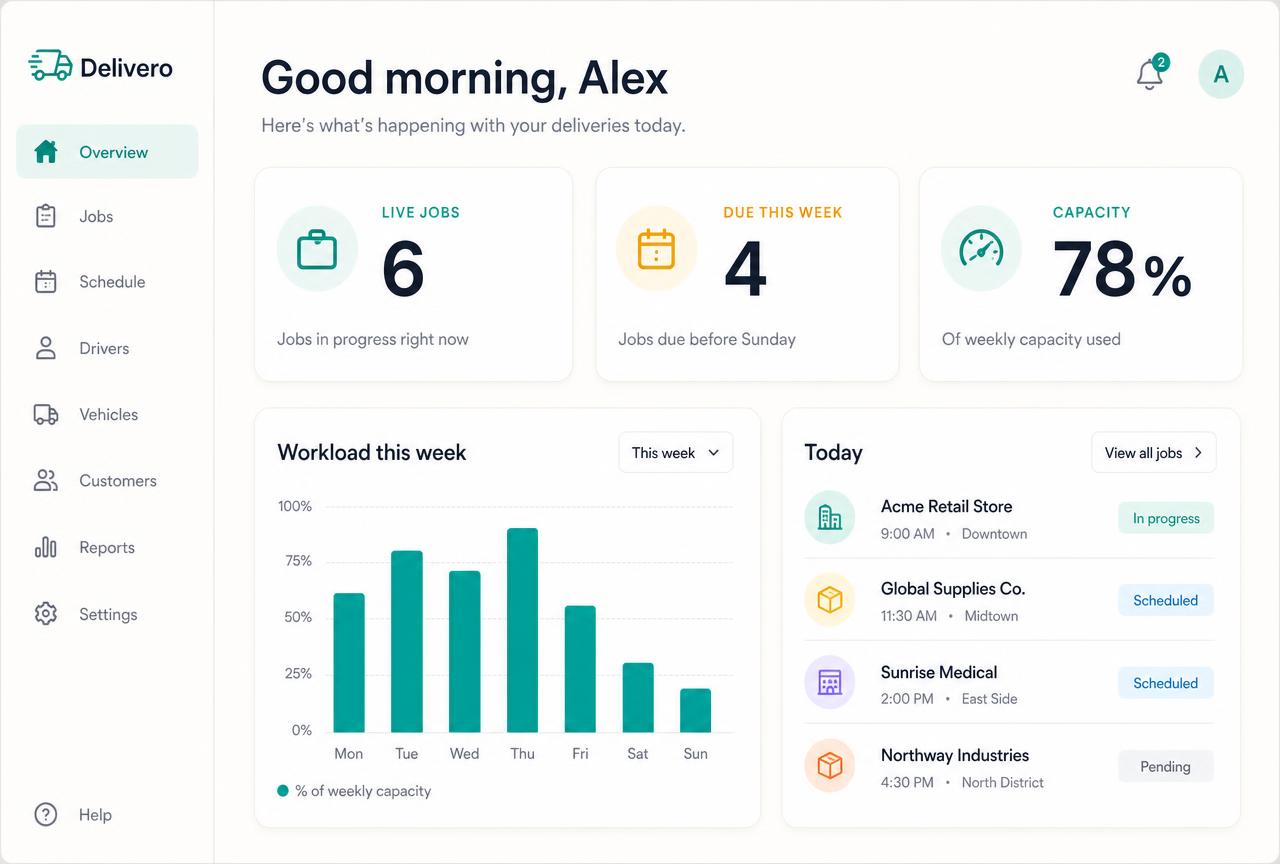 Delivery dashboard
Know your workload before the day starts
Live work and bookings, what is due this week and how much of your capacity is committed — so you take on clients with your eyes open.
Swipe or scroll for more
No sales call needed
See the Whole Alive24 System
Watch a new client onboard themselves, get their portal and move through the work automatically.
Prefer to speak to someone? Book a Live Walkthrough
The apps and people you will no longer need
The admin assistant you were about to hire. The seven apps you were about to stack.
This is not a cheaper project tool. It is the end of paying for a delivery stack that never talked to itself.
People you will no longer need
- Virtual assistant / admin$1,500–$4,000 / month
- Client services coordinator$3,000–$5,500 / month
- Project manager$4,000–$7,000 / month
- Operations manager$4,000–$7,000 / month
- Scheduler / roster coordinator$2,500–$4,500 / month
- Payroll or timesheet administrator$500–$1,500 / month
Apps you can cancel
- Project management app$30–$120 / month
- Task + reminder app$10–$40 / month
- Client portal tool$40–$150 / month
- Team scheduling / rostering app$25–$120 / month
- Timesheet + approval app$20–$80 / month
- Form + intake tool$25–$80 / month
- File storage subscription$10–$40 / month
- Reporting spreadsheetsyour weekends
- Endless message threadsyour evenings
Save
$18k–$52k
the typical first-year cost of buying this separately
No longer needed
$190–$750
of delivery app subscriptions cancelled, every month
You gain
10–18 hours
handed back to you every single week
You pay
less than $12 a day
less than $12 a day
less than $12 a day to run your whole business.
Alive24 works out to less than $12 a day, and you can cancel any time with one month's notice. Full pricing is on the pricing page. From day one you also cancel $190–$750 a month of project, portal, forms, e-sign, course and storage subscriptions, so most owners are ahead within the first few months. The only extra cost is AI prompts, from $25–$100 a month pay-as-you-go depending on how much customising you do.
Averaged small-business market rates. One booking, session or job that quietly slipped through the cracks usually costs more than the entire system.
See it before you decide
Run your whole business in one place — in 24 hours
Watch the full demo and see clients onboarded, work tracked and admin handled without a single spreadsheet.
Prefer to speak to someone? Book a Live Walkthrough
In practice — wellness
75 years old. Sold out her first retreat in week one.
A globally respected energy worker, Maggie had been ripped off more than once by web designers who assumed she wouldn't know the difference. Her courses and client list were scattered across a dozen places. She built her site with a few voice prompts in under five minutes, then sold out six places in Bali — $30,000 — a trip she'd been talking about for five years.

Maggie
Energy healing and intuitive guidance
“I built my website in under five minutes and sold out my first retreat the same week — just using people already in my circle.”
- Her age, no tech
- 75
- To build and launch
- 5 min
- Retreat, sold out
- 6 spots
- From her own network
- $30k

Read the full case studies — real businesses, real screenshots, real numbers.
Connected, not bundled
What this actually means for your week.
Bundled means seven logins on one invoice. Connected means the work moves itself forward while you are on the tools, in the room or with the client.
Onboarding goes out, details and consents come back, the deposit is paid, the work is created with its stages and dates, and your first tasks are already in your week. You sent nothing by hand.
Notes, photos, materials and documents attach to the right client and stage as you go. Nothing sits in your camera roll or a notebook, and nothing needs re-typing tonight.
They log into their own area and see their agreement, their stage, what is outstanding, what is booked and what they owe. The status meeting simply stops being needed.
Sign-off is recorded, the handover or wrap-up documents go out, the final invoice is sent, the review request follows, and the profit on that piece of work lands in your numbers without a spreadsheet.
Time and money
A client-services department that would traditionally cost more than the business earns.
A project tool, portal, scheduling app, timesheets and storage together run $150–$450 a month — plus $1,500–$4,000 a month if you hire an assistant or coordinator to hold it all together.

Admin assistant, client coordinator, project manager and document designer.You no longer need any of them.
ReplacedMost solo businesses cannot justify an assistant, and the ones who try end up paying someone to copy client details between apps that were never connected.
Alive24 for small businesses replaces the whole layer: projects and jobs, tasks and workflows, team scheduling, team management, AI operations oversight and a branded client area with onboarding and progress — in the same system that runs the rest of the business.
- No admin assistant to hire
- No project or portal subscriptions
- No separate scheduling, timesheet or storage apps
- No client details retyped between stages
The traditional first year
- Cost
- $56,000–$146,000+
- People to find, brief, pay and manage
- 5–10
- Separate apps
- 8–15
- Time to build
- 4–9 months
- Owner admin and coordination
- 25–40 hrs / week
- Setup and business admin over a year
- 1,500–2,500 hrs
Alive24 for small businesses
- Cost
- less than $12 a day
- People
- One owner
- Systems
- One connected system
- Core business ready
- Within 24 hours
- New-business setup
- ≈ 8 hrs 18 min
- Existing-business migration
- up to ≈ 13 hrs 5 min
A low subscription runs your whole business in one place.
Less than $12 a day
One system instead of a pile of apps and helpers.
Figures are the comparison model used in the approved Alive24 Solo sales document. Alive24 runs your whole business in one connected system for less than $12 a day — see the pricing page for the full breakdown.
This could be your business in the next 24 hours
Your Entire Business — Built, Connected and Live Within 24 Hours
Not a promise of a finished forever-business. A promise that the core — website, offers, sales, clients, delivery and money — is operating within a day.
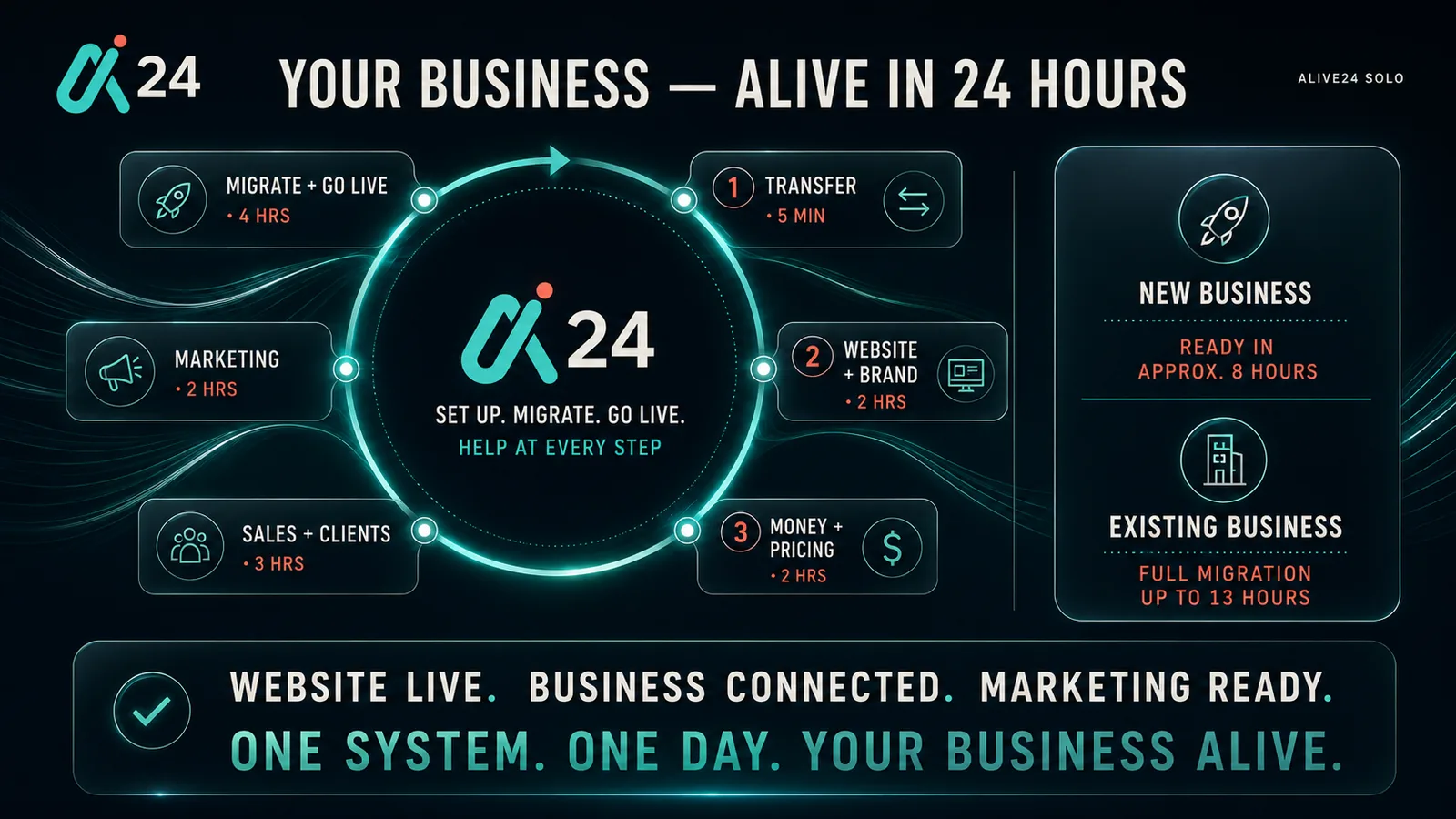
One system. One day.
HOUR 0
Handover call
You buy, book the free handover call, and our team duplicates and transfers the complete system into your ownership.
HOUR 1
Tell AI about the business
Services, prices, location, voice and the way you work — spoken or typed, in any language.
HOUR 3
Brand and website live
Logo, colours, images and copy applied across the site, documents and client area.
HOUR 5
Offers and pricing set
Packages costed and connected to the website, proposals, quotes and invoices.
HOUR 7
Connections made
Domain, email, calendar and payments connected through the guided launch path.
HOUR 8
Sales and delivery switched on
Lead forms, chat, pipeline stages, onboarding, tasks and the client area all active.
HOUR 24
Operating
Enquiries arriving into a system that answers, quotes, books, invoices and reports — while you do the work only you can do.
≈ 8 hrs 18 min of work for a brand-new business setup
Up to ≈ 13 hrs 5 min for a normal existing-business migration
Core business ready within 24 hours
Low subscription to run your whole business in one place
Questions
Deliver — every question, answered.
If you are weighing this up against a project tool, a client portal, a forms app, a course platform and an admin assistant, this is the honest detail.
What exactly is inside Deliver?
Six connected areas: Projects + Jobs, Tasks + Workflows, Team Scheduling, Team Management, the AI Operations Manager and the Client Management Area. Client onboarding and client progress live inside the Client Management Area. All of it built, connected and included — whether you deliver jobs on site or sessions in a room. (Courses sits in the Attract / Website area.)
What happens the second a client accepts a quote?
Onboarding starts on its own. The client is asked for the details, answers, consents and deposit you need, the agreement goes out for signature, their work is created — a job, a program or a block of sessions — with its stages and dates, and your first tasks appear in your week. You do not send a single email by hand.
What is the client area, in plain English?
A secure part of your website that clients log into with your branding on it. They see their documents, where their project, program or session plan is up to, what is outstanding from them, their upcoming appointments and their invoices. It is the single biggest reason clients stop chasing you.
Do my clients have to learn some complicated portal?
No. They get a link, they log in, and they see a short list: what is done, what you need from them and what happens next. That is it.
I do not have "jobs" — I run sessions, treatments or programs. Does this still fit?
Yes. One record can be a job on site, a course of treatments, a coaching program or a single session. It holds its stages, dates, notes, photos, documents, payments and sign-off, and you update it from your phone between clients. Nothing here assumes a building site or an office.
Where do the tasks come from?
From the system, not from you. An accepted sale, a project stage, a workflow or a scheduled session creates the tasks automatically with deadlines and expected time, and anything that slips is escalated before the client notices.
How does team scheduling actually work?
You schedule who is working, when, where and on what type of session or work block, with the tasks and notes attached. Actual time is recorded against expected time, and completed hours come to you for approval — nothing is paid automatically.
What does Team Management hold?
Onboarding, roles, responsibilities, agreements, access and permissions, the projects, tasks and schedules a person holds, their completed work, and access removal when they leave.
What does the AI Operations Manager do?
It reads the operational records people are authorised to see and tells you what is late, stalled, running over time, missing notes or waiting on your approval. It does not monitor devices, screens, keystrokes, locations or private messages, and it does not make employment or payment decisions.
Does my team need training to use it?
No. Each person sees their own day: what they are working on, what is due, what to write up and what needs approval. Serious or urgent matters always go straight to a person, not a chatbot.
Where do my files, notes and photos live?
Inside the system, attached to the client, the work and the stage or session they belong to, with storage included. No separate cloud drive subscription and no hunting through your camera roll.
Will clients be told what is happening without me writing updates?
Yes. Progress timelines and automatic notifications keep them informed as stages complete, and both sides get reminders for appointments and outstanding items.
What happens when the work or the program finishes?
Sign-off is recorded, the handover is confirmed, the final invoice is sent, a review request follows and the profit on that work appears in your numbers — all without you remembering to do any of it.
Can I take on more clients without more chaos?
That is the point. Owners typically get 10–18 hours a week back on onboarding, scheduling, status updates and chasing, which is the difference between two clients feeling busy and seven feeling calm.
Do I have to re-enter anything between sales and delivery?
Never. The lead, quote, client, their work and sessions, tasks, invoices and payments all read the same record. Change a detail once and it is correct everywhere.
How do I change how delivery works once it is live?
Say it. "Add a two-week check-in to every coaching client." "Send an aftercare note the day after every treatment." "Chase unsigned agreements after two days." It happens immediately, everywhere it applies.
So I can cancel my project, portal, scheduling, timesheet and storage apps?
Yes. That whole stack — usually $190–$750 a month — is replaced by one system that works out to less than $12 a day, cancel any time with one month's notice.
Is my client data and content mine?
Yes. Your clients, their records and sessions, notes, files and team information belong to you and can be exported at any time.
Is Deliver enough on its own?
Deliver is already wired into Attract, Sell and Money + Control, so won work starts delivery automatically, delivery drives the final invoice, and every completed job, program or session shows up in your profit and capacity numbers without you rebuilding anything.
What if I want help setting it up anyway?
Use the video guides, the knowledge base or the in-app AI helper, which knows your system. If you would rather someone else did the customising, an Alive24 builder can take it on as a paid extra.
Ready when you are
Give yourself your evenings back
Live in 24 hours, and the admin, folders, forms and app juggling stop for good.
Prefer to speak to someone? Book a Live Walkthrough
We are here to help
Let's onboard every client, run every job and hand the paperwork back to the system.
You do not have to decide everything today. Pick the option that matches where you actually are right now.
Watch the full demo
See the system build a website, socials, SEO, sales follow-up, quotes, bookings and money in real time. No sales call, no pressure.
Watch the Full Alive24 Demo Want it mapped to me
Ask Solomon, your business-in-a-box coach
Solomon is a real business coach who learns your business, then tells you in plain English exactly what Alive24 would build and run for you.
See it for my businessBook your live business demo
30 minutes, one-to-one with a real Alive24 coach who shows you the system running with your services, your pricing and the way you actually work.
Book my live business demoOwn it and book my handover call
Run your whole business in one connected system for less than $12 a day. See the full breakdown on the pricing page.
I'm ready to buy