
Invoicing Software and Payment Processing for Small Business, Connected to Every Sale

- Quote accepted
- Invoice created
- Terms connected
- Stripe connected
- Payment made
- Status recorded
- CRM updated
- Team notified
- Tasks triggered
- Client onboarded
- Client area opened
- Finances updated
Is this you?
Why Disconnected Billing Software for Small Business Creates Hours of Manual Bookkeeping
All three are solo operators with the same problem: the client says yes, then the invoice, the payment and the follow-through scatter across apps, inboxes and bank accounts only you are checking.

You are the entire accounts department
You do the work, send the invoice, chase it, check the bank and update the records yourself. Every unpaid invoice is your evening gone.

Money arrives four different ways
One client pays by Stripe, another by bank transfer, someone hands you cash—and you are left matching payments to invoices across apps and accounts by hand.

Payment lands, but nothing happens next
The money arrives, then sits there while the welcome email, the first task and the client’s access all wait for you to notice and start them manually.
Invoices + Payments walkthrough
Watch Small Business Invoicing Software and Payment Processing Move a Sale From Due to Paid
Watch approved client, package, scope and pricing information become a branded invoice, a clear payment choice and the next stage of the client journey.
- Opening the accepted quote
- Confirming the client and package
- Creating the branded invoice
- Adding the due date
- Connecting approved terms
- Selecting the payment method
- Reviewing before sending
- The client opening the invoice
- Online payment through Stripe
- Payment status updating
- CRM and tasks moving forward
- Client onboarding beginning
Prefer to speak to someone? Book a Live Walkthrough
Are you currently doing this?
Payment processing for small business should not be the most disconnected part of the sale.
The client has already said yes. You should not have to rebuild the same client, scope, price and next step across four more systems, or pay for separate billing software for small business to do it. Owners looking for the best invoicing software for small business, or the best invoice app for small business, usually want one place where the sale, the invoice and the payment already agree.
Rebuilding the sale
- Proposals designed separately
- Quotes generated somewhere else
- Invoices rebuilt in bookkeeping software
- Client and scope details copied again
Splitting the payment
- Payment handled on another platform
- Terms disconnected from payment
- Bank transfers checked by hand
- Client records missing payment status
Losing the context
- CRM stages updated manually
- Bookkeepers missing the sales context
- Clients moved between mismatched apps
- Owners chasing information across dashboards
Delaying the work
- Payment confirmations missed
- Teams unsure when work can begin
- Onboarding tasks created late
- Client access waiting for an update
You can stop rebuilding invoices and checking payment elsewhere. The whole sale—quote, invoice, payment and onboarding—can live in one place.
Introducing
Invoices + Payments inside Alive24.
The invoice starts with the client, package, quote and approved price already connected inside Alive24—then carries payment status into CRM, onboarding, delivery and business finances.
Prefer to speak to someone? Book a Live Walkthrough
 Quote accepted
 Invoice created
 Branded clearly
 Terms connected
 Stripe connected
 Alternative details
 Payment made
 Status recorded
- Client can see it
 Nothing forgotten
- Approved pricing
 Due date visible
- Team notified
- Tasks triggered
- CRM stage updated
- Client onboarded
- Finances updated
- One connected journey
Quote accepted
Start with the work and price the client already approved.
Invoice created
A clear branded invoice without typing the sale again.
Terms connected
Present the business’s approved terms consistently.
Stripe connected
Stripe processes secure online payments where configured.
Status recorded
Keep the payment status attached to the client journey.
CRM updated
The sale and payment remain on the same record.
Team notified
Tell the right people when configured events happen.
Nothing missed
Due date, amount, method and next step stay visible.
Tasks triggered
Configured onboarding work can begin after payment.
Client onboarded
Move naturally from paid sale into delivery.
- Quote accepted
- Invoice created
- Terms connected
- Stripe connected
- Payment made
- Status recorded
- CRM updated
- Tasks triggered
- Client onboarded
- Finances updated
How it works
Start with the agreed sale, create the invoice, connect payment and begin the client journey.
One clear process, five stages, with no separate invoice program for small business to learn. Click through to see what the invoice uses and what happens after payment.
You voice-note one thing…
“Luke accepted the landscaping quote — create the 40% deposit invoice with our project terms.”
One voice note — the invoice, payment status and next step build around the agreed sale
Step 1 · Start with the agreed sale
Start with the agreed sale
Use the approved proposal, accepted quote, package, job or service already connected to the client.
- The lead or client record
- The accepted proposal
- The accepted quote
- The package or service
- The approved scope
- The agreed price
Then the invoice, payment status, client record and onboarding step all agree—without another finance app in the middle.
Solved, in one place
Meet the payment journey that connects the sale to everything that comes next.
As small business invoicing software, Alive24 uses the approved client, package, pricing, proposal and quote information already inside the system to prepare the invoice. Payment becomes the start of onboarding and delivery—not a dead-end transaction.

Your payment journey
Accepted. Invoiced. Paid. Onboarded.
Voice note → Accepted quote updated
What they bought
The agreed package, project, service or job remains attached to the client.
The agreed price
Approved quote and pricing information carries forward without being typed again.
A branded invoice
The invoice stays consistent with the proposal, quote and client experience.
Due dates
The business sets when payment is due and reviews it before anything is sent.
Approved terms
Relevant business or payment terms can be presented and recorded consistently.
Every way you get paid
Connected Stripe payments, bank transfer, cash or any other method you accept—confirmed in one click.
Payment status
The client and relevant team members can see the status they need.
Notifications
The right people can be notified when configured events happen.
No lag after payment
The moment payment is recorded, configured tasks, client access and onboarding kick off automatically.
Prefer to speak to someone? Book a Live Walkthrough
Built for real businesses
From first deposit to final payment—it fits the way you sell.
Deposits, packages, retainers or on completion.

Massage therapist

Personal trainer

Beauty and skin therapist

Yoga and pilates teacher

Naturopath and nutritionist

Counsellor and psychologist

Physio and chiropractor

Health coach
Massage therapist
Personal trainer
Beauty and skin therapist
Yoga and pilates teacher
Naturopath and nutritionist
Counsellor and psychologist
Physio and chiropractor
Health coach

Electrician

Plumber

Builder and carpenter

Landscaper and gardener

Painter and decorator

Cleaner and home services

Handyman

Property and rental operator
Electrician
Plumber
Builder and carpenter
Landscaper and gardener
Painter and decorator
Cleaner and home services
Handyman
Property and rental operator

Website designer

Social media manager

Business coach

Business consultant

Marketing consultant

PR consultant

Bookkeeper

Accountant

Virtual assistant

Copywriter

Brand and graphic designer

Photographer and videographer

Course creator and tutor

Maker and product seller

Mobile and local operator
Website designer
Social media manager
Business coach
Business consultant
Marketing consultant
PR consultant
Bookkeeper
Accountant
Virtual assistant
Copywriter
Brand and graphic designer
Photographer and videographer
Course creator and tutor
Maker and product seller
Mobile and local operator
Trades
Deposit at acceptance, progress payment mid-job and final invoice on completion.
Wellness practitioners
Session packages billed up front and single sessions paid at booking.
Coaches
One payment or a structured payment plan where configured and supported.
Consultants
Milestone invoicing against a scoped proposal, plus monthly retainers.
Makers
Deposit on order, balance before dispatch, receipts issued automatically.
Small teams
A paid invoice notifying the right people that delivery can begin.
Tell it what happened in plain language
Create the invoice and next steps by simply saying what happened.
Alive24 can use information already connected to the client and sale instead of requiring it to be typed again. You still review before sending or recording payment.
“Luke accepted the landscaping quote. Create the 40% deposit invoice and send it with our project payment terms. Include Stripe and our bank-transfer details, and hold it until I approve it.”
- Create the invoice from this accepted proposal
- Use the approved quote and client details
- Create Luke’s 40% deposit invoice
- Add our approved project payment terms
- Give the client the Stripe payment link
- Also show our bank-transfer details
- Set the due date for next Friday
- Include the package and agreed scope
- Show tax where it is configured
- Keep the invoice on the CRM record
- Mark Astrid’s invoice paid
- Move her to onboarding
- Create the preparation tasks
- Hold the invoice until I approve it
What that normally means
- Opening another invoice app
- Copying the client details
- Rebuilding the agreed line items
- Checking payment elsewhere
- Updating the CRM manually
- Creating onboarding tasks later
Plain language can create the invoice and next steps from approved information—but saying ‘paid’ never proves money reached the bank. Payment still needs a connected or manual confirmation.
Time, money and energy saved
Make it easier to get paid—and harder for money to disappear between systems.
This is not another invoice generator. It connects approved work, online invoices and payments, CRM, client records and delivery without pretending to replace Stripe, your bank or professional advice.
What quietly disappears
- Separate invoice subscriptions
- Quote-to-invoice re-entry
- Standalone payment-link tools
- Payment-tracking spreadsheets
- Manual CRM updates
- Onboarding checklists
- Client payment folders
- Repeated sales administration
- Missed or delayed invoices
- Inconsistent payment details
- Work started before deposit confirmation
- Sales data disconnected from reporting
Time, visibility and confidence lost between yes, payment and delivery
Inside Alive24
- Approved information carried forward
- Branded invoices created quickly
- Stripe connected where configured
- Alternative instructions displayed clearly
- Status attached to the client
- Terms presented consistently
- Relevant people notified
- Configured tasks triggered
- Client records kept clear
- One connected Sell journey
One clear path from accepted work to paid, onboarded client
Time and energy returned
- No retyping client information
- No rebuilding approved prices
- No searching across payment apps
- No guessing who has paid
- No repeated status checks
- The right next step visible
- Clients have a clear record
- Bookkeepers see organised context
Alive24 works best with Stripe for connected online payment processing. Stripe processes the payment; Alive24 connects the journey where configured. Alternative details can be displayed but may require manual confirmation. Invoices are sent only after approval, and business, legal, tax and accounting decisions remain yours to review with appropriate professionals.
See full pricingBefore and after
From four disconnected apps to one clear path from yes to paid.
The same client and agreed work—the difference is whether the information carries forward or gets rebuilt after every step.
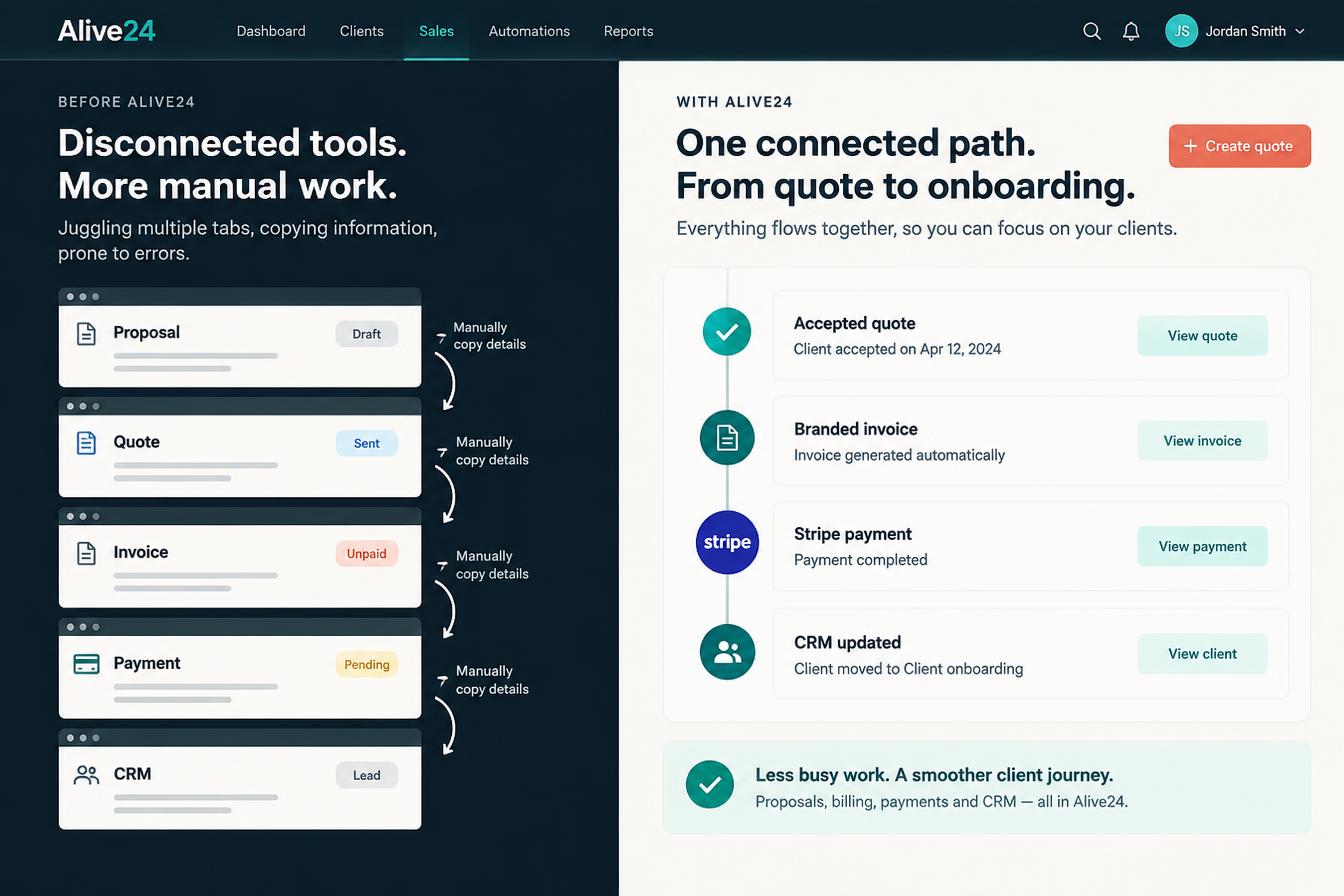
Before
- Proposal designed separately
- Quote created elsewhere
- Invoice rebuilt manually
- Payment stored in another dashboard
- CRM updated later
- Client onboarding delayed
- Payment context hard to find
After
- Agreed information carried forward
- Branded invoice created quickly
- Payment options made clear
- Status connected to the client
- Tasks and notifications triggered where configured
- Onboarding begins without rebuilding
- One connected Sell journey, start to finish
Real examples, one connected record
However your clients pay, keep the sale connected.
The same journey works across deposits, package invoices, projects and complete programs—using the client and agreed sale already inside Alive24.
- A trade quote becoming a deposit invoice before work begins
- A consultant’s accepted proposal becoming a package invoice
- A wellness client paying for a complete program
- A coach offering configured payment choices
- A creative project moving from approved scope to deposit
- A course client moving into the correct onboarding journey
- A professional service invoicing an approved milestone
- A small team seeing when delivery can begin
- Stripe processing a connected online payment
- Bank-transfer details shown on an invoice
- A manual payment confirmation recorded
- The CRM moving to the correct stage
- Onboarding tasks created where configured
- The client seeing their payment record
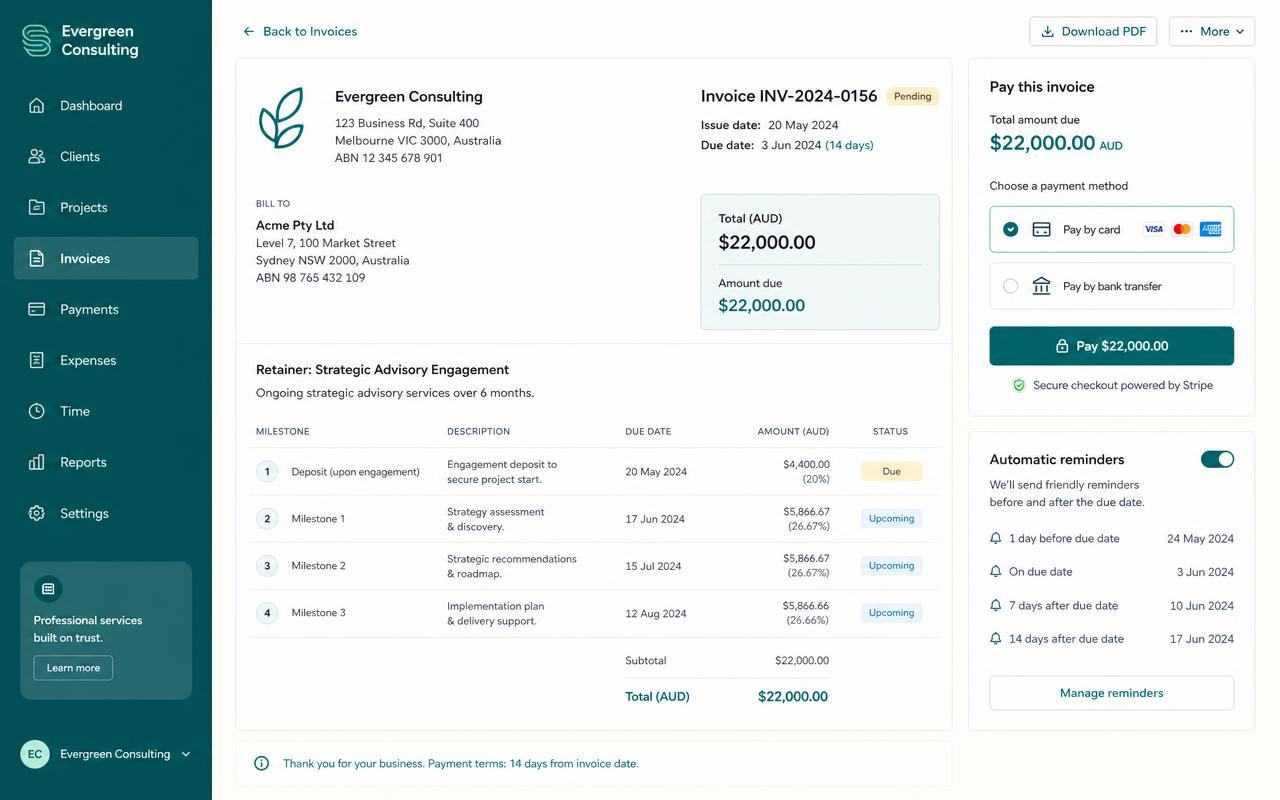 The invoice
Branded and connected
Client, scope, price, due date and approved terms carried forward.
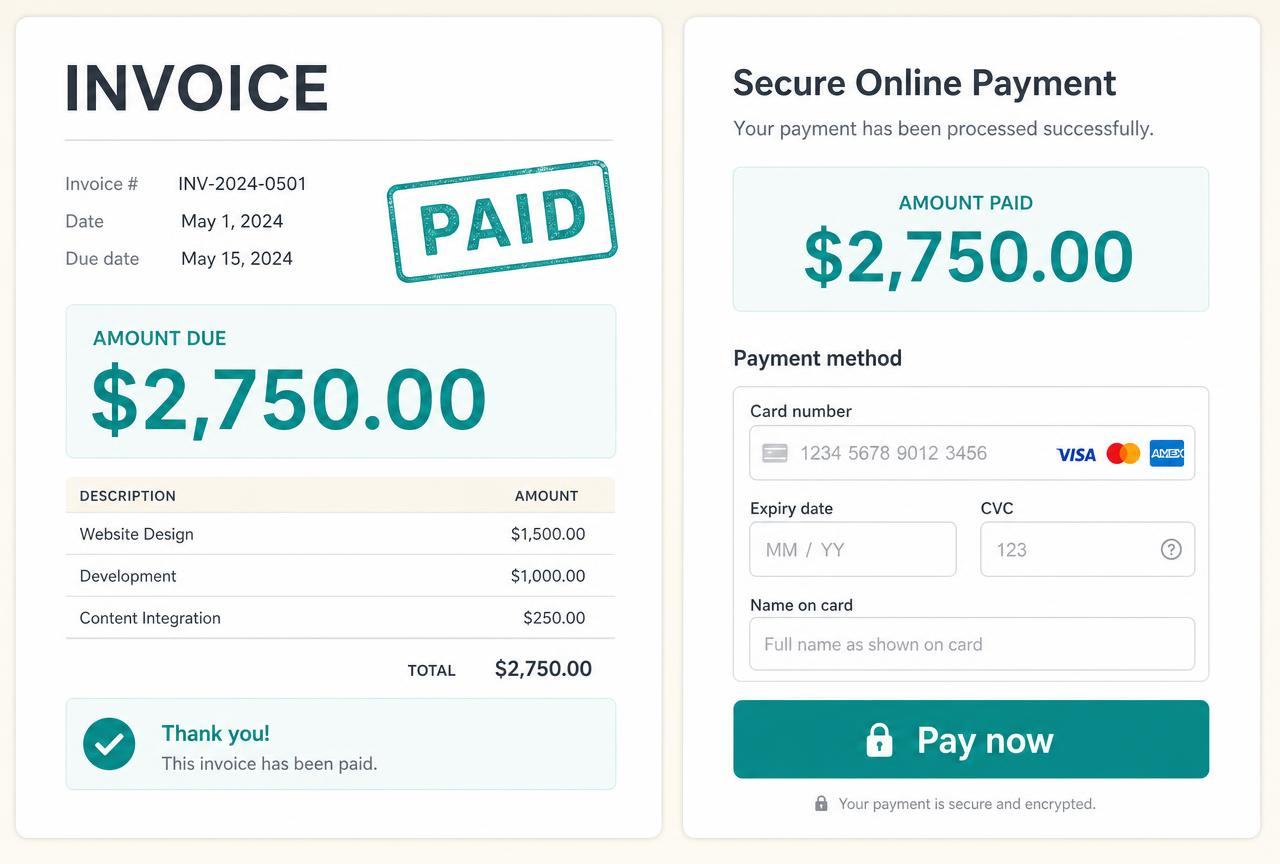 The payment
Clear status on the record
Stripe connected where configured, alternatives confirmed appropriately.
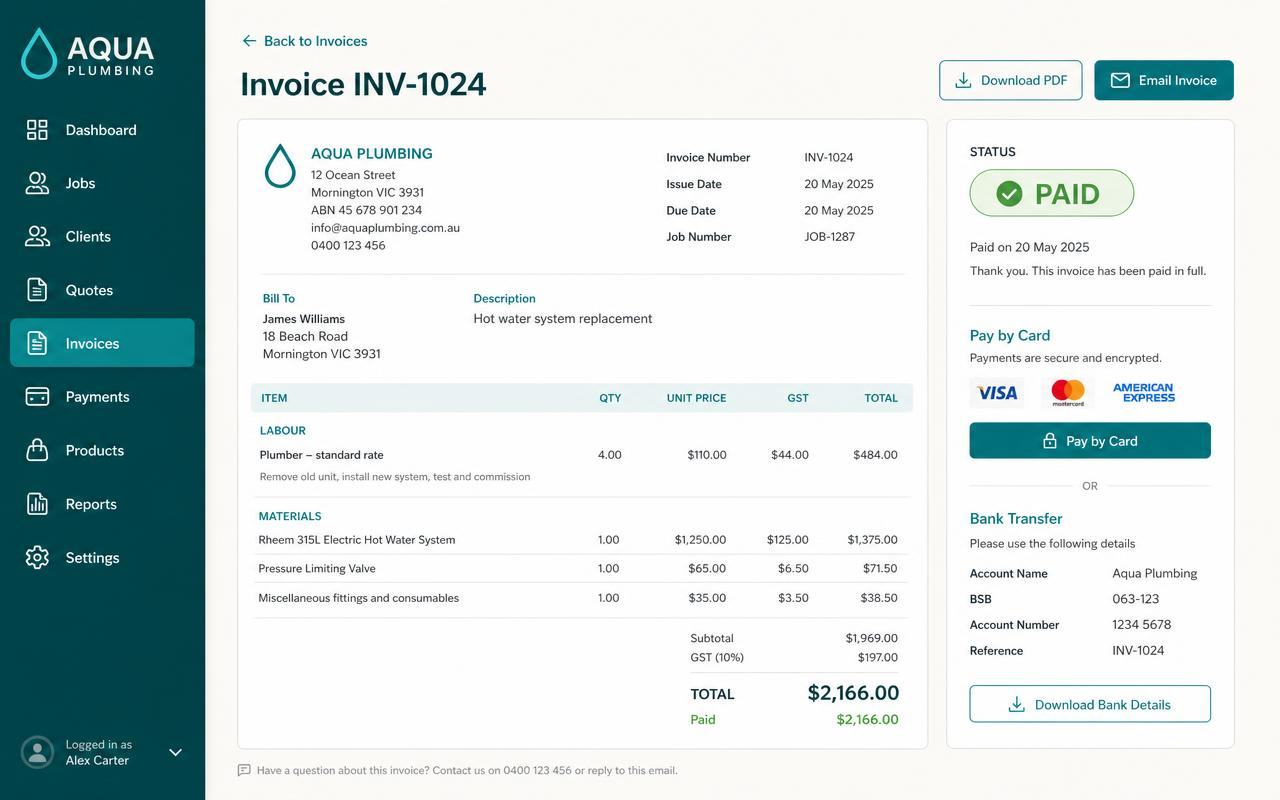 The client journey
One record, one next step
The CRM, notifications and tasks move from the same sale.
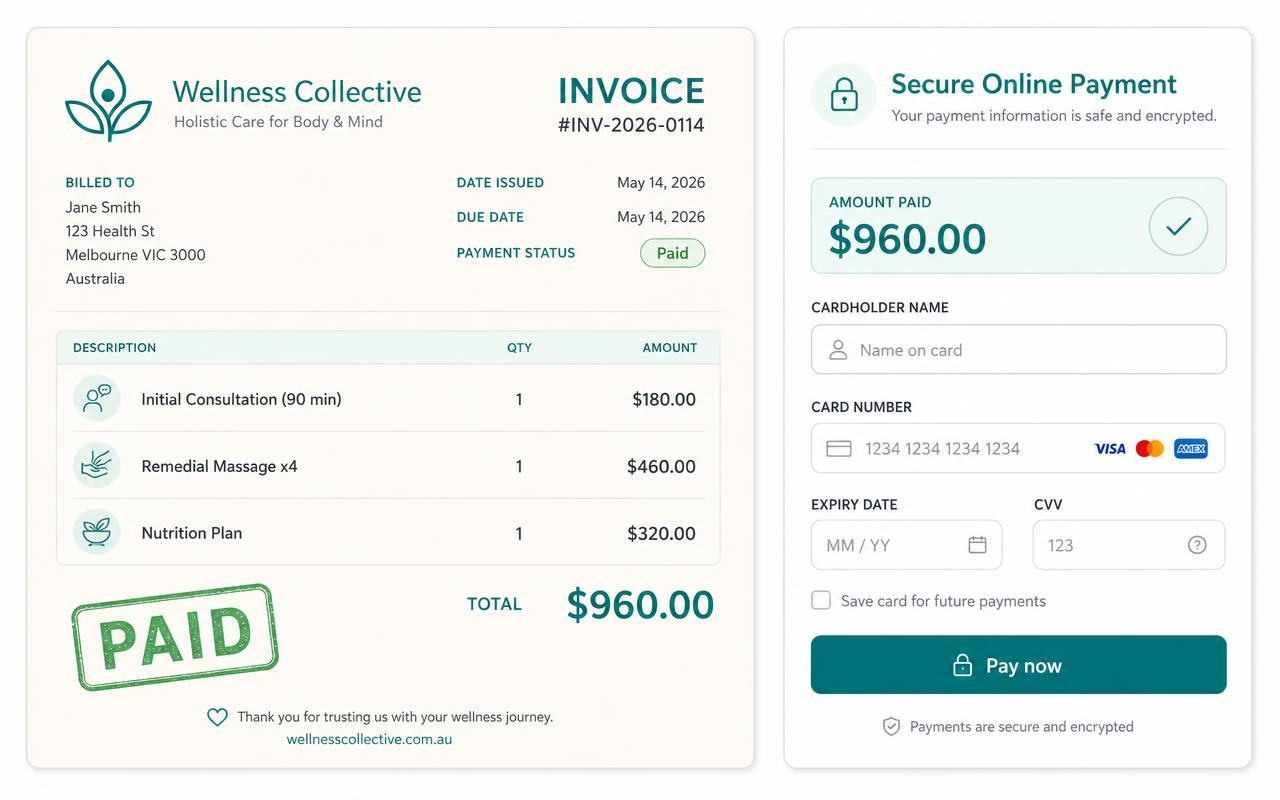 The client area
A clear record for the client
Relevant invoices and payment information stay easy to find.
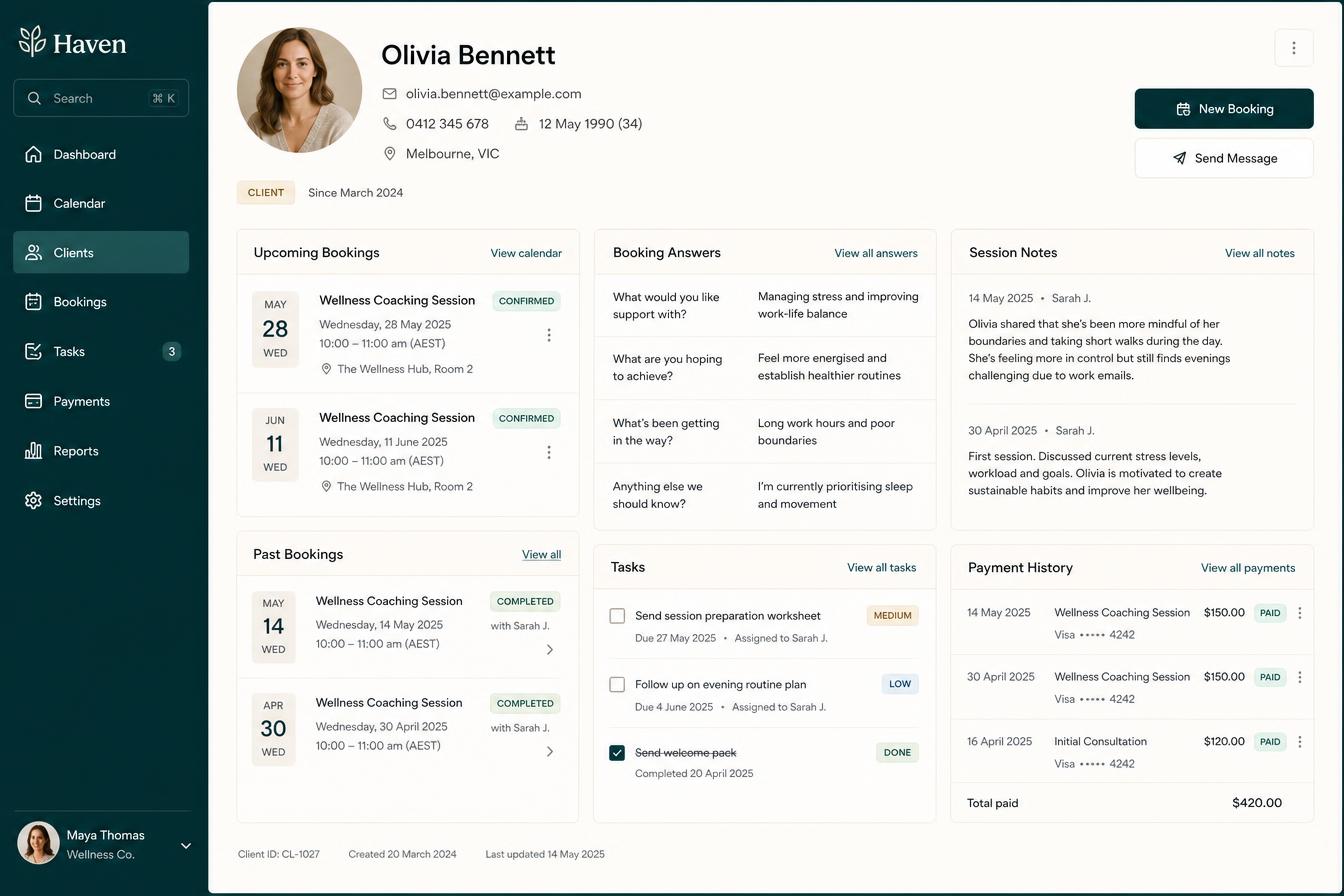 The business view
Payment in context
See what was sold, paid and still needs to be delivered.
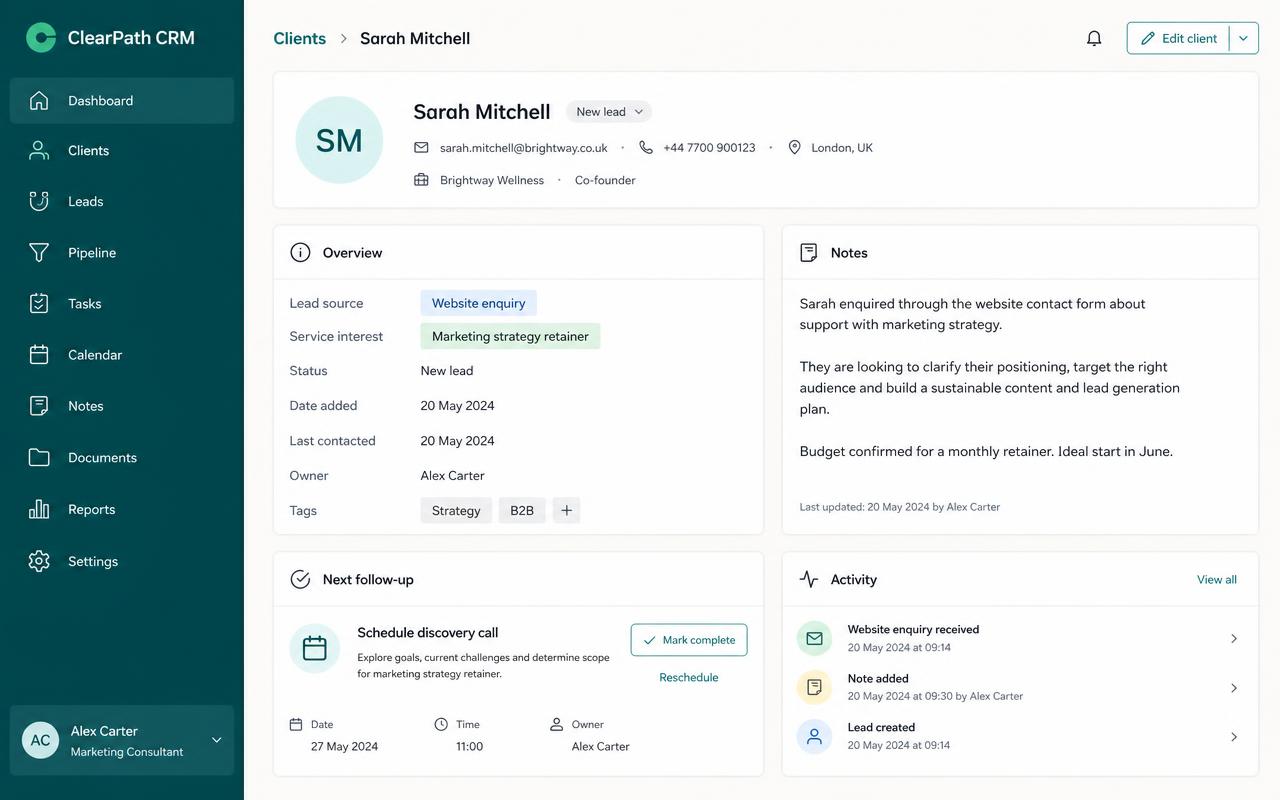 The next stage
Onboarding can begin
Configured tasks and access follow the recorded payment.
Swipe or scroll for more
Prefer to speak to someone? Book a Live Walkthrough
Two clear ways to get paid
Let clients pay online—or record every other way they pay in one click.
Stripe is the connected online option. Bank transfer, cash, Revolut, Venmo and any other method you accept are confirmed by you with a single click—either way, the invoice, the CRM and the next steps update together.
- Connect Stripe
- Create the invoice
- Confirm the client and amount
- Add the due date
- Present approved terms
- Review before sending
- Give the client a secure payment path
- Let Stripe process the payment
- Record the payment status
- Automated tasks kick off immediately
Stripe processes the connected online payment. Alive24 records its status and starts the configured onboarding tasks the moment payment is received—no lag between payment and action.
A consultant’s accepted proposal becomes a branded invoice. The client pays online through Stripe, the CRM updates and onboarding tasks begin the same minute.
- Show bank-transfer instructions
- Accept cash in person
- Show Revolut details where appropriate
- Show Venmo details where appropriate
- Add another method you accept
- Keep the invoice branded
- Present the amount and reference
- See the payment arrive
- Confirm it in one click
- Automated tasks kick off immediately
However the money reaches you, confirming it takes one click—and that one click updates the invoice, the CRM, the payment record and starts the configured next steps.
A trade client pays a deposit by bank transfer. The owner sees it land, confirms it in one click and the preparation tasks and client onboarding start straight away.
See a real invoice inside Alive24Real proof
Payment should complete the sale—not break the system apart.
Working Alive24 examples show proposal and quote information carried into branded invoices, clear payment choices, CRM updates, onboarding tasks, client records and the wider business view.
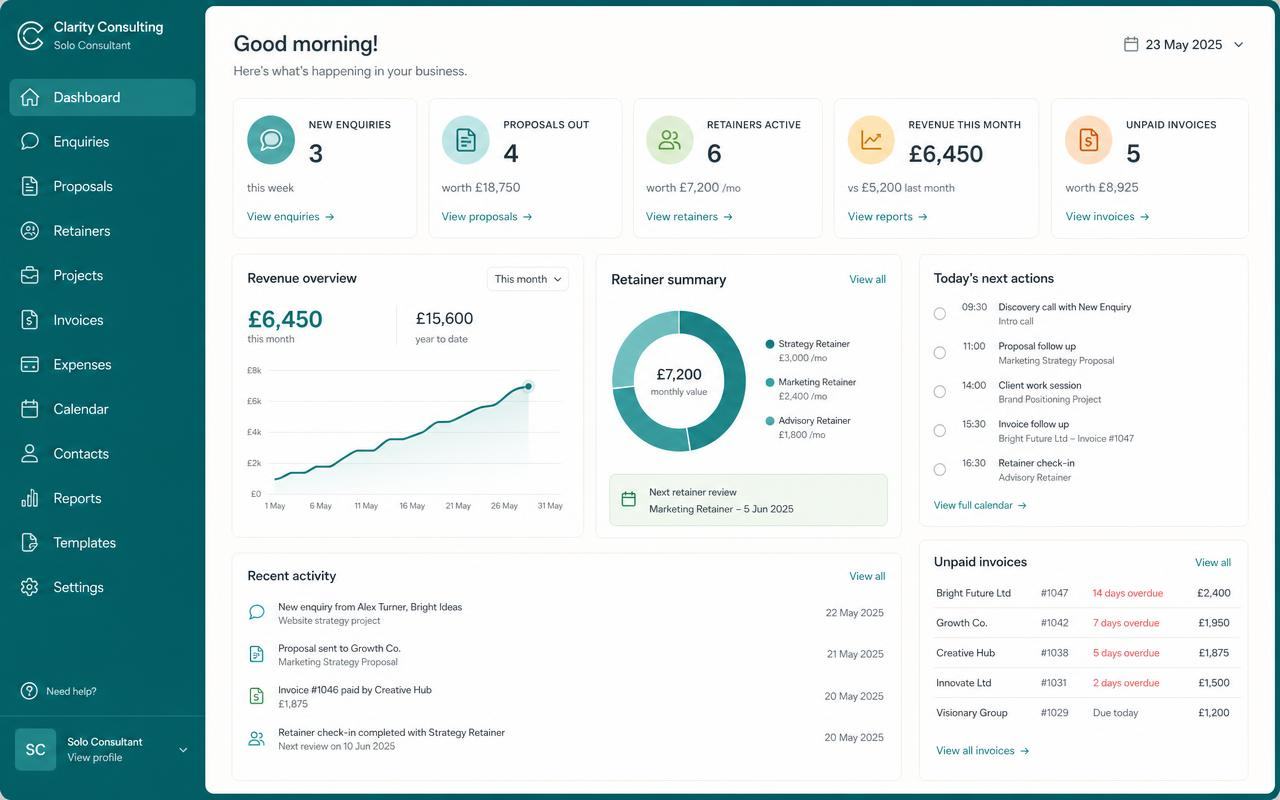
These are realistic Alive24 product examples. No payment volume, conversion rate, security certification, accounting approval or financial outcome is claimed.
Prefer to speak to someone? Book a Live Walkthrough
What you actually receive
See the invoice, payment and client journey in one place.
A branded invoice carries the approved client, job and price forward, then keeps payment and the next step visible.
Raise it fast
Invoices from work you have already recorded.
- Created from accepted quotes with approval
- Client, package and scope carried forward
- Deposits, progress payments and balances
- Invoice number, amount and due date
- Tax and approved terms where configured
Get paid
Make paying you effortless.
- Stripe connected online payment where configured
- Bank-transfer instructions displayed
- Revolut or Venmo details where appropriate
- Alternative payments confirmed appropriately
- Payment record attached to the client
Chase automatically
Late money handled without the awkward text.
- Payment status visible on the client record
- Relevant notifications where configured
- CRM stage updated through the chosen workflow
- Onboarding tasks created after confirmation
- Client area shows the relevant record
Stay reconciled
The money side matches reality.
- Related proposal and quote visible
- Invoice and payment connected to the client
- Expenses and receipts beside income
- Organised records for the bookkeeper
- Business dashboard sees the wider context
Prefer to speak to someone? Book a Live Walkthrough
Prefer to speak to someone? Book a Live Walkthrough
Built to hold the whole paid journey
See the invoice, payment and client journey in one place.
Alive24 keeps the agreed sale, branded invoice, payment record and next actions together so everybody sees the information they need without another disconnected dashboard.
“Consulting package invoice · due in 7 days · Stripe or bank transfer”
Built from the accepted quote, reviewed before sending and connected to the client record and next steps.
- 01
The accepted sale carries forward
The client, package, scope and approved quote become the starting point instead of being typed into another app.
- 02
The payment choice stays clear
Stripe can process connected online payment, while approved alternative instructions can also appear on the invoice.
- 03
Payment starts the next stage
Once appropriately confirmed, the CRM, notifications, client access and configured onboarding tasks can move forward.
- Client details
- Invoice number
- Package, project or service
- Agreed scope
- Line items where relevant
- Price
- Tax where configured
- Amount due
- Due date
- Payment method
- Terms acknowledgement
- Payment status

Alive24 is informed by more than 20 years of hands-on small-business, hospitality, wellness, sales and delivery experience—including knowing how quickly a clear yes turns into messy admin when invoicing, payment and onboarding live apart.
Prefer to speak to someone? Book a Live Walkthrough
Fewer tabs. Fewer repeated details. A payment you can actually follow.
One connected payment journey instead of another pile of finance apps.
The invoice is not a separate admin exercise. It is the agreed sale becoming payment, client access and the work that follows.
From lead source to paid client
See exactly how the sale became money—and what happens next.
- 01
Lead source
The journey begins with the website, chat, referral or source information available on the record.
The sale has context
- 02
CRM + Pipeline
The conversation, client details and sales stage remain together inside Alive24.
Nothing retyped
- 03
Package or job
The approved package, project or service carries its scope and pricing into the sale.
Agreed work
- 04
Proposal + quote
The client reviews the offer, approved price and relevant terms before accepting.
A clear yes
- 05
Invoice + terms
The agreed information becomes a branded invoice with due date, method and approved terms.
Ready to pay
- 06
Payment
Stripe processes connected online payment; alternatives use their appropriate confirmation process.
Status connected
- 07
CRM updated
The invoice and recorded payment stay attached to the client and sale.
Everybody informed
- 08
Onboarding + delivery
Configured access, tasks and delivery steps begin with the right context.
Straight into the work
- No accepted quote retyped
- No disconnected payment status
- No manual CRM update
- No onboarding rebuilt later
Prefer to speak to someone? Book a Live Walkthrough
Connected, not bundled
Every invoice and payment connects to the rest of the business.
The invoice carries the approved sale through payment, CRM, client access, delivery and financial visibility—without turning each stage into another disconnected admin job.
- 1Packages + PricingSupplies the approved price and package.
- 2AI Sales Chat + Follow-UpKeeps the original conversation connected.
- 3CRM + PipelineShows the complete sale and payment status.
- 4Bookings + CalendarConnects paid calls, sessions and booked work.
- 5Proposals + QuotesCarries accepted work into the invoice.
- 6Client Management AreaStarts the paid client journey and opens the path to the Client Area.
- 7Projects + JobsMoves the agreed scope into delivery with Tasks + Workflows.
- 8Business DashboardConnects payment with Expenses + Receipts and Projections + Reporting.
- Packages + Pricing supplies the approved price
- AI Sales Chat records the original conversation
- CRM + Pipeline keeps the complete sale together
- Bookings + Calendar connects paid time
- Proposals + Quotes supplies the agreed work
- Client Onboarding starts the next stage
- Client Area shows the relevant client record
- Projects + Jobs carries the scope into delivery
- Tasks + Workflows creates configured next steps
- Business Dashboard connects the sale to the wider picture
- Invoices + Payments is part of Alive24. Stripe processes connected online payments; Alive24 does not hold funds, replace your bank or provide legal, tax, bookkeeping or accounting advice.
Find your number
Connect every dollar back to the journey that created it.
See the available lead source, funnel, package, proposal, quote, invoice, payment status and delivery commitment together—without promising attribution where tracking information is unavailable.
Take the 2-minute payment check
Free, no commitment, with a practical summary of the sales admin to connect.
Start with SolomonPrefer to speak to someone? Book a Live Walkthrough
Explore the connected system
See how one invoice connects across Sell, client delivery and your numbers.
The journey stays inside Sell, with the accepted quote becoming payment and the paid client moving into delivery.
You
One voice note. One change.
Voice note → Website updated
Prefer to speak to someone? Book a Live Walkthrough
One consistent client experience
One professional journey builds far more trust than five mismatched apps.
The client moves naturally from understanding the offer to accepting the quote, reading the approved terms, receiving the invoice, paying and entering their client area.
The same branding
The proposal, quote, invoice and client area still feel like the same business.
The agreed information
The scope, price, terms and client details stay consistent from yes to paid.
A clear payment path
Stripe handles connected online payment while Alive24 keeps the journey clear.
What happens next
The client can see the record and understand how onboarding and delivery begin.
Questions
Invoices + Payments—the questions owners actually ask.
Still unsure? The full demo answers most of it in a few minutes, without a sales call.
Ready to connect every sale from first enquiry to money in the bank?
See how Alive24 turns accepted work into a clear invoice, simple payment journey and fully connected client onboarding process.
Book a Live Walkthrough
See an accepted quote become a branded invoice, connected payment and ready-to-start client journey.
Book a Live WalkthroughSee How Sell Works
Explore how invoices and payments connect to packages, CRM, proposals, bookings and client delivery.
See How Sell WorksGet Alive24
Pay once to own the ready-built system, then run Invoices + Payments, Sell, delivery and Money + Control with one low subscription.
Get Alive24