
Inventory software for small business: know what you have, what it costs and where it went.
Simple inventory software for small business owners who hold products or materials—record what you buy, what you use and what is left, without warehouse systems.

- Add a product
- Add a material
- Record the cost
- Record quantity
- Assign to a job
- Record usage
- See what is left
- Low stock reminder
- Reorder prompt
- Cost per product
- Upload your sheet
- Skip it entirely
Is this you?
If you hold products or materials, this inventory app for small business is for you. If not, skip it.
Wondering what the best inventory software for small business looks like? For most solo owners it is simple stock management software for small business that connects to the work.

You promise work before checking stock
You commit to a job, then discover the materials are not there and pay extra for urgency.

Your stock lives in a spreadsheet
A sheet that is accurate until the first busy week, then quietly becomes fiction.

You do not know product cost
You sell things without knowing what they actually cost you, so the margin is a hopeful guess.
Inventory walkthrough
See inventory software for small business turn a material purchase into a record you can actually use.
Watch inventory tracking software for small business record a purchase, assign it to a job and show what remains—simple inventory management software, not warehouse software.
- Product added
- Material added
- Quantity recorded
- Cost recorded
- Supplier noted
- Assigned to a job
- Usage recorded
- Remaining quantity
- Low stock flagged
- Reorder reminder
- Cost in the job
- Simple review
Prefer to speak to someone? Book a Live Walkthrough
Are you currently doing this?
Counting stock by walking around the shed is not a system.
When product and material records live in your head, both money and promises go missing.
You do not know what you hold
- Stock counted by walking around
- Materials found missing mid-job
- Work promised before checking
Cost never reaches the price
- Product cost never recorded
- Margin guessed
- Waste never noticed
Reordering happens too late
- Running out mid-job
- Paying urgency premiums
- Suppliers chased in a panic
The tools are the wrong size
- Warehouse software for one person
- Spreadsheets nobody updates
- Systems separate from the work
You can stop guessing what you hold. Products and materials can be recorded simply, assigned to work and reduced as they are used.
Introducing
Inventory inside Alive24.
Simple inventory software for small business owners who hold products or materials—record what you buy, what you use and what is left, without warehouse systems.
Prefer to speak to someone? Book a Live Walkthrough
 Purchase
 Record
 Count
Count Assign
 Use
Use Reorder
 Understand the cost
Products
Items you sell, with cost.
Materials
Supplies you use on work.
Quantity
How many you actually hold.
Cost
What each one cost you.
Assign
Attach usage to a job.
Update
Record usage as you work.
Remaining
What is left, without counting.
Low stock
A prompt at your own level.
Upload
Start from your existing sheet.
Voice
Say what you used.
- Add a product
- Add a material
- Record the cost
- Record quantity
- Assign to a job
- Record usage
- See what is left
- Low stock reminder
- Reorder prompt
- Cost per product
- Upload your sheet
- Skip it entirely
How it works
From a purchase to a record that tells you something useful.
Five simple steps. Click through to see how small records stay accurate without becoming a second job.
You voice-note one thing…
“Here's the receipt from this morning — log it against the job.”
One voice note — your numbers update themselves around it
Step 1 · Add it
Add the product or material
Add items one at a time or start from the spreadsheet you already keep.
- Name it
- Product or material
- Supplier
- Unit
- Upload a sheet
- Notes
Then the purchase, the job cost and the price you charge all agree—without warehouse software in the middle.
Solved, in one place
Meet simple product and material records built for a business of one.
Small, honest records: what you have, what it cost, where it went and what is left.

One owner
One connected set of numbers
Voice note → Leads updated
Products you sell
Items you sell with the cost you paid and the price you charge.
Materials you use
Supplies consumed while delivering work for clients.
Quantity and cost
Record how many and what each one actually cost you.
Supplier notes
Keep the supplier and reorder detail with the record.
Assign to work
Attach items to a product, project or job as they are used.
Usage recorded
Reduce the remaining quantity as items are actually used.
Remaining view
See what is left without walking around counting.
Low stock reminders
A prompt when a level you set is reached.
Upload your sheet
Start from the spreadsheet you already keep.
Cost visibility
See the real cost behind what you sell and deliver.
Prefer to speak to someone? Book a Live Walkthrough
Built for real businesses
Stock means different things by trade.
Materials, products or consumables.

Massage therapist

Personal trainer

Beauty and skin therapist

Yoga and pilates teacher

Naturopath and nutritionist

Counsellor and psychologist

Physio and chiropractor

Health coach
Massage therapist
Personal trainer
Beauty and skin therapist
Yoga and pilates teacher
Naturopath and nutritionist
Counsellor and psychologist
Physio and chiropractor
Health coach

Electrician

Plumber

Builder and carpenter

Landscaper and gardener

Painter and decorator

Cleaner and home services

Handyman

Property and rental operator
Electrician
Plumber
Builder and carpenter
Landscaper and gardener
Painter and decorator
Cleaner and home services
Handyman
Property and rental operator

Website designer

Social media manager

Business coach

Business consultant

Marketing consultant

PR consultant

Bookkeeper

Accountant

Virtual assistant

Copywriter

Brand and graphic designer

Photographer and videographer

Course creator and tutor

Maker and product seller

Mobile and local operator
Website designer
Social media manager
Business coach
Business consultant
Marketing consultant
PR consultant
Bookkeeper
Accountant
Virtual assistant
Copywriter
Brand and graphic designer
Photographer and videographer
Course creator and tutor
Maker and product seller
Mobile and local operator
Trades
Fittings, parts and consumables tracked per job with billable items charged.
Wellness practitioners
Retail products, oils and consumables with reorder levels and retail margins.
Makers
Raw materials and packaging costed per commission, with stock value tracked.
Salons and clinics
Professional and retail stock with usage per treatment.
Retail side-lines
Product availability reflected on the website so you never oversell.
Consultants
Minimal stock, but printed materials and equipment still costed properly.
Say it out loud
Update the records by simply saying what you used.
Speak the change, review what was captured and confirm before it is saved.
“Stage two is complete. Upload these photos, update the client and remind me to send the second invoice tomorrow.”
- Add twenty units of timber
- Used four on the Hillcrest job
- Cost is nine dollars each
- Set reorder level at ten
- Add candle wax stock
- Sold six candles today
- How many are left?
- What did that job use?
- Add the supplier name
- Mark five as waste
- Show low stock items
- Reorder from the usual supplier
What that normally means
- Walking around counting
- Updating a spreadsheet at night
- Guessing what is left
- Discovering shortages mid-job
- Paying urgent delivery fees
- Never knowing product cost
Alive24 turns what you say into a record you review and confirm. Quantities are the ones you enter—no stock accuracy is guaranteed and nothing is counted automatically.
Time, money and energy saved
Stop paying urgency premiums for things you thought you had.
Small honest records prevent shortages, waste and prices that never covered the cost.
What quietly drains the month
- Inventory app subscriptions
- Stock spreadsheets
- Counting sessions
- Urgent delivery fees
- Overselling and apologies
- Unknown product cost
- Margin guessed
- Waste unnoticed
Hours of counting, plus the cost of running out at the wrong moment
Inside Alive24
- Simple product records
- Simple material records
- Cost per unit
- Assigned usage
- Remaining quantity
- Reorder prompts
- Uploaded starting sheet
- Cost feeding your prices
Small records kept as you work
Time and clarity returned
- No counting sessions
- No stock spreadsheet
- Fewer urgent orders
- Fewer oversold promises
- Real product cost
- Better margins
- Waste noticed
- Calmer job planning
Alive24 is not a bank, payment processor, accountant, bookkeeper or tax, financial or investment adviser, and it is not enterprise accounting software. Budgets, records, inventory, projections and reports reflect the information and assumptions you enter. Keep your accountant for tax, compliance and advice.
See full pricingBefore and after
From counting in the shed to knowing before you promise.
The same stock—the difference is whether it is recorded honestly or remembered optimistically.
Before
- Stock counted by walking around
- Spreadsheet out of date
- Work promised before checking
- Materials found missing
- Urgent delivery fees paid
- Product cost unknown
- Margin guessed
After
- Quantities recorded
- Records updated as you work
- Availability checked first
- Usage assigned to jobs
- Reorder prompted early
- Cost per item known
- Margin based on real cost
Real examples
Perfect for small stock, not for warehouses.
The same simple records work for makers, trades, retail-style sellers and practices holding products.
- A maker recording materials and finished stock
- A trades business recording timber and fixings
- A wellness practice recording retail products
- A salon recording consumables
- A creative business recording print stock
- A consultant recording equipment
- Materials assigned to a specific job
- Remaining quantity checked before promising work
- A reorder reminder before running out
- Product cost feeding the price you charge
- Waste recorded rather than ignored
- An existing spreadsheet uploaded once
- Stock reviewed without counting
- The whole feature ignored if you hold nothing
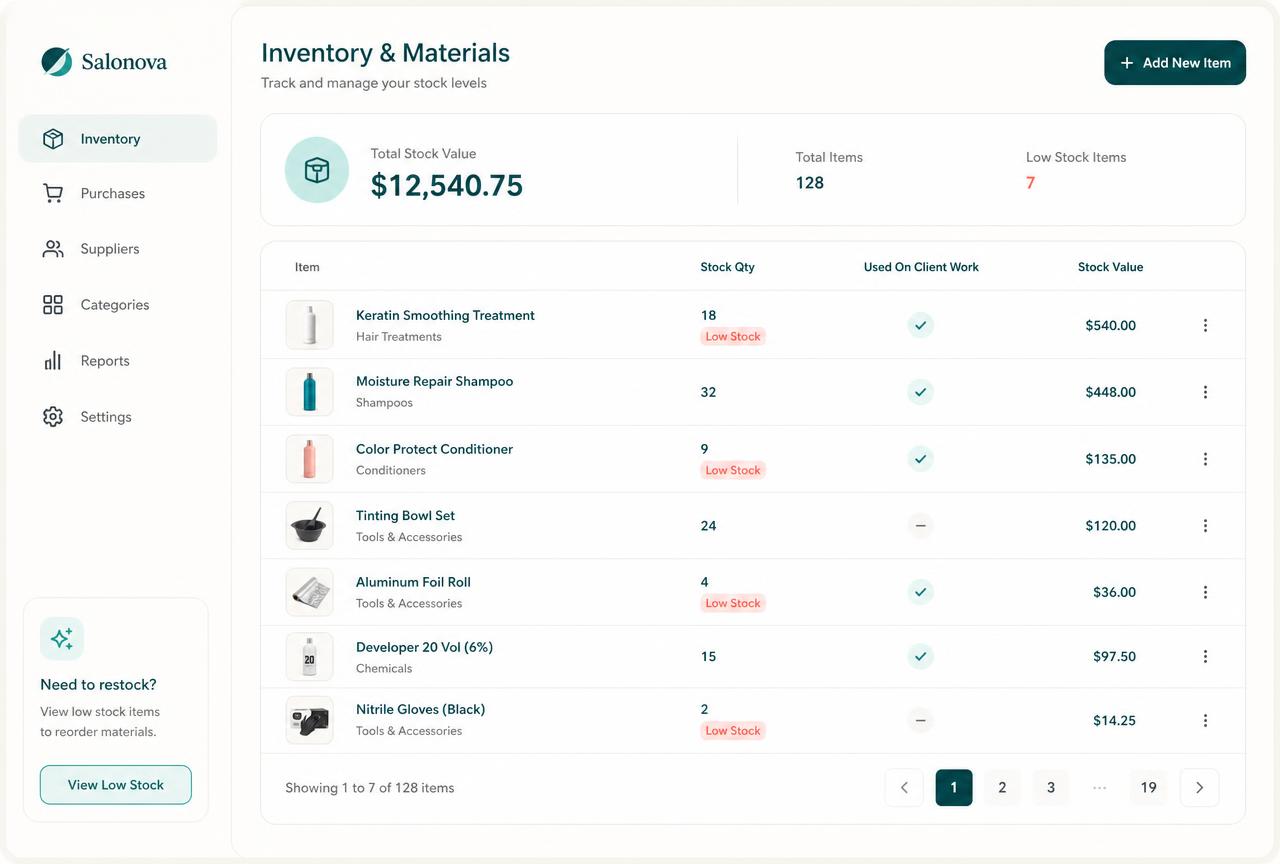 Products
What you sell
Cost, price and quantity held.
 Materials
What you use
Supplies consumed on client work.
 Assigned
Where it went
Usage attached to a job or product.
 Remaining
What is left
Availability without counting.
 Reorder
Prompted early
Your own level triggers a reminder.
 Cost
CostReal margin
Recorded cost behind the price.
Swipe or scroll for more
Prefer to speak to someone? Book a Live Walkthrough
Two simple views
Products you sell. Materials you use. Recorded the same simple way.
Two straightforward record types, both connected to the work and the costs behind them.
- Product name
- Cost to you
- Price you charge
- Quantity held
- Supplier
- Reorder level
- Sold quantity
- Remaining
- Notes
- Simple margin
Know what each product costs you and what is left before you promise it to someone.
A maker records candles with unit cost, quantity, reorder level and remaining stock so orders are never oversold.
- Material name
- Cost per unit
- Quantity held
- Supplier
- Reorder level
- Assigned job
- Used quantity
- Remaining
- Waste notes
- Cost in the job
See where materials went and what that job actually consumed.
A trades business records timber and fixings, assigns them to the job and sees the real material cost of that work.
See a real inventory exampleReal proof
Small records, honestly kept—so promises and prices hold up.
Working Alive24 examples show products, materials, quantities, costs, assigned jobs and reorder prompts.
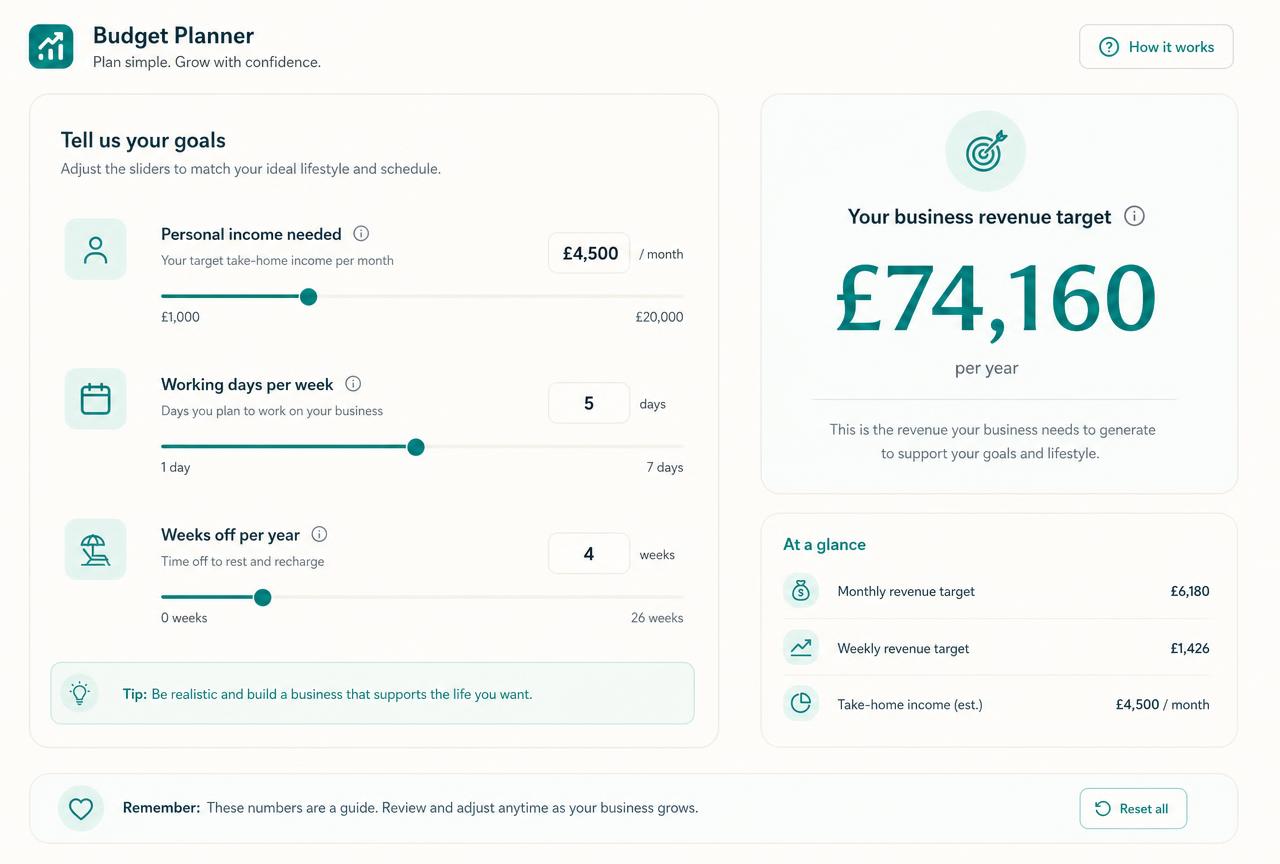
These are realistic Alive24 product examples. Quantities and costs are the ones you record; nothing is counted automatically.
Prefer to speak to someone? Book a Live Walkthrough
Prefer to speak to someone? Book a Live Walkthrough
What you actually receive
Stock tracking that stays useful without becoming a job.
Sized for a solo business, connected to the work that consumes it.
Track
What you hold, and what it cost.
- Products, materials and consumables
- Quantities on hand and unit costs
- Supplier and purchase history
- Stock value at a glance
- Batch, size or variant tracking where needed
Use
Consumption recorded where it happens.
- Materials assigned to a job, session or order
- Stock reduced automatically when used
- Billable items flagged for invoicing
- Waste and write-offs recorded
- Cost of goods calculated properly

Reorder
Never caught short mid-job.
- Low-stock warnings at levels you set
- Reorder lists ready to send to suppliers
- Lead times factored in
- Purchases recorded as expenses automatically
- Seasonal usage patterns visible
Sell
Only sell what you can deliver.
- Product availability reflected on your website
- Quotes drawn from real stock and current costs
- Margins per product visible before you discount
- Retail and trade pricing supported
- Slow-moving stock identified
Prefer to speak to someone? Book a Live Walkthrough
A simple, readable view
See what you hold, what it cost and where it went.
Enough detail to plan a week of work—without an enterprise stock system.
“Timber · 20 held, 4 used on Hillcrest, reorder at 10”
Quantity, cost, supplier and the job the materials were used on.
- 01
Every item has a cost
Recorded cost is what makes margin and job cost real rather than assumed.
- 02
Every use has a home
Materials are assigned to the job or product that consumed them.
- 03
Every level is yours
You set the reorder level and confirm each quantity change.
- Item name
- Product or material
- Quantity held
- Cost per unit
- Price charged
- Supplier
- Reorder level
- Assigned job
- Quantity used
- Remaining
- Waste noted
- Linked expense
- Cost in job
- Simple margin
- Reorder prompt

Alive24 is informed by more than 20 years of hands-on small-business experience—including knowing that a small business owner needs clear numbers they can read in five minutes, not an accounting course.
Prefer to speak to someone? Book a Live Walkthrough
Simple records instead of warehouse software.
From counting in the shed to knowing before you promise.
Products, materials, costs, usage and reorder levels stay recorded simply—and stay out of the way if you hold nothing.
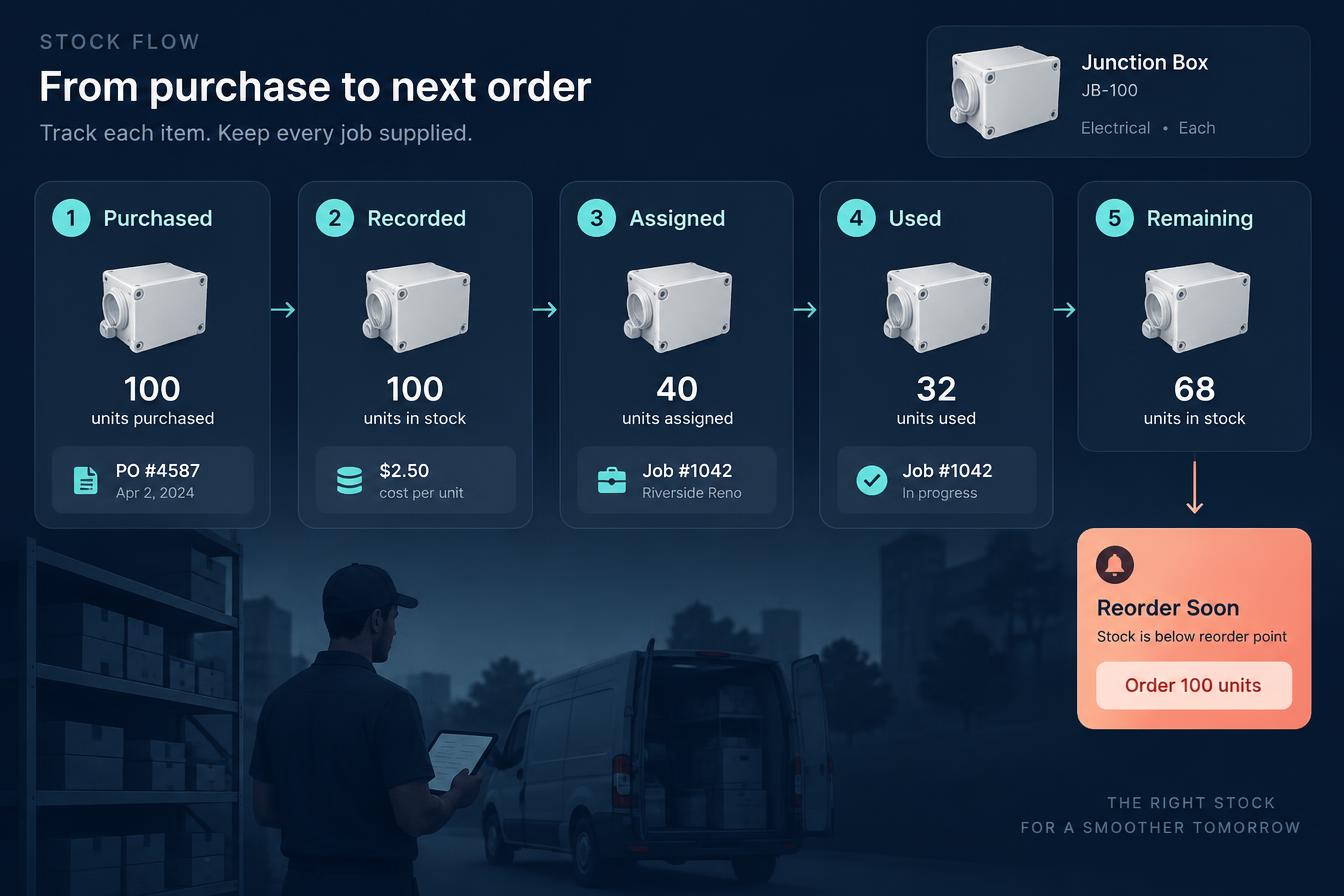
From purchase to real cost understanding
See how a purchase becomes a record, a job cost and a timely reorder.
- 01
Purchase made
Products or materials are bought from a supplier for stock or a job.
Money out
- 02
Recorded in inventory
Quantity, unit cost and supplier are entered so the record means something.
Recorded
- 03
Assigned to work
Items are attached to a product, project or client job as they are used.
Assigned
- 04
Usage or sale
Used or sold quantities reduce what remains, with waste noted honestly.
Used
- 05
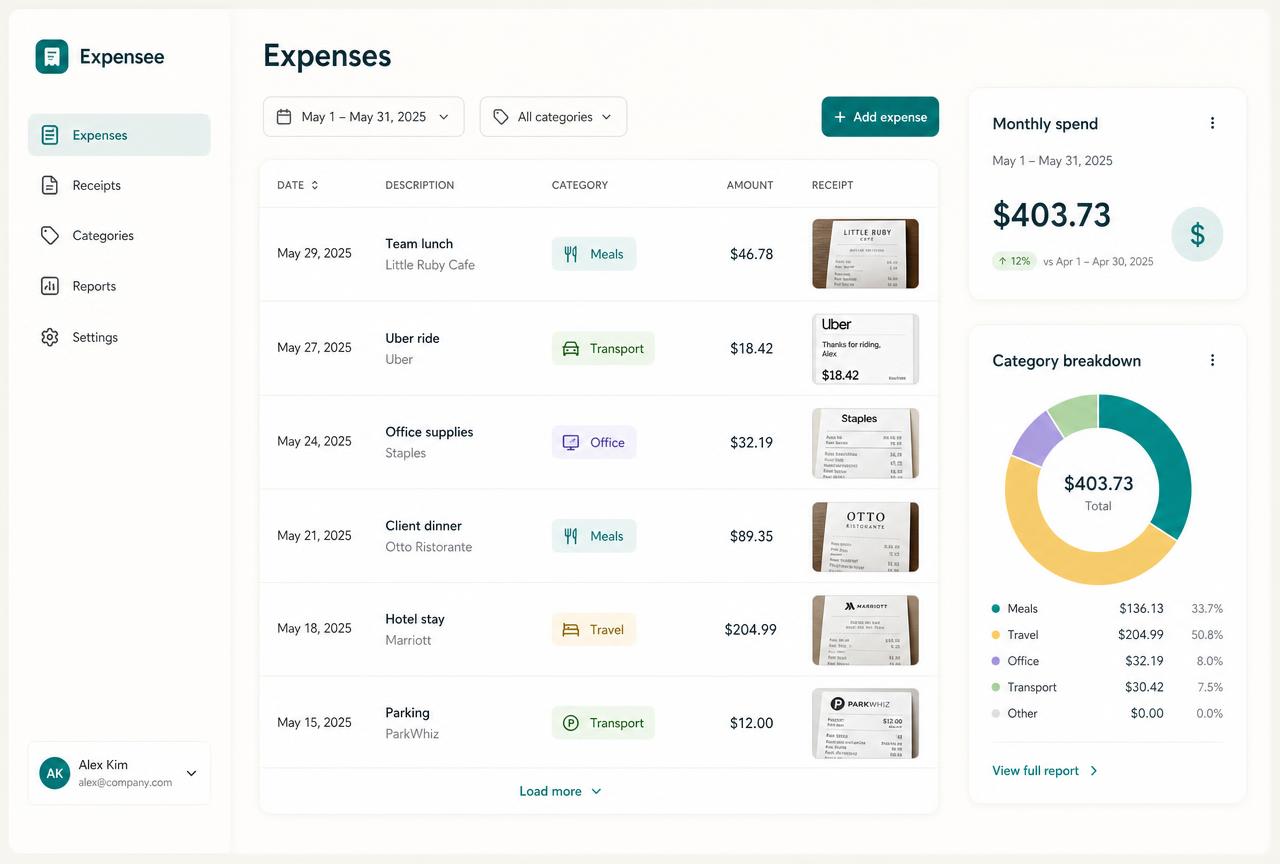
Expense and cost
The purchase sits with your recorded expenses and the cost of the work.
Cost visible
- 06
Remaining quantity
What is left is visible before you promise anything to a client.
Availability clear
- 07
Reorder prompt
The level you set triggers a reminder rather than a mid-job discovery.
Reorder early
- 08
Dashboard and pricing
Real cost feeds your business view and the prices you decide to charge.
Decision made
- No inventory subscription
- No barcode system
- No counting sessions
- No enterprise stock control
Prefer to speak to someone? Book a Live Walkthrough
Connected, not bundled
Every item connects to the purchase, the job and the price behind it.
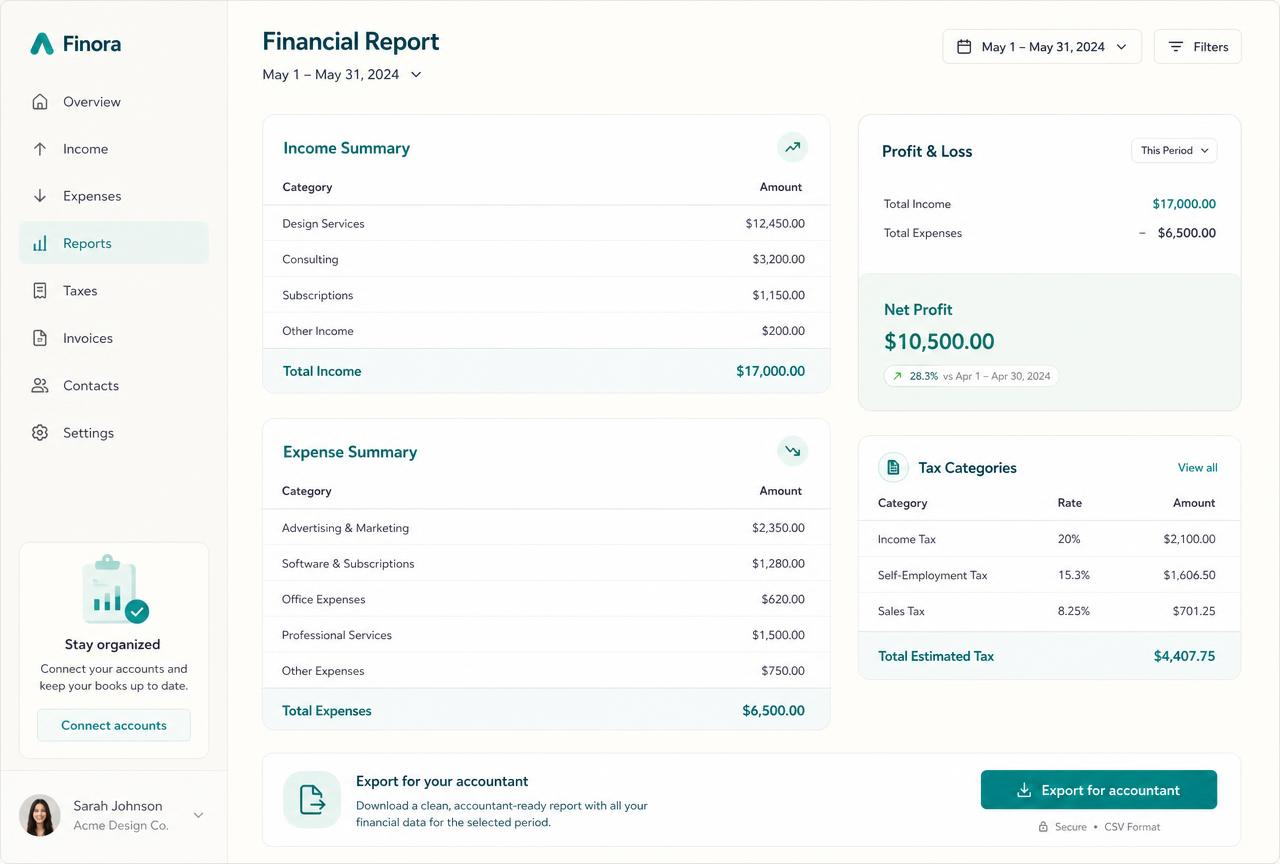
Inventory sits inside Money + Control as an optional feature, connecting purchases, usage and the real cost of what you sell.
- 1Business DashboardOne clear view of the whole business.
- 2BudgetsWhat your life and business actually cost.
- 3Expenses + ReceiptsEvery receipt recorded and connected.
- 4Projections + ReportingWhere the business is heading.
- Expenses + Receipts record the purchase
- Projects + Jobs carry material cost
- Packages + Pricing use real product cost
- Budgets include material spend
- Business Dashboard shows the wider position
- Invoices + Payments charge billable materials
- Client Management Area keeps client context
- Projections + Reporting use recorded costs
- You can ignore inventory entirely if you hold nothing
- Inventory is an optional part of Alive24 for simple product and material records. It is not warehouse, barcode or enterprise inventory software, quantities are the ones you enter, and no stock accuracy is guaranteed. Solo supports one owner plus two helpers.
Protect your decisions
Know what you hold before you promise it to a client.
Simple records prevent shortages, urgent orders and prices that never covered the cost.
Take the 2-minute stock check
Free, no commitment, with a practical summary of whether inventory is worth using at all.
Start with SolomonPrefer to speak to someone? Book a Live Walkthrough
Explore the connected system
See how inventory connects across the rest of your business.
Inventory stays inside Money + Control while the leads, sales, client work and payments behind the numbers stay connected.
You
One voice note. One change.
Voice note → Website updated
Prefer to speak to someone? Book a Live Walkthrough
Questions
Inventory—the questions small business owners actually ask.
Still unsure? The full demo answers most of it in a few minutes, without a sales call.
Ready to see inventory working inside one connected system?
Simple inventory software for small business owners who hold products or materials—record what you buy, what you use and what is left, without warehouse systems.
Book a Live Walkthrough
See inventory used the way a small business owner actually uses it.
Book a Live WalkthroughSee How Money + Control Works
Explore how budgets, expenses, records, dashboards and projections connect.
See How Money + Control WorksGet Alive24
Own the complete connected system, including Inventory and every Solo money tool.
Get Alive24