An AI powered virtual assistant that watches the gaps across every moving part of your business.
Think of it as an AI powered virtual assistant for your operations. The AI Operations Manager quietly reviews the work recorded across Alive24 and shows you what is late, what is stuck, what is costing more than it should and what actually needs you today—while helping your team solve the smaller problems before they land back on you.
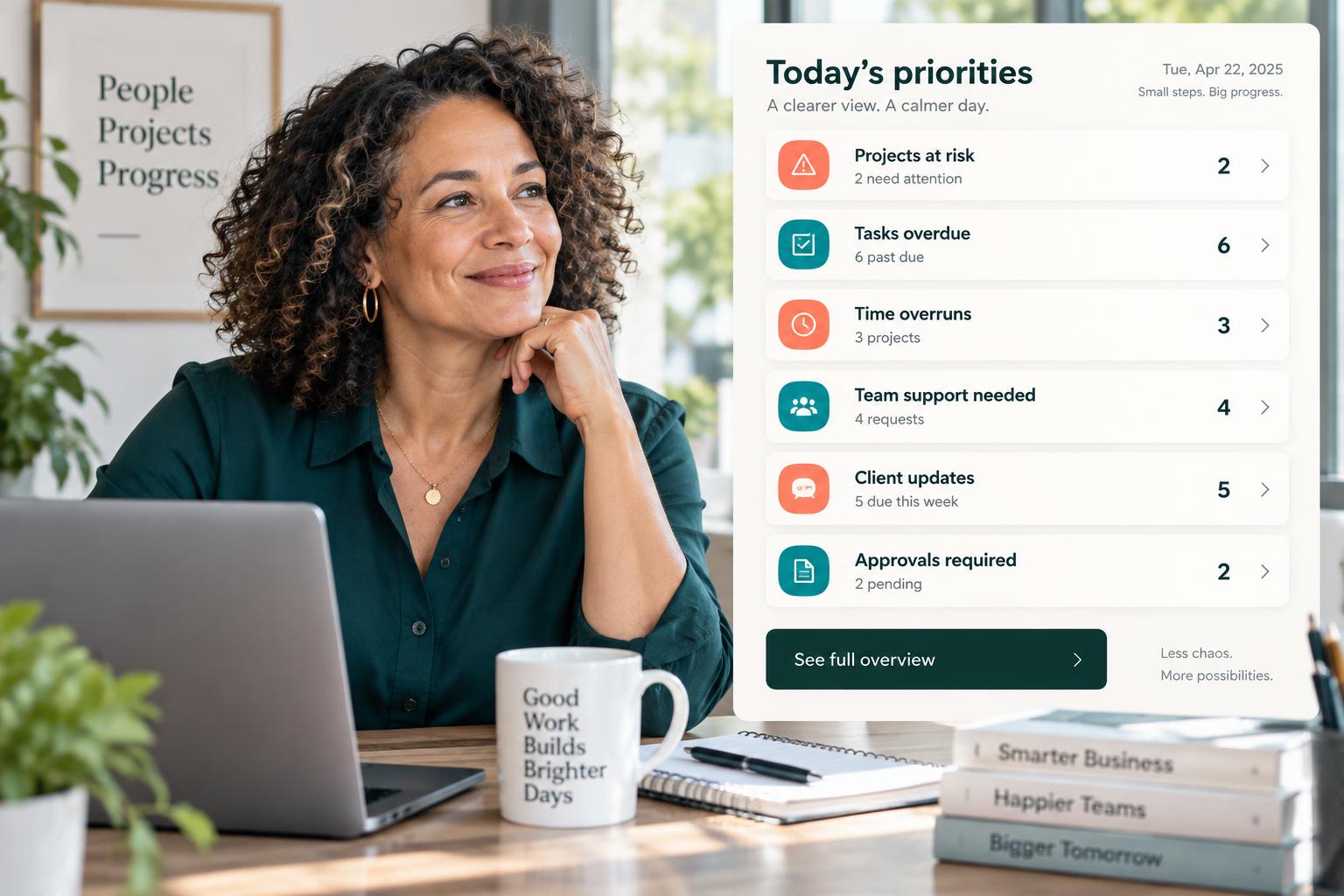
- Today’s priorities
- Projects at risk
- Tasks overdue
- Workflows stalled
- Missing notes
- Expected vs actual time
- Time overruns
- Pricing worth reviewing
- Work awaiting approval
- Client updates due
- Team support needed
- Access to review
Is this you?
Looking for an AI assistant for business because the whole business lives in your head? This page is for you.
You are the connection between every system and every person. You find out about problems after the time and the money have already gone.

You are the operating system
What was promised, what is late, what is paid, what still needs approving—you are the only one holding it all.

Meetings replace clarity
You hold a meeting to learn what everyone is doing, then another to work out what somebody should have done.

Overruns arrive with the invoice
Quoted for 20 hours. Delivered in 35. You only see it once the project has already lost the money.
AI Operations Manager walkthrough
See the AI business assistant deliver one morning briefing, catch one overrun and free one team member from waiting on you.
Watch the operations view pick out the three things that matter, connect a time overrun to the money behind it, and coach a stuck team member to a solution before it becomes your problem.
- The morning briefing
- Today’s priorities
- A project falling behind
- A stalled workflow
- A task repeatedly moved
- Expected against actual time
- Quoted hours against used hours
- A pricing review flagged
- Work awaiting your approval
- A team member asking for help
- A concise escalation to you
- The access and security overview
Prefer to speak to someone? Book a Live Walkthrough
Are you currently doing this?
The information exists. Nobody is overseeing it.
Tasks, schedules, projects, notes and invoices all exist somewhere. Nothing pulls them together and tells you which one is about to cost you. Most business activity monitoring software gives you more dashboards, not the one decision that needs you.
You find every problem manually
- Projects quietly falling behind
- Workflows stalled mid-step
- Tasks that keep getting moved
- Notes missing from completed work
Every problem comes straight to you
- Stuck team members message immediately
- You stop your own work to explain
- The same questions, weekly
- Decisions waiting on your reply
Time and money stay disconnected
- Hours over the quote, discovered late
- Labour costs eating the margin
- Packages priced before the real time was known
- Approvals sitting unseen
Meetings fill the gap
- Status meetings to learn the obvious
- Meetings to hand out tasks
- Meetings to check work already recorded
- Message threads instead of a system
You can stop opening seven screens to work out what happened. The recorded work can tell you what is late, what is stuck and what it is costing you.
Introducing
The AI Operations Manager inside Alive24.
The operational brain above your business: one clear view of what is working, what is stuck and what it is costing you.
Prefer to speak to someone? Book a Live Walkthrough
 Morning briefing
 Today’s priorities
 Projects at risk
 Overdue tasks
 Stalled workflows
 Missing notes
 Expected vs actual
 Quoted vs used hours
- Cost impact
 Pricing review
- Work awaiting approval
 Client updates due
- Team support needed
- Ask for help
- Clear escalation
- Access review
- One clear view
- Fewer meetings
A morning briefing
The short version before the day starts.
Risks surfaced early
Projects, tasks and workflows slipping.
Stalled work flagged
Workflows that stopped mid-step.
Expected vs actual
Where the time really went.
Time against money
Quoted hours beside used hours.
Pricing reviews
When delivery keeps beating the price.
Ask it anything
Plain questions, role-aware answers.
Team coaching
Help before it becomes your problem.
Clear escalations
The problem, the checks, the decision.
Access reviews
Who can see what, and until when.
- Today’s priorities
- Projects at risk
- Overdue tasks
- Stalled workflows
- Missing notes
- Expected vs actual
- Cost impact
- Pricing review
- Approvals
- Client updates
- Team support
- Access review
How it works
It reads the recorded work, then tells you what needs you.
One clear process, five stages. Click through to see a normal week turn into a short list of decisions.
Step 1 · It reads the work
It reviews what is already recorded
It works from the permitted business information recorded inside Alive24. It does not monitor personal devices, screens, keystrokes, locations or private messages.
- Projects
- Tasks and workflows
- Schedules and work blocks
- Notes and completions
- Expected and actual time
- Quotes, rates and approvals
Then the person, their access, their work, their time and their pay all agree—without rebuilding the story from ten separate accounts.
Solved, in one place
Do not show me everything. Show me what needs me.
One operational view over the work already recorded in Alive24—built to make a complicated business feel simple in seconds. An AI business manager and AI personal assistant for business that points to what needs you—you still make every decision.

AI Operations Manager
What is stuck. What is leaking. What needs you.
Voice note → Projects + Jobs updated
Today’s priorities
The few things that genuinely need you, in order, with the context behind them.
Overdue and stalled work
Tasks past their deadline and workflows that stopped mid-step.
Expected against actual time
Where the work landed against what it should reasonably have taken.
Time against money
Quoted hours beside used hours, and the cost impact on that job.
Work awaiting approval
Completed work, approved hours and prepared payments waiting on your yes.
Team support needed
Who looks overloaded, blocked or working from unclear instructions.
Access to review
Temporary access nearing expiry and permissions worth another look.
Prefer to speak to someone? Book a Live Walkthrough
Built for real businesses
However your business runs, the same early warning.
Built for solo operators and small teams who need operational help without a full-time operations manager.

Massage therapist

Personal trainer

Beauty and skin therapist

Yoga and pilates teacher

Naturopath and nutritionist

Counsellor and psychologist

Physio and chiropractor

Health coach
Massage therapist
Personal trainer
Beauty and skin therapist
Yoga and pilates teacher
Naturopath and nutritionist
Counsellor and psychologist
Physio and chiropractor
Health coach

Electrician

Plumber

Builder and carpenter

Landscaper and gardener

Painter and decorator

Cleaner and home services

Handyman

Property and rental operator
Electrician
Plumber
Builder and carpenter
Landscaper and gardener
Painter and decorator
Cleaner and home services
Handyman
Property and rental operator

Website designer

Social media manager

Business coach

Business consultant

Marketing consultant

PR consultant

Bookkeeper

Accountant

Virtual assistant

Copywriter

Brand and graphic designer

Photographer and videographer

Course creator and tutor

Maker and product seller

Mobile and local operator
Website designer
Social media manager
Business coach
Business consultant
Marketing consultant
PR consultant
Bookkeeper
Accountant
Virtual assistant
Copywriter
Brand and graphic designer
Photographer and videographer
Course creator and tutor
Maker and product seller
Mobile and local operator
Trades
Jobs over their allowed labour hours, incomplete safety tasks and missing progress notes.
Wellness
Missing session notes, incomplete follow-ups and practitioners quietly becoming overloaded.
Clinics
Client updates due, incomplete records and work waiting on your approval.
Coaches
Packages using more delivery time than they were priced for.
Professional services
Project bottlenecks, delayed deliverables and repeated task overruns.
Creative + marketing
Overdue content work and campaign tasks stalled mid-workflow.
Small admin or sales teams
Follow-ups waiting too long and proposals sitting without action.
Solo operators
A short morning list instead of the whole business in your head.
Ask it in a sentence
Ask the question you would ask a good operations manager.
In plain language, for you or for your team—answered from the information that person is allowed to see.
“What are the three things that most need me today, which project is quietly running over, and what is sitting waiting on my approval?”
- What are the three things that most need me today?
- Which projects are at risk this week?
- Why does this project keep running over?
- Which tasks have been moved more than twice?
- Where is expected time furthest from actual time?
- Which package is taking longer than we priced it for?
- What is waiting on my approval?
- Which clients are due an update?
- Who on the team looks overloaded?
- Whose access is about to expire?
- Help me prepare a fair conversation about missed deadlines
- I’m spending too long in meetings—what could the system handle?
What that normally means
- Opening the CRM, then the task app
- Then the project board and the calendar
- Then the spreadsheet and the messages
- Then the invoices
- Then a meeting to confirm it
- Then finding out anyway, a fortnight late
It reviews permitted business information and recommends. Pricing, pay, employment and approval decisions stay with you.
Time, money and energy saved
Less chasing. Fewer meetings. Better decisions.
Earlier warnings, fewer interruptions and a clearer line between the time your business spends and the money it keeps.
What quietly drains the week
- Status meetings
- Repeated team questions
- “Where is this up to?” messages
- Checking every task by hand
- Chasing notes and updates
- Finding overruns after the invoice
- Pricing work from memory
- Wondering who still has access
Interruptions, late discoveries and money lost before anybody noticed
Inside Alive24
- One morning briefing
- Projects at risk surfaced early
- Stalled workflows flagged
- Expected against actual time
- Quoted hours beside used hours
- Pricing reviews recommended
- Team coached before escalating
- Access reviews prompted
One operational view instead of seven screens and a meeting
Time and energy returned
- Fewer status meetings
- Fewer repetitive messages
- Fewer interruptions
- Less manual checking
- Faster problem-solving
- Earlier warning of overruns
- Clearer project labour costs
- More time for your actual work
The AI Operations Manager reviews the permitted business information recorded inside Alive24. It does not monitor personal devices, screens or private messages, and it does not replace legal, financial, HR or clinical professionals. Humans keep every final decision.
See full pricingBefore and after
From checking everything to reviewing the exceptions.
The same week of work—the difference is whether you piece the picture together from seven screens or read what needs you in one.

Before
- Seven screens to understand one week
- Meetings to learn what happened
- Chasing progress updates
- Problems arriving by message
- Overruns found in the invoice
- Pricing set from memory
- Access nobody has reviewed
After
- One briefing before the day starts
- Risks surfaced while they matter
- Stalled workflows flagged
- Your team coached before escalating
- Overruns visible mid-project
- Quoted hours beside used hours
- Access reviewed and expiring cleanly
Real examples
Trades, wellness or professional services—the same early warning.
Small, practical signals that arrive while there is still time to do something about them.
- A job running over its allowed labour hours
- Safety tasks still incomplete on site
- Progress notes missing from yesterday’s work
- Session notes not attached to a completed session
- A practitioner quietly becoming overloaded
- A package using more delivery time than it was priced for
- A project blocked by one unfinished approval
- A milestone reached with no next action started
- Temporary access nearing its expiry date
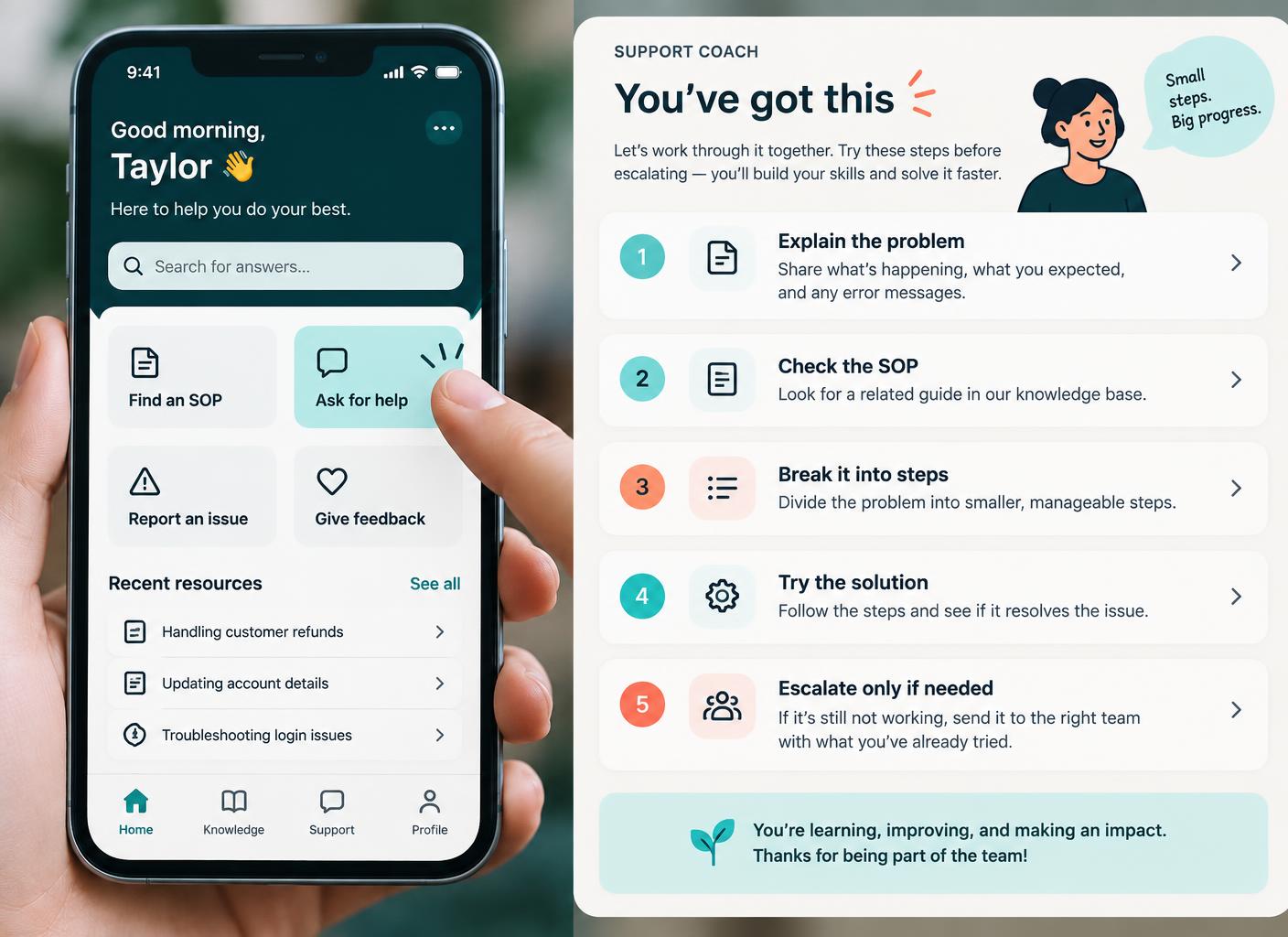 Daily briefing
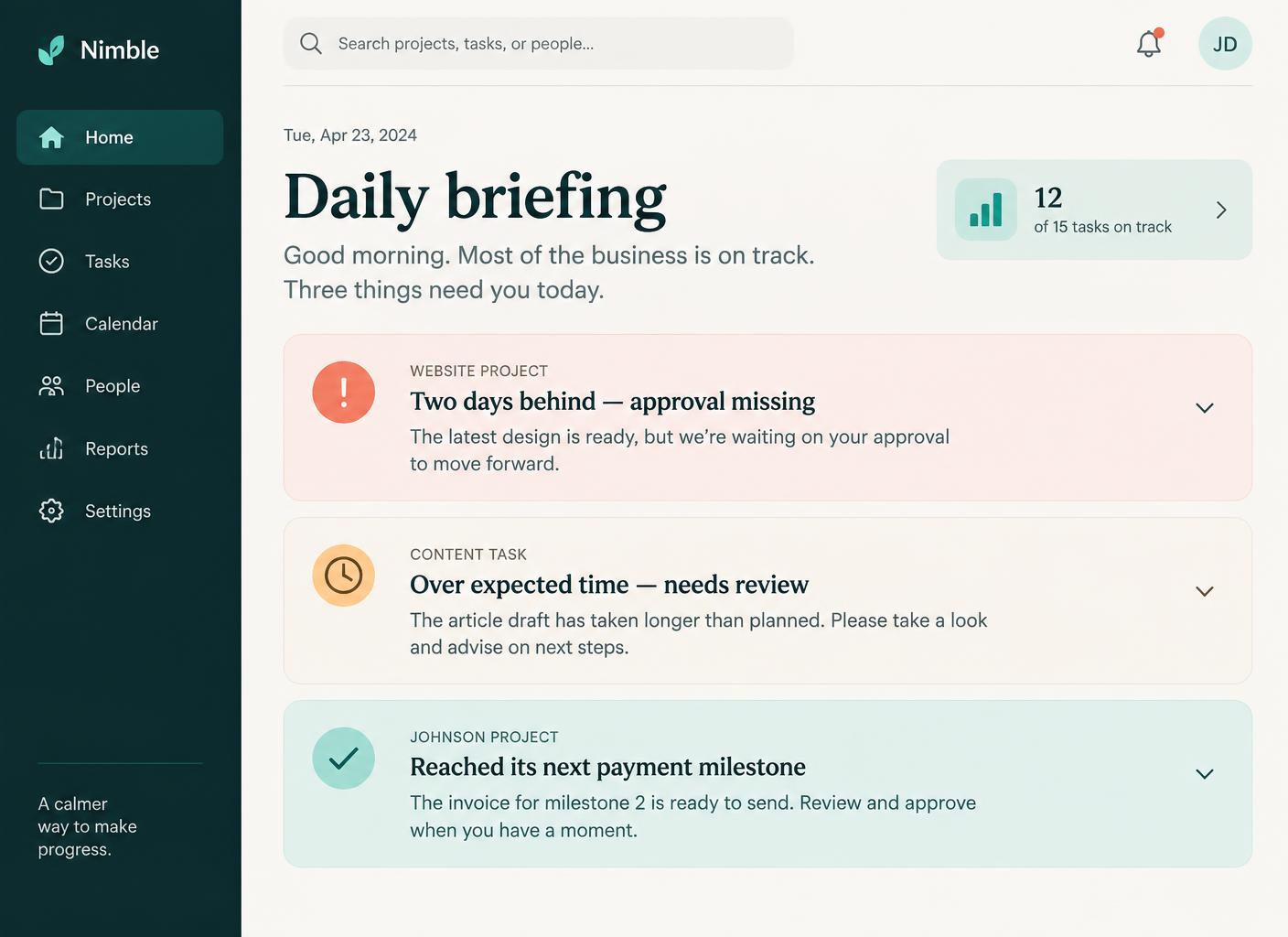
Three things need you today
The short version, with the context one click away.
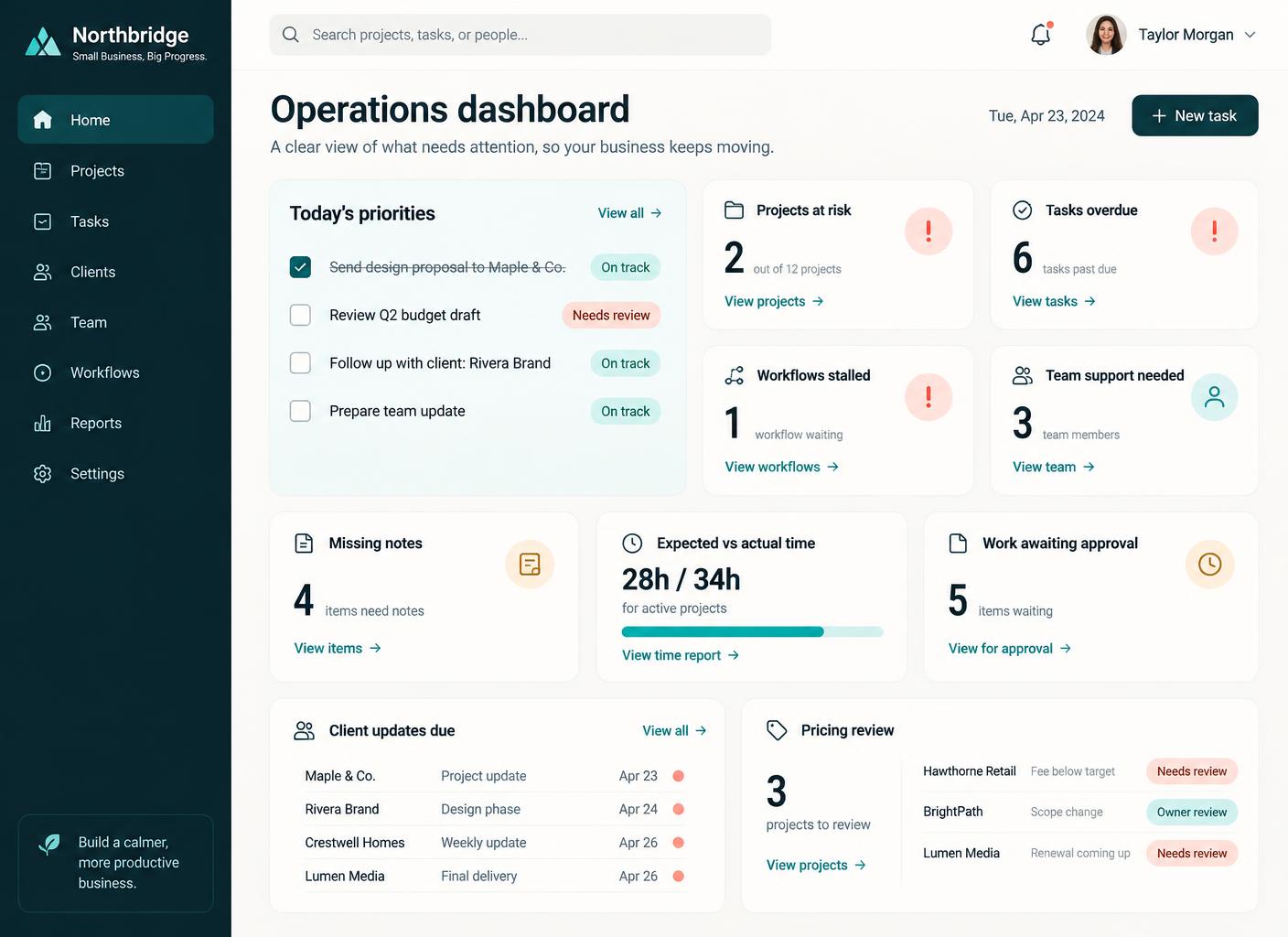
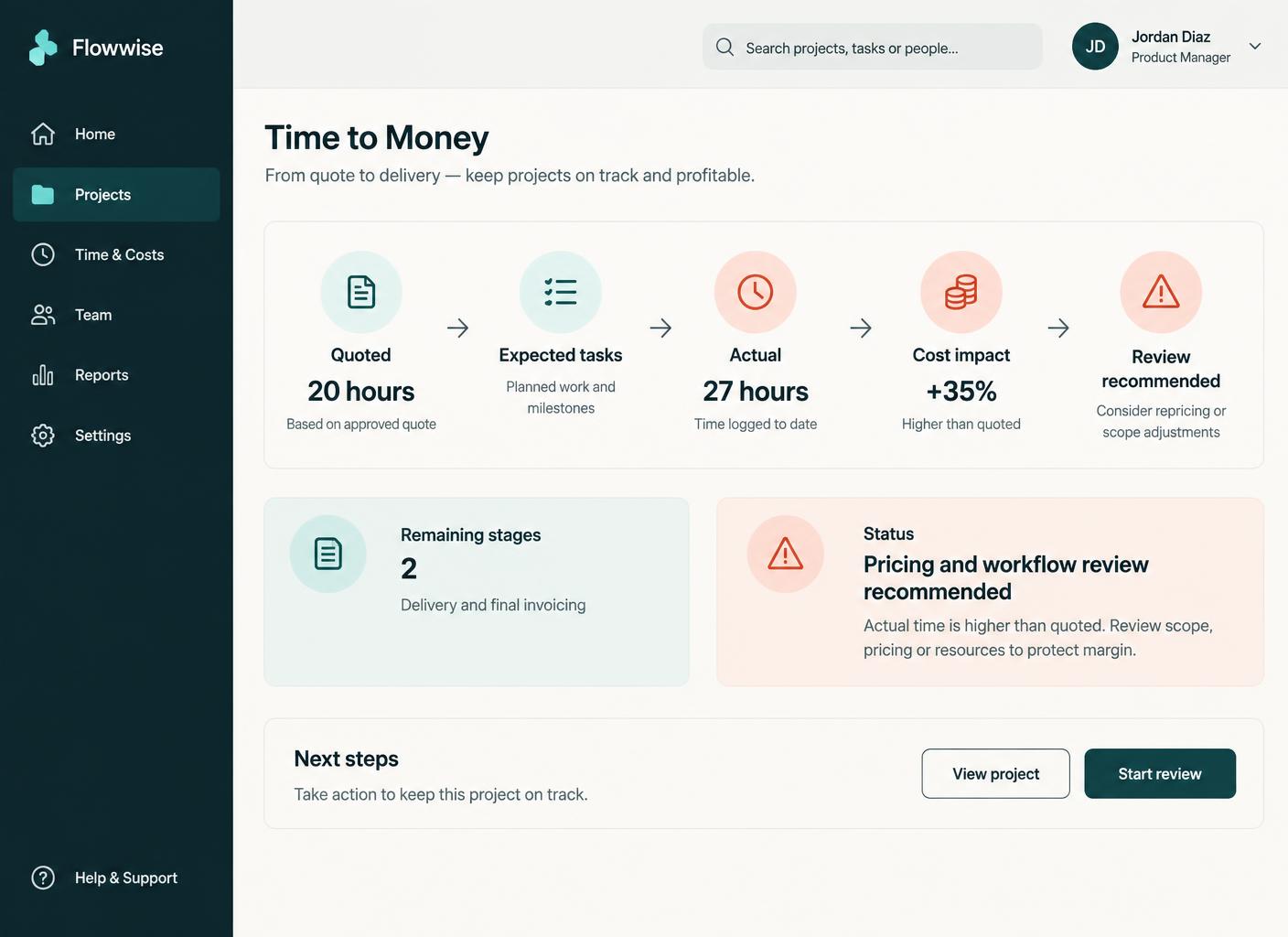 Operations dashboard
One calm view of the business
Risks, overdue work, time and approvals together.
Time to moneyQuoted 20 hours. Used 27.
Cost impact shown while two stages remain.
Ask for helpYour team gets support first
Problem, SOP, steps, solution—then escalate.
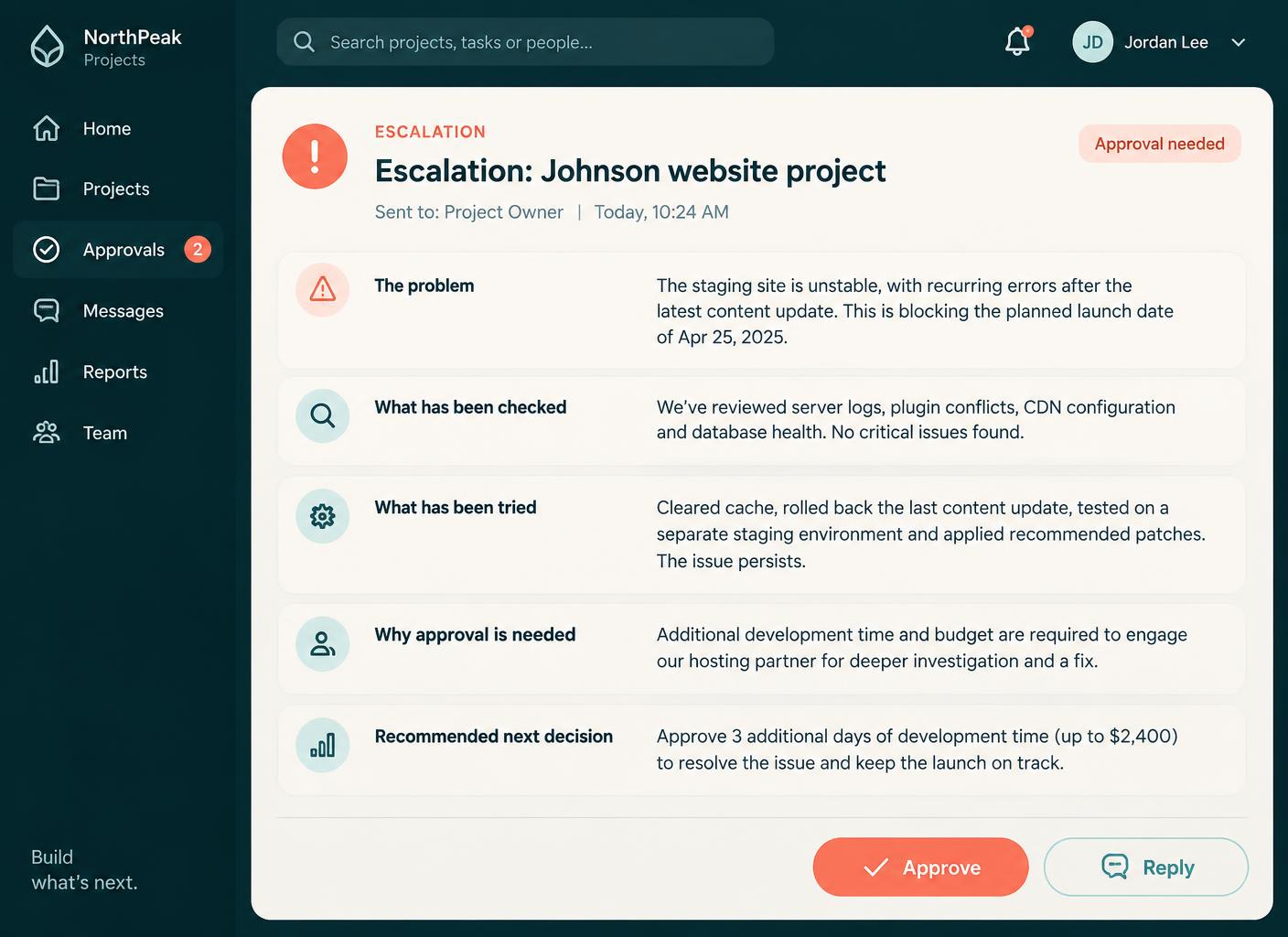 Escalation
The useful version reaches you
What was checked, what was tried, what you must decide.
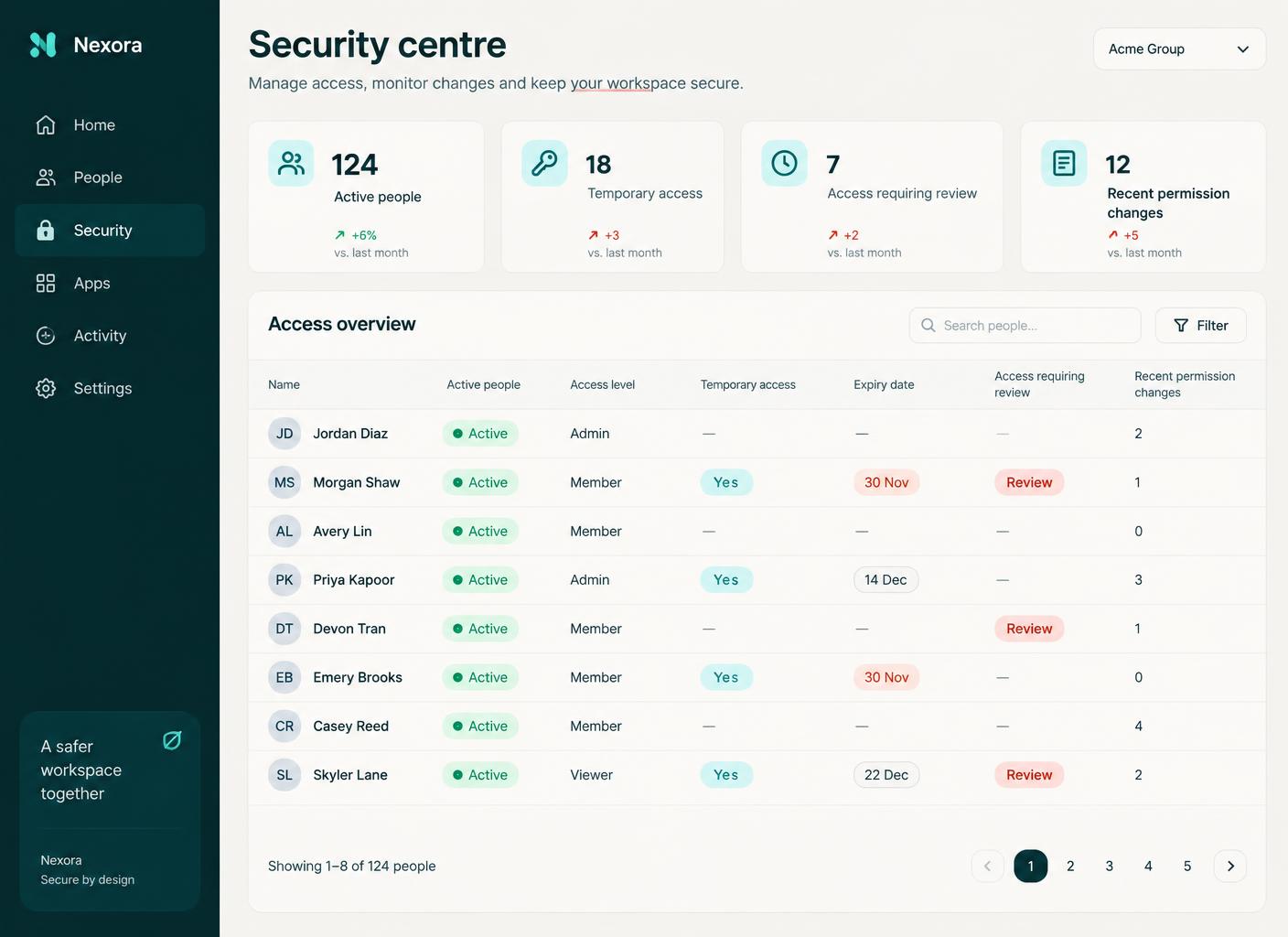 Security centre
Access you can actually review
Levels, temporary access and expiry dates.
Swipe or scroll for more
Prefer to speak to someone? Book a Live Walkthrough
Two views, one system
Support for your team. A clear picture for you.
The same operational information, shown according to what each person is allowed to see.
- Ask for help in their own work area
- Clarify what they are actually trying to finish
- Find the SOP that applies
- Break the problem into steps
- Try a solution within their role
- Escalate with the detail already gathered
- Their tasks, deadlines and priorities
- Their recorded work and approved hours
Help arrives before they are stuck—and urgent or serious matters still go straight to a human, immediately.
“I can’t finish the client handover.” Three questions later, the SOP answered it and nobody had to interrupt you.
- The morning briefing
- Projects at risk
- Overdue tasks and stalled workflows
- Expected against actual time
- Quoted hours against used hours
- Client updates due
- Work awaiting your approval
- Access and permissions to review
You review the exceptions instead of opening every screen in the business.
Three things today: one approval missing, one task over expected time, one project at its payment milestone.
See a real operations pictureReal proof
A real business proved this first—by discovering everything too late.
Alive Luxury Retreats ran a twenty-person team from a colour-coded document, endless group chats and invoices that never quite matched the work. Every problem—every delay, every missing session note, every overrun—arrived through the owner, usually after it had already cost something. Bringing the work, the time and the oversight together changed the job of running it.
What it used to look like

What it looks like now
Inside that one business: internal messages dropped by roughly 90%, session notes arrived with the work instead of being chased daily, invoices matched the work actually completed, overruns became visible while there was still time to act, and the resulting visibility substantially reduced the need for manual scheduling and day-to-day operational oversight. This is one business’s experience. Results vary with team size, rates and existing habits, nothing here is guaranteed, and Alive24 does not automatically replace anybody.
Prefer to speak to someone? Book a Live Walkthrough
Prefer to speak to someone? Book a Live Walkthrough
What you actually receive
One operational view. Everything that needs a decision.
A calm oversight layer for a solo operator or a small team—not enterprise analytics.
The briefing
What needs you today
- Today’s priorities in order
- What is on track
- What is overdue
- What is waiting on you
The work
Where delivery is slipping
- Projects at risk
- Stalled workflows
- Tasks repeatedly moved
- Missing notes and completions
The money
Where time is beating the price
- Quoted against used hours
- Cost impact by project
- Labour cost trends
- Pricing reviews recommended
The people
Support, not surveillance
- Who looks overloaded
- Who asked for help
- Concise escalations to you
- Access and permissions to review
Prefer to speak to someone? Book a Live Walkthrough
One operational picture
Everything you need to run the week, in one place.
Enough oversight to protect the business, without turning a small team into a monitored workforce.
“Most of the business is on track. Three things need you today.”
The risks, the overruns, the approvals and the support requests in one operational view.
- 01
It reads the recorded work
Projects, tasks, workflows, schedules, notes, time, quotes and approvals.
- 02
It shows you the exceptions
What is late, stalled, over expected time or waiting on your decision.
- 03
You decide with the evidence
The pattern and the context are there. The call stays yours.
- Today’s priorities
- Projects at risk
- Overdue tasks
- Stalled workflows
- Missing notes
- Incomplete sessions
- Expected time
- Actual time
- Quoted against used hours
- Cost impact
- Pricing to review
- Work awaiting approval
- Client updates due
- Payment milestones
- Team support needed
- Access to review
- Recommended next actions

The coaching behind it is informed by roughly 25 years of real business, management and coaching experience—running teams, projects, retreats and delivery where the owner was the only person holding the whole picture. It is operational guidance, not legal, financial, HR or clinical advice.
Prefer to speak to someone? Book a Live Walkthrough
Seven screens and a meeting, replaced by one view.
From checking everything to reviewing the exceptions.
The recorded work becomes one operational picture, so the things that used to surprise you a fortnight late arrive while you can still fix them.
From invite to approved pay
See exactly how one person becomes onboarded, working, recorded and approved for payment.
- 01
The briefing arrives
What is on track, and the few things that genuinely need you before the day starts.
The short version first
- 02
Risks are surfaced
Projects slipping, tasks overdue, workflows stalled and the one action holding things up.
Found early
- 03
Gaps in the record show
Missing notes, incomplete sessions and work marked done without the required information.
Nothing quietly missing
- 04
Time is compared
Expected against actual, with repeated overruns and tasks that keep moving made visible.
The pattern, not the accusation
- 05
Money is connected
Quoted hours beside used hours, the cost impact and the pricing or workflow worth reviewing.
Before the margin goes
- 06
Your team gets help
Ask for help clarifies the problem, points to the SOP and tries a solution within their role.
Fewer interruptions
- 07
Escalation reaches you clearly
The problem, what was checked, what was tried and the decision you actually need to make.
Decide in a minute
- 08
Access is reviewed
Who has access, at what level, what is temporary and what is due to expire.
Nothing left switched on
- No status meetings to learn the obvious
- No chasing for updates
- No overruns discovered by invoice
- No forgotten access
Prefer to speak to someone? Book a Live Walkthrough
Connected, not bundled
Oversight that arrives with the work, the client and the money behind it.
The AI Operations Manager sits above the connected Alive24 areas, so a delay, a gap or an overrun shows up beside the project, the person and the money it affects.
- 1Projects + JobsShows where delivery is slipping and what is blocking it.
- 2Tasks + WorkflowsShows overdue tasks and workflows that stalled mid-step.
- 3Team SchedulingShows scheduled time against the work actually completed.
- 4Team ManagementCarries roles, responsibilities and access levels.
- 5Client Management AreaShows which clients are due an update.
- 6Business DashboardConnects hours and labour cost to the numbers.
- Projects + Jobs shows which projects are slipping and why
- Tasks + Workflows shows overdue tasks and workflows that stalled
- Team Scheduling shows scheduled time against completed work
- Team Management carries roles, responsibilities and access
- Client Management Area shows which clients are due an update
- Attract and Sell surface overdue content, leads and follow-ups
- Money + Control connects hours, labour cost and pricing reviews
- Answers follow the person’s role and access: a team member is helped using only what they are allowed to see, while an owner gets the authorised picture across Attract, Sell, Deliver and Money + Control. Fewer systems means fewer access points and far fewer places for your business to disappear into—centralised, permission-based access reduces unnecessary exposure and is easier to review, and it cannot stop somebody copying what they are allowed to see.
Protect your own time
Your team gets support. You get your time back.
See where status meetings, repeated questions, manual checking and late-discovered overruns are quietly taking time and money out of your week.
Take the 2-minute operations check
Free, no commitment, with a practical summary of the operational checking worth handing over.
Start with SolomonPrefer to speak to someone? Book a Live Walkthrough
Explore the connected system
See how the oversight connects across delivery, sales and your numbers.
The AI Operations Manager sits inside Deliver while reading the project, client, schedule, team and payment context around it.
You
One voice note. One change.
Voice note → Website updated
Prefer to speak to someone? Book a Live Walkthrough
Questions
The AI Operations Manager—the questions owners actually ask.
Still unsure? The full demo answers most of it in a few minutes, without a sales call.
Ready to stop being the only thing holding it all together?
See the briefing, the overruns, the coaching and the access review working over one real week of business.
Book a Live Walkthrough
See the operations view, the time-to-money picture and the team coaching inside Alive24.
Book a Live WalkthroughSee How Deliver Works
Explore how clients, projects, tasks, scheduling and your team stay connected.
See How Deliver Works