
Online Scheduling Tool and Bookings Calendar for Small Business
Alive24 is an online scheduling tool that lets people book the time you actually have, collects what you need before it starts, puts it on your calendar and keeps it attached to the client record, the work and the hours it took.

- Real availability
- Free or paid
- Details collected first
- One business calendar
- Prep tasks set
- On the client record
- Time recorded
- Team assignments
- Work blocks protected
- No double bookings
- Notes kept with the client
- Every hour tracked
Is this you?
Why Standalone Online Appointment Scheduling Software Leaves Your Small Business in Chaos
All three have the same problem: the booking sits somewhere different from the client, the work and the money.
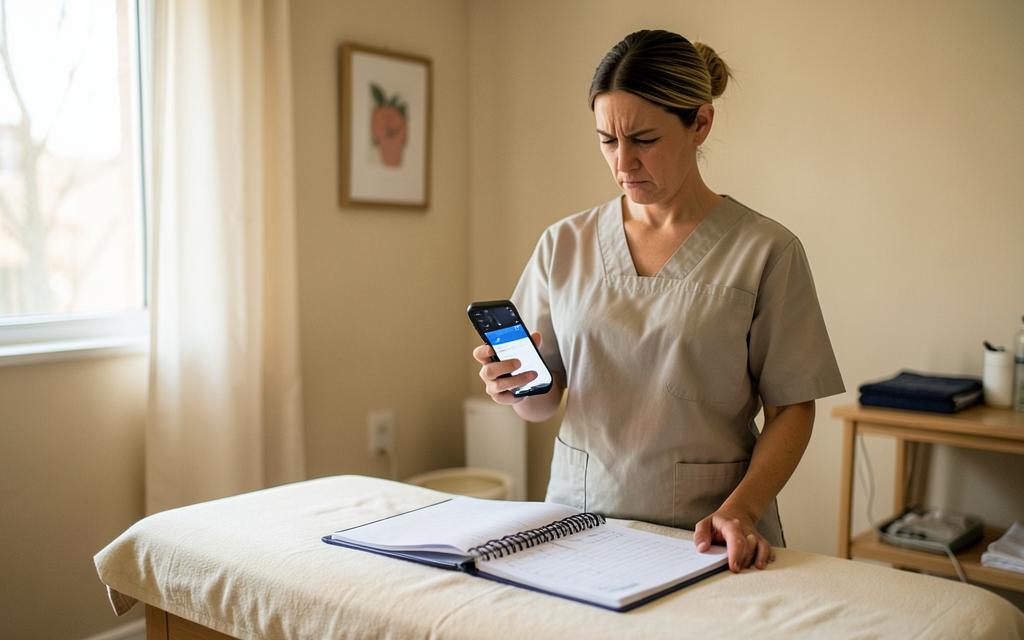
Your bookings live in a separate app
The appointment is in one tool, the client details are in another and the notes are in a notebook—so you rebuild the picture before every session.

Every job is a different length and a different day
A quick quote, a site visit and a full day on the tools do not fit the same slot, and nothing stops them landing on top of each other.

You cannot see where your hours actually went
The week was full, but nothing tells you which time was paid, which was preparation and what each piece of work really cost to deliver.
Bookings + Calendar walkthrough
Watch the Online Scheduling Tool Turn Enquiries Into Confirmed, Prepared Bookings
Watch one booking start from a call, session or job, collect the details, land on the calendar, create the prep task and end up on the client record with the time and notes saved.
- Choosing a call, session or job
- Only real available times offered
- The questions you want asked
- A free or paid booking
- Payment taken where required
- The booking on your calendar
- The person delivering it assigned
- A preparation task created
- The client or lead record updated
- Session notes saved afterwards
- Hours and delivery cost recorded
- The follow-up set, not remembered
Prefer to speak to someone? Book a Live Walkthrough
Are you currently doing this?
A calendar entry with a name and a time is not a booking.
The appointment is the easy part, and most online booking software stops there. What decides whether it goes well is everything attached to it—and that is usually scattered. The best scheduling app is the one that keeps the booking with the client, the work and the money.
Agreeing the time
- Six messages to settle on one hour
- Offering a time that is already taken
- No travel or preparation time allowed for
- Personal commitments colliding with work
What is missing before it starts
- Turning up without the details you need
- Asking the same intake questions again
- No deposit or payment taken up front
- No preparation time actually set aside
What it costs to keep running
- A booking subscription per person
- Higher tiers for paid bookings
- A separate tool for team schedules
- Time spent rewriting the same week
Where the booking ends up
- Appointments stored away from the client
- Answers and notes in a different place
- No record of the hours delivered
- Follow-up depending on somebody remembering
You can stop rebuilding your week by hand. The whole booking can live in one place.
Introducing
Bookings + Calendar inside Alive24.
It works from the sessions, hours, prices and people already set inside Alive24—so a booking arrives with everything you need and leaves a record of what was delivered.
Prefer to speak to someone? Book a Live Walkthrough
 Real availability
 Free or paid
 Details collected first
 One business calendar
 Prep tasks set
 On the client record
 Time recorded
 Team assignments
- Work blocks protected
 No double bookings
- Deposits taken
 Travel time allowed
- Their own time zone
- Notes with the client
- Reschedules handled
- Hours against the job
- Every hour tracked
- One connected calendar
Real availability
Only the time you genuinely have, in the visitor's own time zone.
Any kind of time
Discovery calls, consultations, sessions, jobs and site visits.
Free or paid
Free where it should be, paid or deposited where the work needs it.
Details up front
The questions you set, answered before the session begins.
One calendar
Client work, sales calls, team blocks and your own time in one view.
Prep handled
Buffers and preparation tasks set around the booking, not guessed.
Notes in the right place
What happened saved on the client record, by voice or typing.
Nobody double booked
Blocked time and existing bookings are never offered again.
On the client record
Every booking stays with the person and the work it belongs to.
Time recorded
The hours delivered land beside the money the work brought in.
- Real availability
- Free or paid
- Details collected first
- One business calendar
- Prep tasks set
- On the client record
- Time recorded
- Team assignments
- Work blocks protected
- No double bookings
How it works
You set the session, people book real time, the details arrive, the calendar holds it and the work gets recorded.
One clear process, five stages. Click through to see exactly what a booking uses and what it connects to.
You voice-note one thing…
“Create a paid 60-minute initial consultation and ask about their goals and health history.”
One voice note — the booking, the prep and the record all build themselves around it
Step 1 · You set the session up
You set the session up
You describe the call, session or job once—its length, price, availability, buffer and the details you need—and it becomes something people can book.
- Name and length
- Free or paid
- Real availability
- Preparation buffer
- Who delivers it
- The questions to ask
Then the booking, the client record, the work and the hours all agree—without another scheduling tool in the middle.
Solved, in one place
Meet the online scheduling tool that already knows your business.
Alive24 Bookings is online appointment booking software that works from the services, packages, prices, people and availability already set inside Alive24. It knows what you offer, how long it takes, whether it is free or paid, who can deliver it and what happens afterwards—and you set it up in normal language.

Your business calendar
Real time. Collected details. Recorded work.
Voice note → Booking page updated
Your session types
Discovery calls, consultations, sessions, jobs and site visits, each with its own length.
Your real availability
The hours you actually work, with the days and times you keep for yourself protected.
Your prices
Free where it should be free, paid where payment belongs before the work starts.
Your questions
The details you need collected while the booking is being made, not chased later.
Your team
Who can deliver which session or job, so the right person is assigned.
Your buffers
Preparation, travel and recovery time built into the booking instead of guessed.
Your client records
Every booking stays with the lead or client it belongs to.
Your notes
What happened in the session saved on the record, by voice or typing.
Your time and costs
Hours delivered recorded, so the work can be seen beside the money.
Prefer to speak to someone? Book a Live Walkthrough
Built for real businesses
It learns how your time actually works—not just how booking links work.
Sessions, jobs, calls or classes.

Massage therapist

Personal trainer

Beauty and skin therapist

Yoga and pilates teacher

Naturopath and nutritionist

Counsellor and psychologist

Physio and chiropractor

Health coach
Massage therapist
Personal trainer
Beauty and skin therapist
Yoga and pilates teacher
Naturopath and nutritionist
Counsellor and psychologist
Physio and chiropractor
Health coach
Electrician

Plumber

Builder and carpenter

Landscaper and gardener

Painter and decorator

Cleaner and home services

Handyman

Property and rental operator
Electrician
Plumber
Builder and carpenter
Landscaper and gardener
Painter and decorator
Cleaner and home services
Handyman
Property and rental operator

Website designer

Social media manager

Business coach

Business consultant

Marketing consultant

PR consultant

Bookkeeper

Accountant

Virtual assistant

Copywriter

Brand and graphic designer

Photographer and videographer

Course creator and tutor

Maker and product seller

Mobile and local operator
Website designer
Social media manager
Business coach
Business consultant
Marketing consultant
PR consultant
Bookkeeper
Accountant
Virtual assistant
Copywriter
Brand and graphic designer
Photographer and videographer
Course creator and tutor
Maker and product seller
Mobile and local operator
Wellness practitioners
Session types with intake forms, consent, deposits and rebooking prompts.
Trades
Site visits and job slots with travel buffers and suburb-based scheduling.
Coaches
Discovery calls plus recurring program sessions booked as a block.
Consultants
Paid strategy sessions with pre-work sent before the meeting.
Fitness professionals
One-to-one and small group sessions with capacity limits and waitlists.
Creatives
Consultations and shoot dates with deposits and briefing forms attached.
Tell it what you want in plain language
Tell your calendar how you work—in normal human language.
Describe the sessions, the hours, the prices and the rules. There is no separate scheduling tool to configure.
“Create a free 30-minute discovery call for weekday mornings, make the initial consultation 60 minutes and paid before it starts, and never book me after 3pm on a Friday.”
- Create a free 30-minute discovery call I can take on weekday mornings
- Make the initial consultation 60 minutes and paid before it starts
- Allow 30 minutes travel either side of a site visit
- Never book me after 3pm on a Friday
- Only Sarah can take the wellness sessions
- Ask what they want help with and when they want to start
- Block out Wednesday afternoons for my own work
- Give me a prep task the day before every consultation
- Attach the site visit to the job it belongs to
- Take a deposit on the full-day bookings
- Keep two hours clear between jobs on the other side of town
- Add a weekly team work block for content
- Save my session notes to the client record when I speak them
- Record the hours against the job so I can see what it cost
What that normally means
- Another scheduling dashboard to learn
- Availability rebuilt in a second place
- Paid bookings behind a higher tier
- A separate tool for the team schedule
- Notes kept somewhere else entirely
- Hours reconstructed at the end of the month
Plain language in, a calendar that behaves the way your business actually runs out—with you deciding the sessions, the hours, the price and the rules.
Time, money and energy saved
Stop paying for a calendar that knows nothing about your business.
The message is not ‘add another booking link’. It is: book real time, arrive prepared, and keep the hours attached to the client, the work and the money.
What quietly disappears
- Booking subscriptions per person
- Higher tiers just to take payment
- A separate team scheduling tool
- Messages spent agreeing a time
- Sessions starting without the details
- Deposits never taken
- Double bookings and clashes
- Preparation time nobody protected
- Notes kept away from the client
- Hours reconstructed from memory
- Delivery costs never known
- Follow-up that never happened
A full week you cannot account for—and work you cannot price properly
Inside Alive24
- Real availability offered
- Free and paid sessions in one place
- Details collected before it starts
- One calendar for the whole business
- Buffers and blocks respected
- The right person assigned
- Bookings on the client record
- Notes saved where they belong
- Hours and costs recorded
- One connected Sell journey
One connected calendar, used across Sell, delivery and your numbers
Time and energy returned
- No back-and-forth to agree a time
- No rebuilding your week by hand
- No arriving without the details
- No chasing deposits after the work
- Knowing what is on before you look
- Preparation time that survives the week
- Notes written once, in the right place
- Seeing what your hours actually earned
Alive24 Bookings works from the sessions, availability, prices and people you set up inside Alive24. Paid bookings require your own connected payment provider, notifications depend on the contact details and settings you configure, and Alive24 for small businesses supports up to three paid seats—it is not enterprise workforce scheduling, payroll or attendance software.
See full pricingBefore and after
From a name in a square to a booking that holds everything.
The same appointment, the same hour—the difference is whether the details, the payment, the notes and the hours live with it.
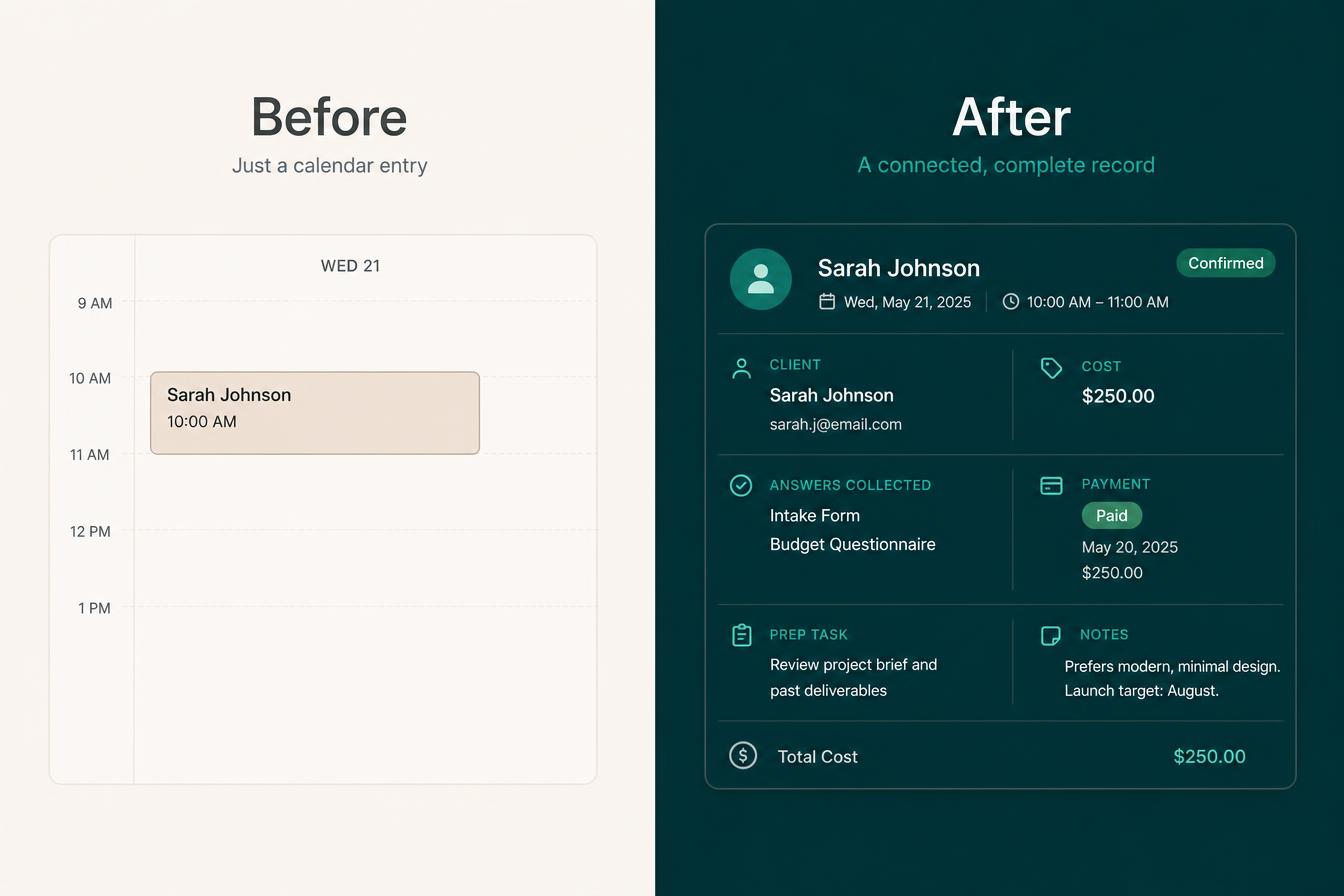
Before
- Times agreed over several messages
- Bookings sitting in a separate app
- Sessions starting without the details
- Deposits chased after the work
- Preparation and travel time guessed
- Notes kept away from the client
- Hours reconstructed at month end
After
- People book the time you actually have
- One calendar for the whole business
- The details arrive with the booking
- Paid sessions and deposits handled
- Buffers and blocks respected
- Notes saved on the client record
- One connected Sell journey, start to finish
A real booking record, not a square on a grid
One connected booking—shaped around your business.
A clean record keeps the time, the person, the details, the payment, the notes and the hours together without becoming an oversized dashboard.
- A free discovery call taken on a weekday morning
- A paid 60-minute initial consultation
- A site visit with travel time either side
- A full-day job with a deposit taken
- Intake questions answered before the session
- The right team member assigned
- A preparation task the day before
- A protected block for your own work
- A reschedule handled without messages
- Session notes saved to the client record
- The hours delivered recorded
- The booking visible on the client profile
- A follow-up action set
- The work carried into delivery
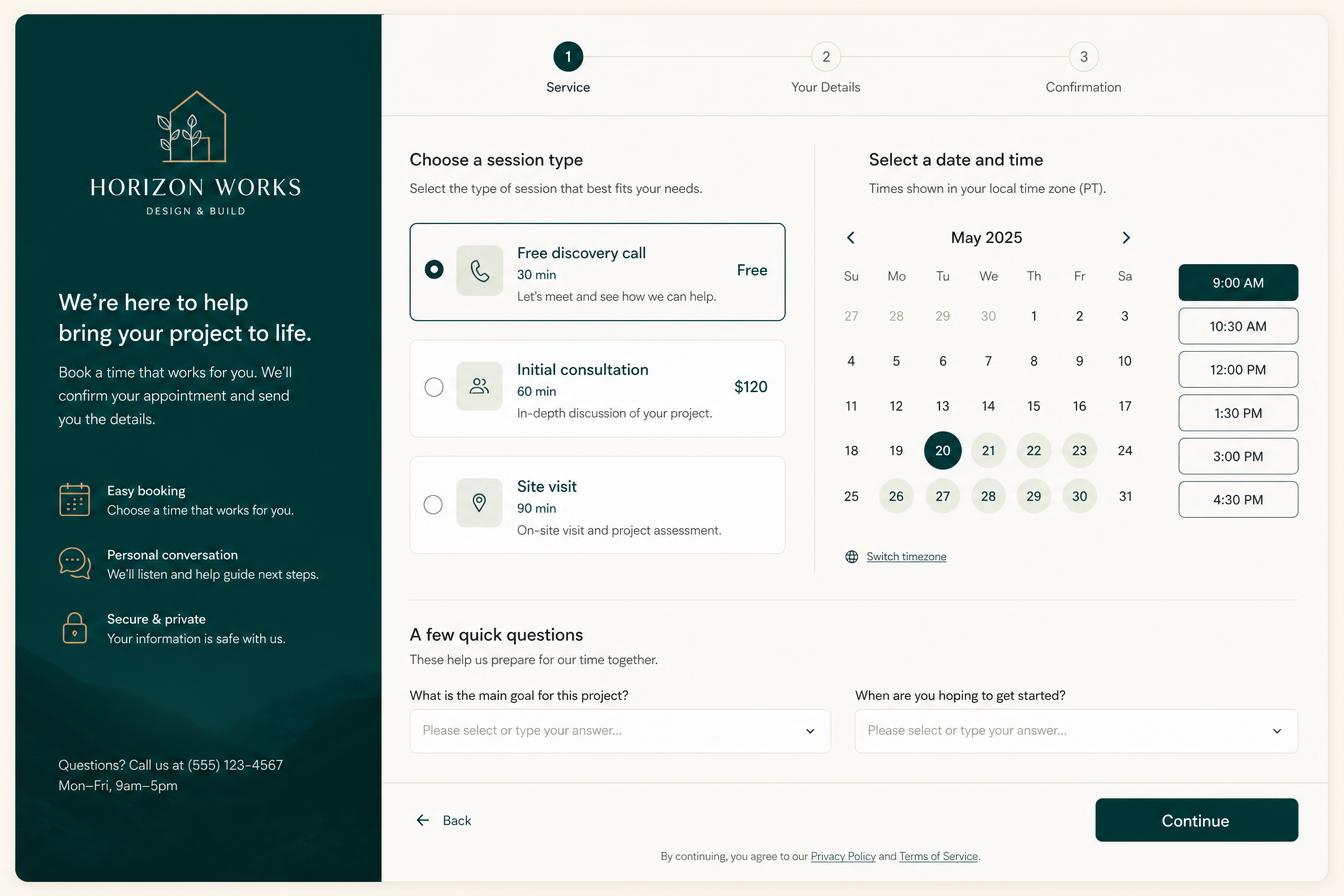 The booking page
Real time, chosen by them
They pick the call, session or job and see only the times you genuinely have.
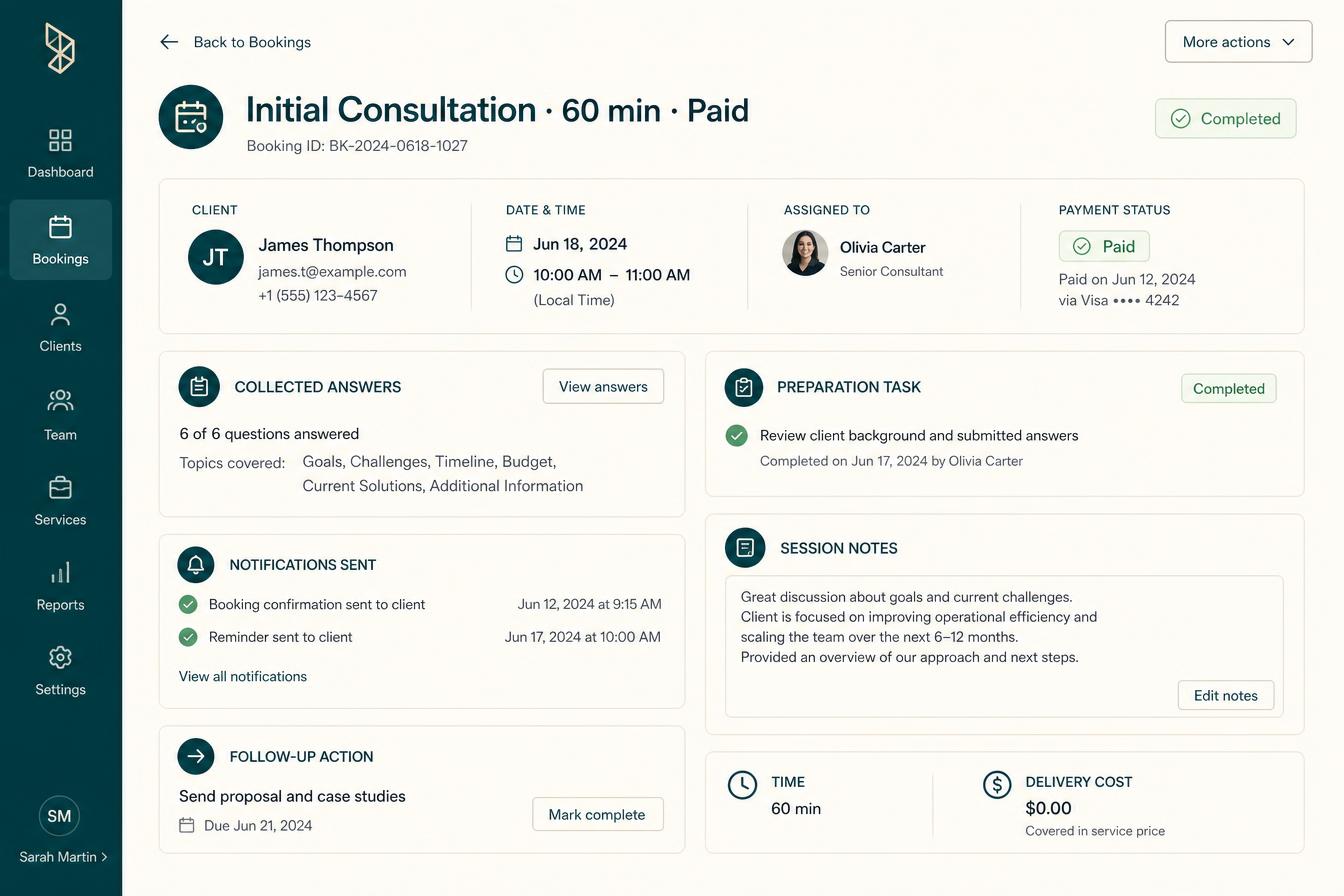 The booking
Details and payment together
Who, what, when, the answers they gave and whether it has been paid for.
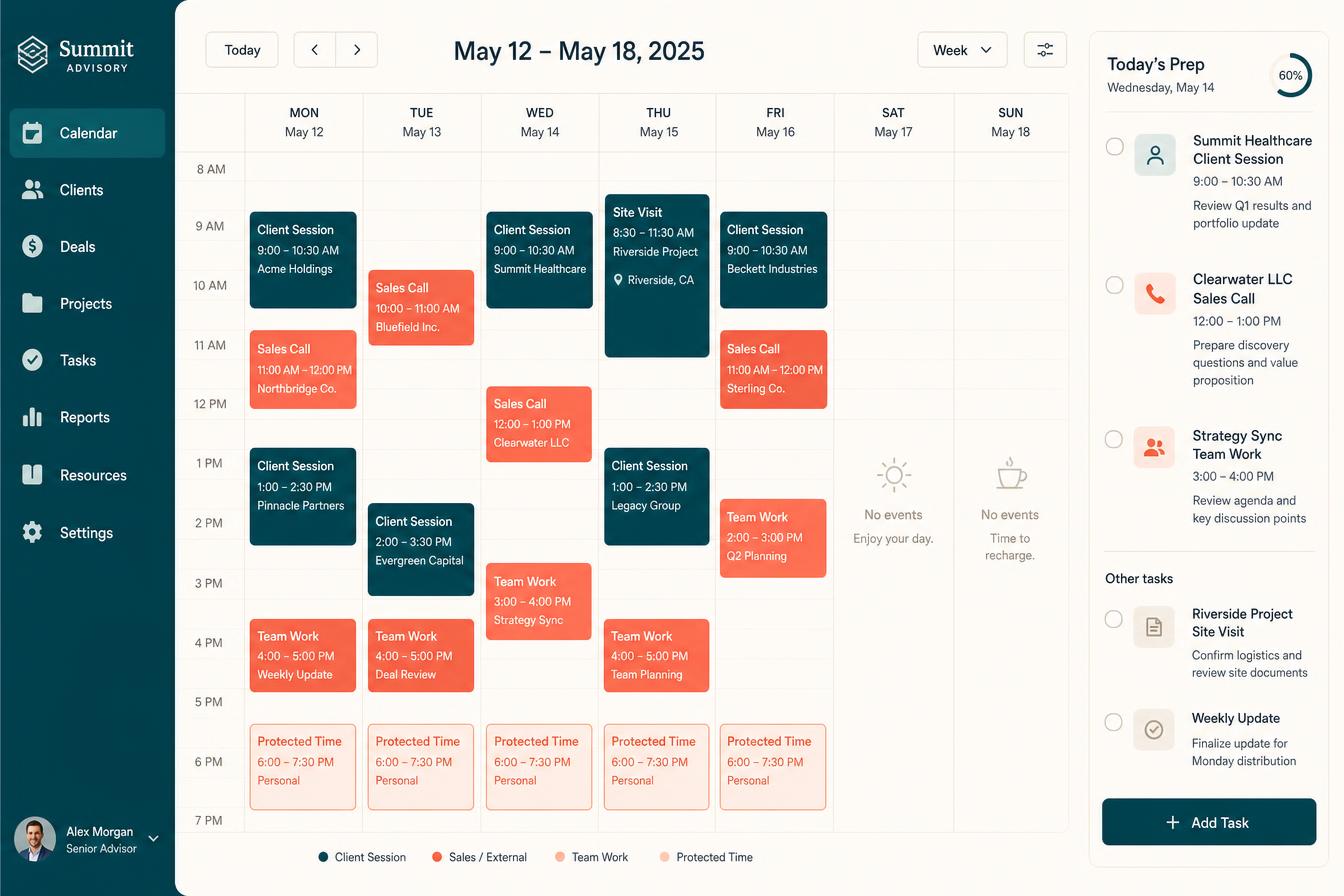 The week
One calendar for the whole business
Client sessions, sales calls, jobs, team work blocks and protected personal time.
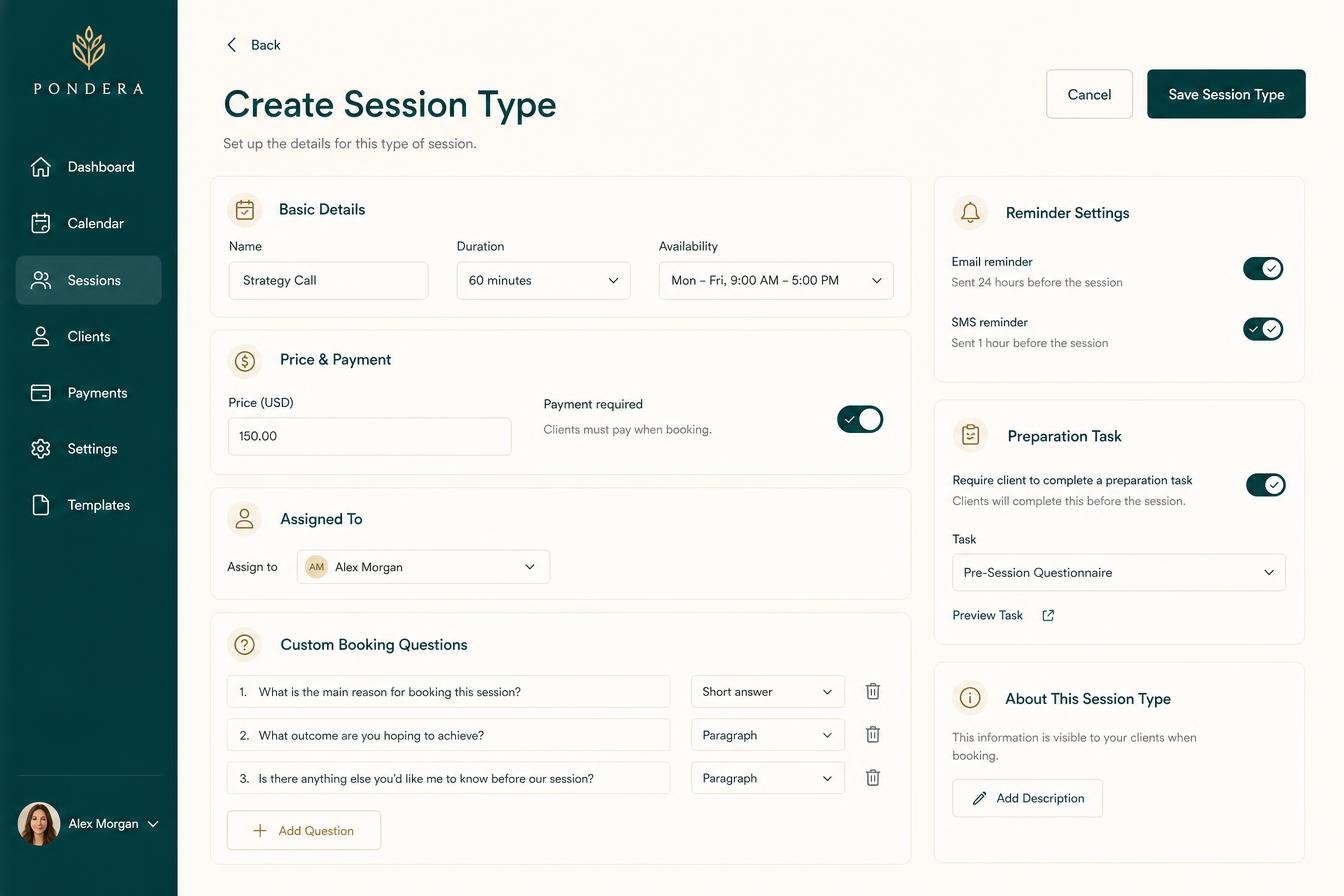 The setup
A session type in a few fields
Length, availability, price, buffer, who delivers it and the questions to ask.
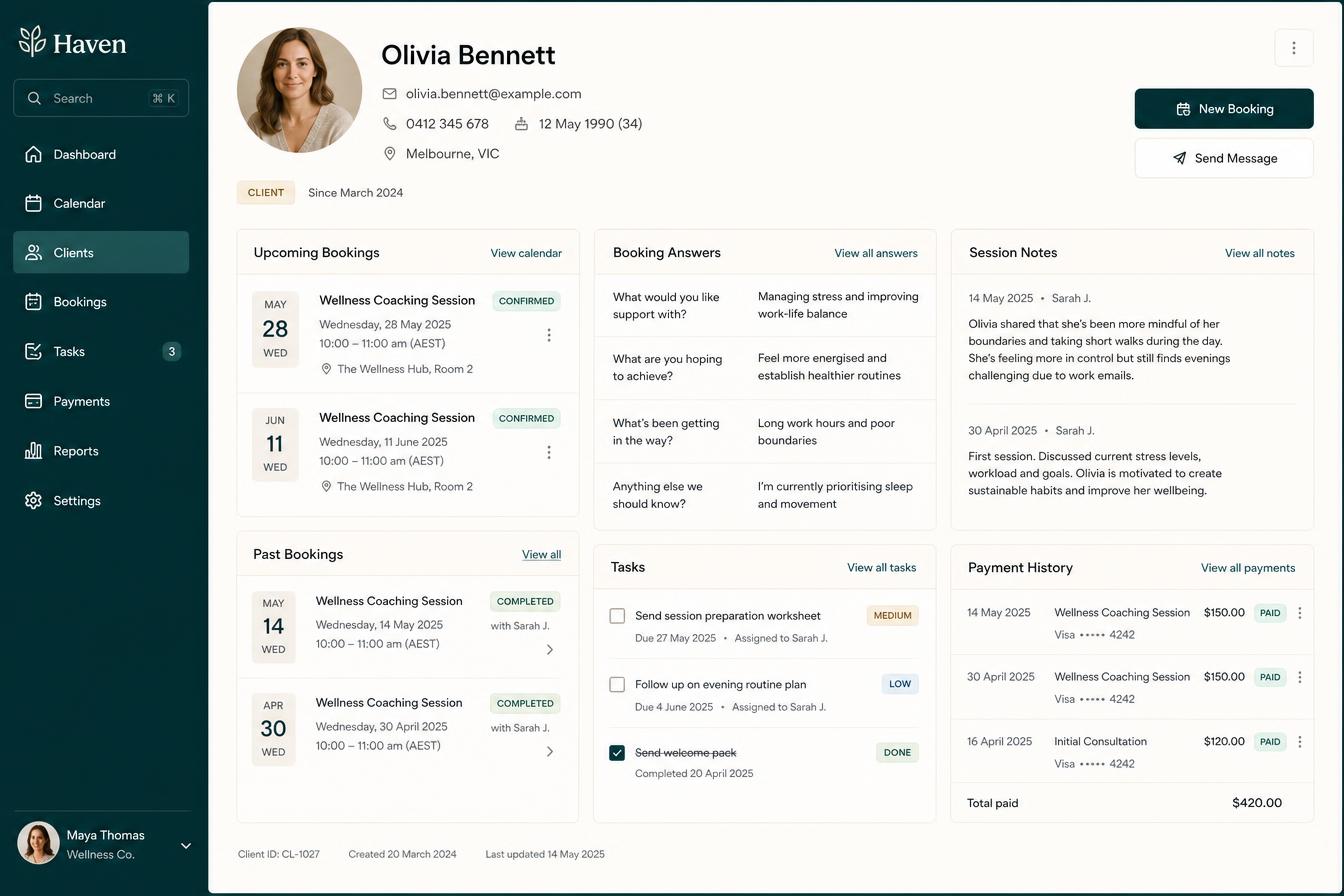 The client
Bookings on the client record
Past and upcoming sessions, their answers, the notes and what they have paid.
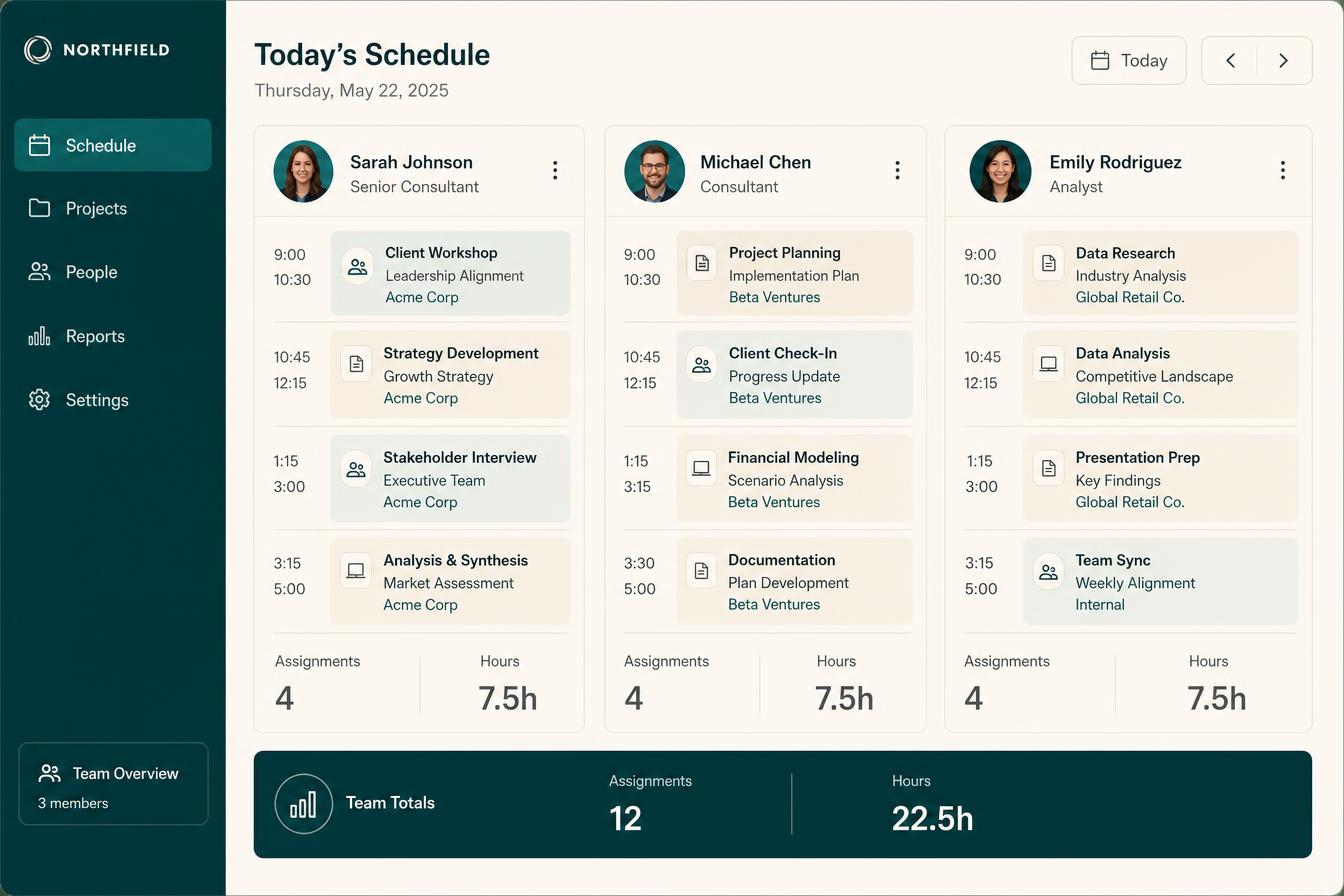 The team
Who is delivering what today
One person is included, with extra paid seats available up to 3 seats and assignments and hours visible.
Swipe or scroll for more
Prefer to speak to someone? Book a Live Walkthrough
Two clear ways to book
Let people book themselves—or put the time in yourself.
Both routes end the same way: one booking on one calendar, attached to the right person and the right work.
- Choose the call, session or job
- See only times that are genuinely free
- Times shown in their own time zone
- Answer the questions you set
- Pay where payment is required
- Get the confirmation immediately
- Land on your one calendar
- Become a lead or client record
- Create the preparation task
- Set the follow-up automatically
People choose from the time you actually have, give you what you need up front and pay where it matters—without a single back-and-forth message.
A wellness client books a 60-minute initial consultation for Thursday, answers three health questions and pays before the session—while the practitioner is with somebody else.
- Add a call, session or job yourself
- Book it for somebody in your team
- Block the day you are not available
- Protect preparation and travel time
- Add internal work blocks
- Attach it to the client or job
- Record what it is being delivered against
- Mark it free or paid
- Save notes afterwards
- Keep the hours recorded either way
When you take the booking by phone, on site or in person, you put it in once—and it behaves exactly like a booking somebody made themselves.
A builder adds Tuesday's site visit while standing in a driveway, attaches it to the job and lets the system set the prep task and the follow-up.
See a real booking inside Alive24Real proof
Not a booking link. A connected part of how your business runs.
Working Alive24 examples show the difference between an appointment in a separate app and a booking that carries the details, the payment, the client record, the notes and the hours delivered.
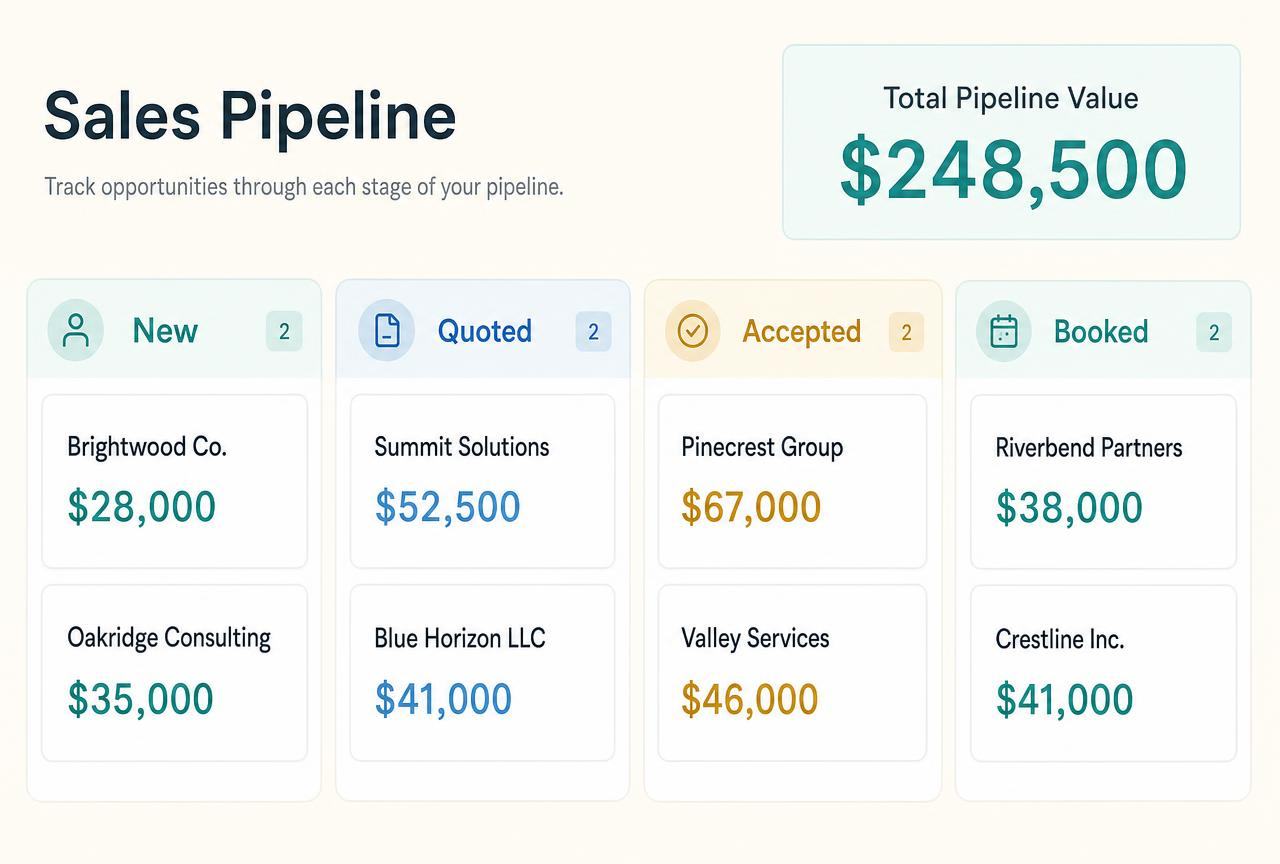
These are realistic product examples inside Alive24. No customer testimonial, booking volume, utilisation rate, award or performance statistic is claimed.
Prefer to speak to someone? Book a Live Walkthrough
Prefer to speak to someone? Book a Live Walkthrough
What you actually receive
A booking system that protects your time and your income.
Availability, payment, preparation and reminders all handled in one flow.
Availability
You control exactly when you can be booked.
- Working hours, breaks and blackout dates
- Different durations and buffers per service
- Travel time between locations for mobile work
- Daily and weekly limits so you do not overbook
- One calendar for jobs, sessions, calls and personal time
Booking
Clients book themselves, correctly.
- Book from your website, chat, quote or a direct link
- Service, duration and price shown up front
- Deposits or full payment at the time of booking
- Recurring appointments and multi-session packages
- Group sessions and capacity limits where needed
Preparation
They arrive ready.
- Intake forms and questionnaires sent automatically
- Documents, consents and instructions attached
- Location, parking and access details included
- Everything stored on the client record
- You see the answers before they arrive
Protection
Your time protected, your work recorded.
- Confirmation sent when a booking is made
- Rescheduling and cancelling within your rules
- Deposit and payment terms applied before the work
- Session notes saved to the client record
- Hours and delivery cost recorded against the work
Prefer to speak to someone? Book a Live Walkthrough
Built to hold the whole booking
See the booking—and everything attached to it.
Alive24 keeps the time, the person, the details, the payment and the work together, so a booking is never just a name in a square.
“Initial consultation · Thursday 10:00am · 60 minutes”
Booked from real availability, paid before it starts, and recorded properly once it is done.
- 01
The right time is chosen
The session, the length, the price and the availability all come from what you set up inside Alive24.
- 02
The booking becomes a record
Who it is with, the answers they gave, the payment status and the person delivering it, all on one record.
- 03
The work is recorded
Prep task, session notes, hours delivered, follow-up action and the client record all updated.
- Who the booking is with
- Which session, call or job
- Date, time and length
- The person delivering it
- Free or paid
- Payment status
- The answers they gave
- Location or site details
- The preparation task
- Session notes afterwards
- Hours delivered
- The follow-up action

Alive24 is informed by more than 20 years of hands-on small-business, hospitality, wellness, sales and delivery experience—including knowing exactly how much of a week disappears into agreeing times, rewriting a schedule and working out afterwards where the hours went.
Prefer to speak to someone? Book a Live Walkthrough
Fewer messages. Fewer clashes. A week you can actually account for.
From booked time to delivered work—without the booking sitting somewhere else.
The calendar is not a widget bolted onto the website. It is where the sale becomes real time, and where that time turns into recorded work.
From booked time to delivered work
One booking, connected through the entire Sell journey.
- 01
Lead or client
Somebody enquires, replies to a proposal or is already a client who needs the next session booked.
The moment it matters
- 02
Session, call or job
They choose the call, session, consultation or job that fits—each with its own length and price.
The right kind of time
- 03
Details collected
The questions you set are answered while the booking is made, so nothing has to be chased.
Prepared before it starts
- 04
Free or paid booking
Free where it should be free, paid or deposited where the work needs paying for up front.
Paid before the work
- 05
Calendar
The time lands on one business calendar with the buffers, blocks and the person delivering it.
No clashes
- 06
Notifications and tasks
Confirmation goes out, the preparation task is created and the follow-up is set, not remembered.
Someone owns it
- 07
CRM or client profile
The booking, the answers and the notes stay on the lead or client record where they belong.
Nothing retyped
- 08
Work delivered and recorded
The session happens, the notes are saved and the hours and costs are recorded against the work.
Time accounted for
- No booking stranded in another app
- No session starting without the details
- No separate tool for the team schedule
- No hours reconstructed at month end
Prefer to speak to someone? Book a Live Walkthrough
Connected, not bundled
Every booking connects to the rest of Sell—and into the work itself.
Change your services, prices, hours or team once and your bookings change with them—because the calendar uses the information already connected inside Alive24 instead of a separate copy you have to remember to update.
- 1Packages + PricingWhat a paid session or job actually costs.
- 2CRM + PipelineThe booking stays on the lead record.
- 3AI Sales Chat + Follow-UpGuides people to the right booking.
- 4Proposals + QuotesAn accepted document becomes booked time.
- 5Invoices + PaymentsDeposits and paid sessions collected.
- 6Forms and FunnelsDetails the booking did not need to ask.
- 7Client Management AreaA confirmed booking starts the work.
- 8Tasks + WorkflowsPreparation and follow-up actually happen.
- The booking page can sit on the website built inside Alive24
- Packages + Pricing decides what a paid session costs
- AI Sales Chat can guide somebody to the right booking
- Forms and Funnels collects what the booking did not ask
- CRM + Pipeline keeps the booking on the lead record
- Proposals + Quotes can lead straight into a booked start
- Invoices + Payments handles the paid sessions and deposits
- Client Onboarding carries a confirmed booking into the work
- Tasks + Workflows make sure the preparation and follow-up happen
- Bookings + Calendar is included inside Alive24. It is not a separate booking platform, scheduling subscription or brand. The plan starts with one person, with extra paid seats available up to 3 seats.
Find your number
Spend your week on the work you are paid for, not on arranging it.
Answer a few clear questions about the calls, sessions and jobs you deliver, the messages it takes to arrange them and the hours you never account for. Solomon helps show where a connected calendar would return real time to your week.
Take the 2-minute booking check
Free, no commitment, with a practical summary of the time and admin to connect.
Start with SolomonPrefer to speak to someone? Book a Live Walkthrough
Explore the connected system
See how one booking connects across Sell, client delivery and your numbers.
The main journey stays inside Sell, with capture and chat feeding it and the booked time carrying into delivery.
You
One voice note. One change.
Voice note → Website updated
Prefer to speak to someone? Book a Live Walkthrough
What owners say about Alive24
Real owners building clearer, more connected businesses with Alive24.
I got so excited when I opened the app to start I almost peed myself.
 Skye S.Breathwork Coach · 35 · Australia
Whiz bang. Just like that. Website up in 3 mins. This is crazy!
 LukeNoosa Fencing · 44 · Australia
Who needs a husband when you have this!
 AstridLuxury Hospitality Consultant · 51 · France
I can't believe I waited so long. Stuck in a job I hated. Launched my business after a friend recommended this. Immediately took on clients. It's too easy.
 VaneziaChild Psychologist and Educator · 29 · Indonesia
Procrastination was my middle name. I would do anything to not deal with business admin. One quick set up and one big contract. I can breathe again. Thank you.
 MarnieSpa Consultant · 55 · Australia
I actually wake up excited to work. I've got so much more free time I actually don't know what to do with myself!
 RosaInterior Decorator · 41 · Australia
A sold out retreat. I'm 75 years old. I've been trying to do this for years. It just paid for itself 5 times over.
 MaggieEnergy Healer · 75 · Australia
I got so excited when I opened the app to start I almost peed myself.
Skye S.Breathwork Coach · 35 · AustraliaWhiz bang. Just like that. Website up in 3 mins. This is crazy!
LukeNoosa Fencing · 44 · AustraliaWho needs a husband when you have this!
AstridLuxury Hospitality Consultant · 51 · FranceI can't believe I waited so long. Stuck in a job I hated. Launched my business after a friend recommended this. Immediately took on clients. It's too easy.
VaneziaChild Psychologist and Educator · 29 · IndonesiaProcrastination was my middle name. I would do anything to not deal with business admin. One quick set up and one big contract. I can breathe again. Thank you.
MarnieSpa Consultant · 55 · AustraliaI actually wake up excited to work. I've got so much more free time I actually don't know what to do with myself!
RosaInterior Decorator · 41 · AustraliaA sold out retreat. I'm 75 years old. I've been trying to do this for years. It just paid for itself 5 times over.
MaggieEnergy Healer · 75 · AustraliaQuestions
Bookings + Calendar—the questions owners actually ask.
Still unsure? The full demo answers most of it in a few minutes, without a sales call.
Ready to stop losing your week to agreeing times and rewriting your schedule?
See how Alive24 can hold your calls, sessions and jobs on one calendar—connected to the client, the work and the money.
Book a Live Walkthrough
See how your own sessions, hours, prices and team could become one connected business calendar.
Book a Live WalkthroughSee How Sell Works
Explore how Bookings + Calendar connects to CRM, chat, proposals, payments and client delivery across Alive24.
See How Sell WorksGet Alive24
Pay once to own the ready-built system, then run Bookings + Calendar, Sell, delivery and Money + Control with one low subscription.
Get Alive24