
Small business accounting software that connects the numbers to the business behind them.
Record money in, money out, expenses, receipts, transfers and payments—then see how those numbers connect to your sales, clients, projects, inventory, team costs and budgets. Alive24 gives you everyday bookkeeping in plain English and the wider business picture in the same connected system.
Money records what happened. Control helps you decide what to do next.

- Money in recorded
- Money out recorded
- Receipts attached
- Expenses categorised
- Accounts organised
- Transfers recorded
- Payments connected
- Statements uploaded
- Transactions reviewed
- Recorded results visible
- Accountant exports
- One connected picture
Is this you?
If your bookkeeping lives between your bank account, inbox, receipts and memory, this small business accounting app is for you.
You may know roughly what is in the bank and still have no simple answer when somebody asks what the business earned, spent or kept.
You only look when something feels wrong
You check the balance when money feels tight, but the transactions behind it have not been organised.
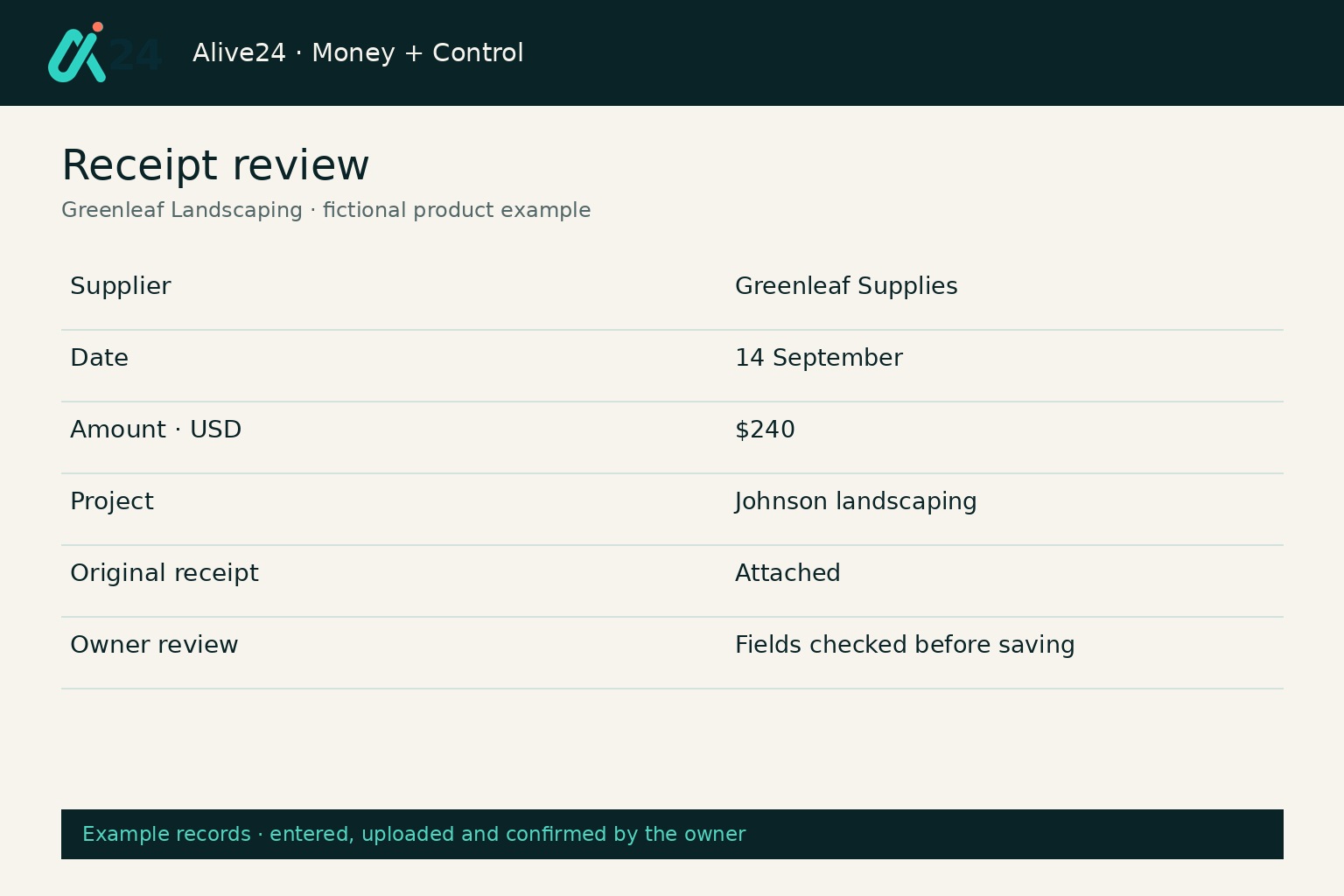
The paperwork is everywhere
Receipts sit in email, photos, bags and message threads, while expenses live somewhere else.
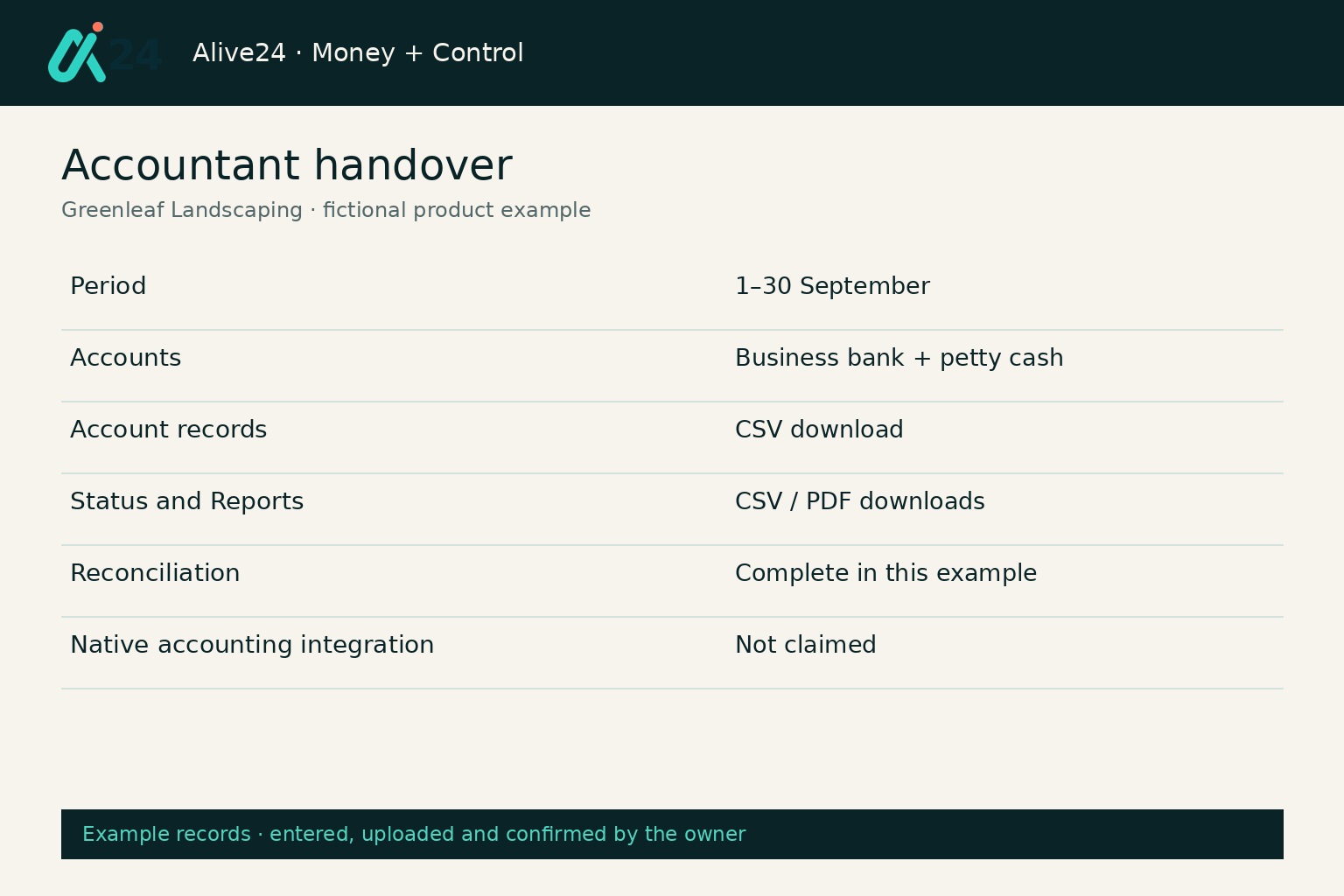
Your accountant gets the puzzle later
Your accountant receives statements, receipts and explanations long after you have forgotten what half of them were for.
Bookkeeping + Accounting walkthrough
See everyday bookkeeping become one clear financial record inside your business.
Money in, money out, receipts, expenses, accounts, statements and reporting connect without turning you into an accountant.
- Set up accounts
- Record money in
- Record money out
- Attach receipts
- Categorise expenses
- Record transfers
- Connect client payments
- Add inventory and team costs
- Upload a CSV statement
- Review unmatched items
- Compare recorded results
- Export for the accountant
Prefer to speak to someone? Book a Live Walkthrough
Are you currently doing this?
The problem is not that you cannot understand money. It is that the information is split across too many places.
Small-business bookkeeping becomes painful when the payment, receipt, client, job and reason no longer live together.
Money arrives without the story
- Client or invoice checked elsewhere
- Deposits difficult to identify
- Sales disconnected from the CRM
- No simple view of what created the income
Expenses lose their context
- Receipt stored separately
- Category added later
- Job or client never attached
- Inventory and team costs reviewed elsewhere
The statement becomes detective work
- Weeks of transactions reviewed at once
- Transfers mistaken for income or spending
- Missing receipts chased later
- Month-end becomes an archaeological dig
Accounting never becomes control
- Bank balance mistaken for profit
- Pricing disconnected from costs
- Budgets not compared with reality
- Reports seen too late to act
Record the daily movements and understand their place in the wider business.
Introducing
Bookkeeping + Accounting inside Alive24.
Record money in, money out, expenses, receipts, transfers and payments—then see how those numbers connect to your sales, clients, projects, inventory, team costs and budgets. Alive24 gives you everyday bookkeeping in plain English and the wider business picture in the same connected system.
Prefer to speak to someone? Book a Live Walkthrough
 Money in
 Money out
 Accounts
 Expenses
 Receipts
 Transfers
 Statements
 Recorded position
 Reporting
 Accountant exports
Accounts
See where business money is held and moved, with starting balances and recorded movements.
Money in
Record payments with their client, invoice or source. Other receipts stay separate from customer sales.
Money out
See business spending, supplier bills and amounts still to pay in clear categories.
Expenses
Keep the amount, purchase date, reason and relevant project or client together.
Receipts
Upload the proof, review the suggested fields and attach it to the spending record.
Transfers
Move money between your accounts without creating another sale or purchase cost.
Statement checking
Upload a CSV statement, review suggested matches and confirm what agrees.
Client and project connections
Link supported payments and spending to the saved client, invoice or project behind them.
Inventory and team costs
Stock purchases and approved people costs remain connected to the wider financial picture.
Reporting and exports
Compare recorded results with your plan and download dated records for your accountant.
- Money in recorded
- Money out recorded
- Receipts attached
- Expenses categorised
- Accounts organised
- Transfers recorded
- Payments connected
- Statements uploaded
- Transactions reviewed
- Recorded results visible
- Accountant exports
- One connected picture
How it works
From scattered transactions to records you and your accountant can actually use.
Five clear steps. Financial information stays subject to your review and confirmation.
You voice-note one thing…
“This receipt is for materials for the Johnson job. Help me prepare the spending record.”
One voice note → prepared instructions → review and confirm in Money
Step 1 · Set up
Add the accounts and opening information you actually use.
Add your real accounts. Different currencies stay separate; no automatic conversion is claimed.
- Business accounts
- Payment accounts
- Petty cash
- Categories
- Starting balances
- Account currencies
The records stay readable to the owner and organised enough to hand to the accountant.
Solved, in one place
The everyday financial record a small business actually needs.
A small business bookkeeping app that records daily money movements and keeps them connected to the work, clients, products and people behind them.

You
One voice note · review · confirm
Voice note → Sell updated
Accounts
See where business money is held and moved, with starting balances and recorded movements.
Money in
Record payments with their client, invoice or source. Other receipts stay separate from customer sales.
Money out
See business spending, supplier bills and amounts still to pay in clear categories.
Expenses
Keep the amount, purchase date, reason and relevant project or client together.
Receipts
Upload the proof, review the suggested fields and attach it to the spending record.
Transfers
Move money between your accounts without creating another sale or purchase cost.
Statement checking
Upload a CSV statement, review suggested matches and confirm what agrees.
Client and project connections
Link supported payments and spending to the saved client, invoice or project behind them.
Inventory and team costs
Stock purchases and approved people costs remain connected to the wider financial picture.
Reporting and exports
Compare recorded results with your plan and download dated records for your accountant.
Prefer to speak to someone? Book a Live Walkthrough
Built for real businesses
The bookkeeping changes. The need for a clear record does not.
Small business bookkeeping software for practical trades, wellness practices, consultants and product businesses.

Massage therapist

Personal trainer

Beauty and skin therapist

Yoga and pilates teacher

Naturopath and nutritionist

Counsellor and psychologist

Physio and chiropractor

Health coach
Massage therapist
Personal trainer
Beauty and skin therapist
Yoga and pilates teacher
Naturopath and nutritionist
Counsellor and psychologist
Physio and chiropractor
Health coach

Electrician

Plumber

Builder and carpenter

Landscaper and gardener

Painter and decorator

Cleaner and home services

Handyman

Property and rental operator
Electrician
Plumber
Builder and carpenter
Landscaper and gardener
Painter and decorator
Cleaner and home services
Handyman
Property and rental operator

Website designer

Social media manager

Business coach
Business consultant

Marketing consultant

PR consultant

Bookkeeper

Accountant

Virtual assistant

Copywriter

Brand and graphic designer

Photographer and videographer

Course creator and tutor

Maker and product seller

Mobile and local operator
Website designer
Social media manager
Business coach
Business consultant
Marketing consultant
PR consultant
Bookkeeper
Accountant
Virtual assistant
Copywriter
Brand and graphic designer
Photographer and videographer
Course creator and tutor
Maker and product seller
Mobile and local operator
Wellness practitioner
See session income beside room hire, product purchases, insurance and practitioner costs.
Tradie
Connect deposits and progress payments, materials, subcontractors, fuel and supplier costs to the jobs behind them.
Consultant
See retainers, project payments, software, contractors, travel and professional fees without rebuilding the month.
Product seller
Keep sales, inventory purchases, packaging, delivery, supplier payments and returns in the same picture.
Say it out loud
Record the money while you still remember what it was for.
Describe the transaction in normal language. Prepare the instructions, then review and confirm the financial record in Money.
“This receipt is for materials for the Johnson job. Help me prepare the expense, then show me how to check the statement.”
- This receipt is for the Johnson materials
- Help me identify Sarah’s package payment
- Help me choose the software category
- This was a transfer between accounts
- How do I attach this receipt?
- How do I review this CSV statement?
- Help me compare advertising with the plan
- Help me prepare accountant records
- Which project should this cost link to?
- Which budget costs need attention?
- How do I record this stock purchase?
- Explain recorded sales less costs
What that normally means
- Opening several apps
- Searching emails for receipts
- Remembering transaction details
- Rebuilding project costs
- Copying totals into spreadsheets
- Sending incomplete files
Voice helps prepare instructions; receipt reading proposes fields. You review and confirm in the correct Money screen. Prepared instructions never mean a financial entry has already been saved.
Time, money and energy saved
Stop rebuilding the financial story after the month has already ended.
Your daily record stays connected to the wider business.
What quietly drains the month
- Separate accounting subscription
- Receipt-storage app
- Expense spreadsheet
- Manual statement detective work
- Missing explanations
- Repeated accountant questions
- Disconnected job costing
- Costs found too late
Hours of reconstructing—and no useful picture while decisions are being made
Inside Alive24
- Money in and money out recorded
- Receipts attached
- Transfers separated
- Clients and projects linked
- Statements reviewed
- Recorded results visible
- Accountant exports prepared
- One connected picture
One daily record connected to the wider business
Time and clarity returned
- Less double handling
- Fewer missing receipts
- Faster review
- Cleaner accountant handover
- Earlier cost visibility
- Better project context
- More useful reporting
- Decisions from recorded information
Alive24 is not a bank, payment processor, accountant, bookkeeper or tax, financial or investment adviser, and it is not enterprise accounting software. Budgets, records, inventory, projections and reports reflect the information and assumptions you enter. Keep your accountant for tax, compliance and advice.
See full pricingBefore and after
From “I will sort it out later” to records that stay connected as you work.
The money did not become complicated. The context was lost across too many places.
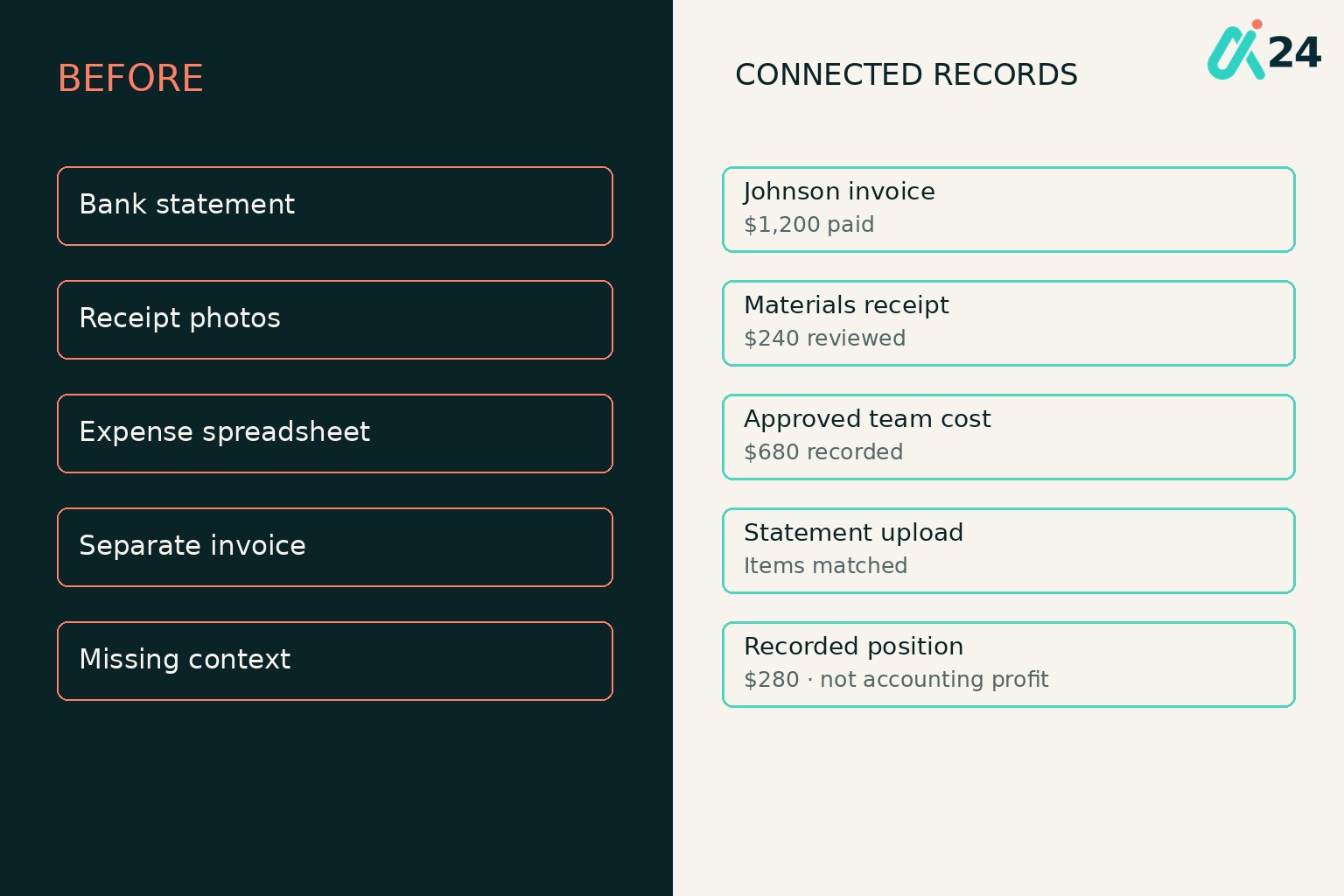
Before
- Balance checked in isolation
- Receipts scattered
- Expenses entered late
- Transfers confused
- Payments checked elsewhere
- Project costs unclear
- Accountant receives incomplete records
After
- Accounts organised
- Money movements recorded
- Receipts attached
- Transfers identified
- Payments connected
- Work and costs linked
- Dated accountant exports
Real examples
Built for owners who want the records clear before the accountant asks.
The same connected approach works across practical trades, wellness practices, consultants, creatives and product businesses.
- A landscaper connecting payments and materials to each job
- A coach linking package payments to clients
- A clinic keeping room and practitioner costs visible
- A consultant recording retainers and contractor costs
- A product business linking purchases to inventory
- A designer attaching costs to delivery
- An owner reviewing unmatched statement items
- A receipt attached while the purchase is remembered
- A transfer that creates no additional purchase cost
- Team costs flowing from approved work
- Client payments connected with invoices
- Accountant records downloaded without rebuilding the month
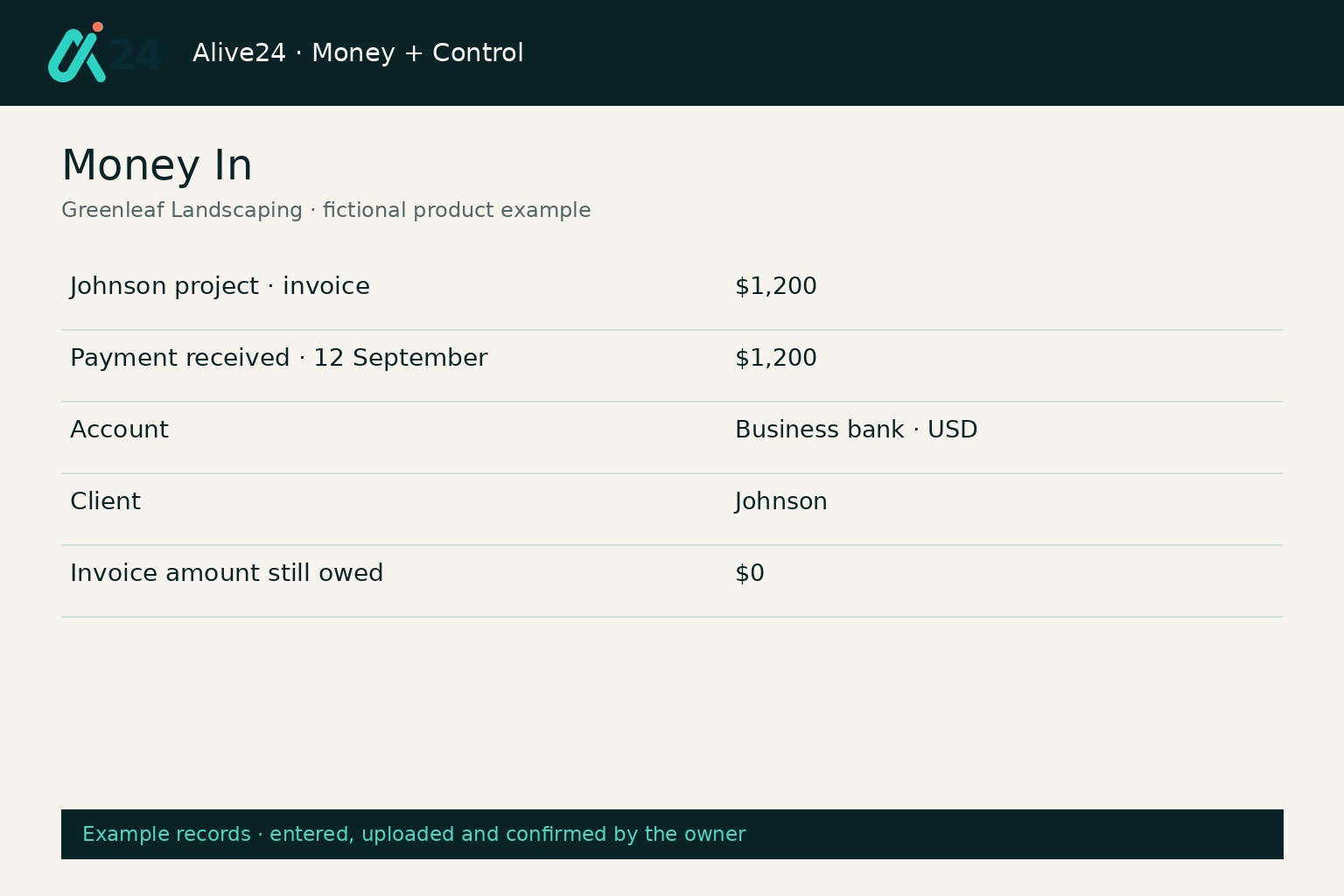 Money in
What arrived and where it came from
Client payment linked to the Johnson invoice.
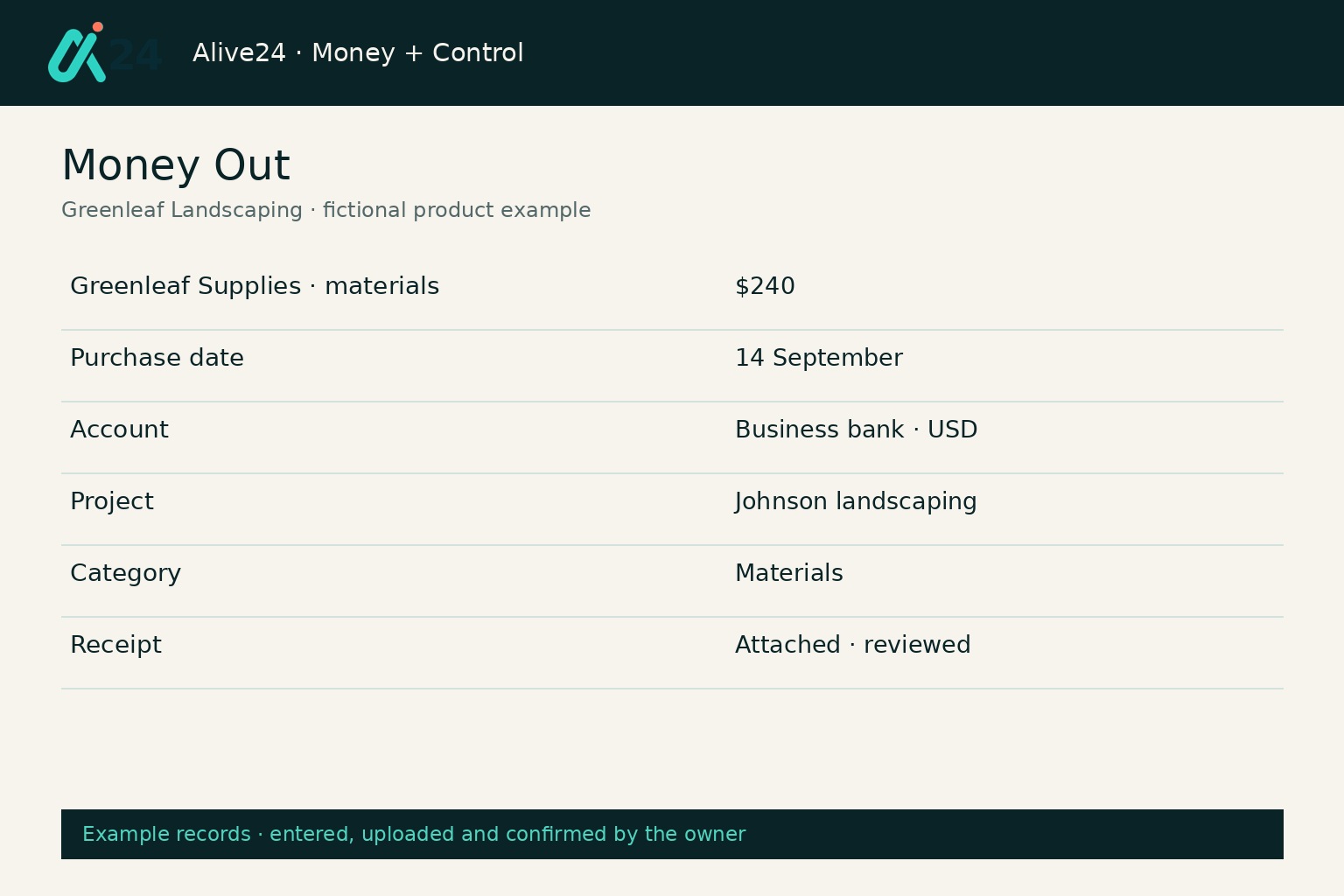 Money out
What left and why
Materials purchased with the project and category recorded.
ReceiptsThe proof beside the record
Original receipt linked after field review.
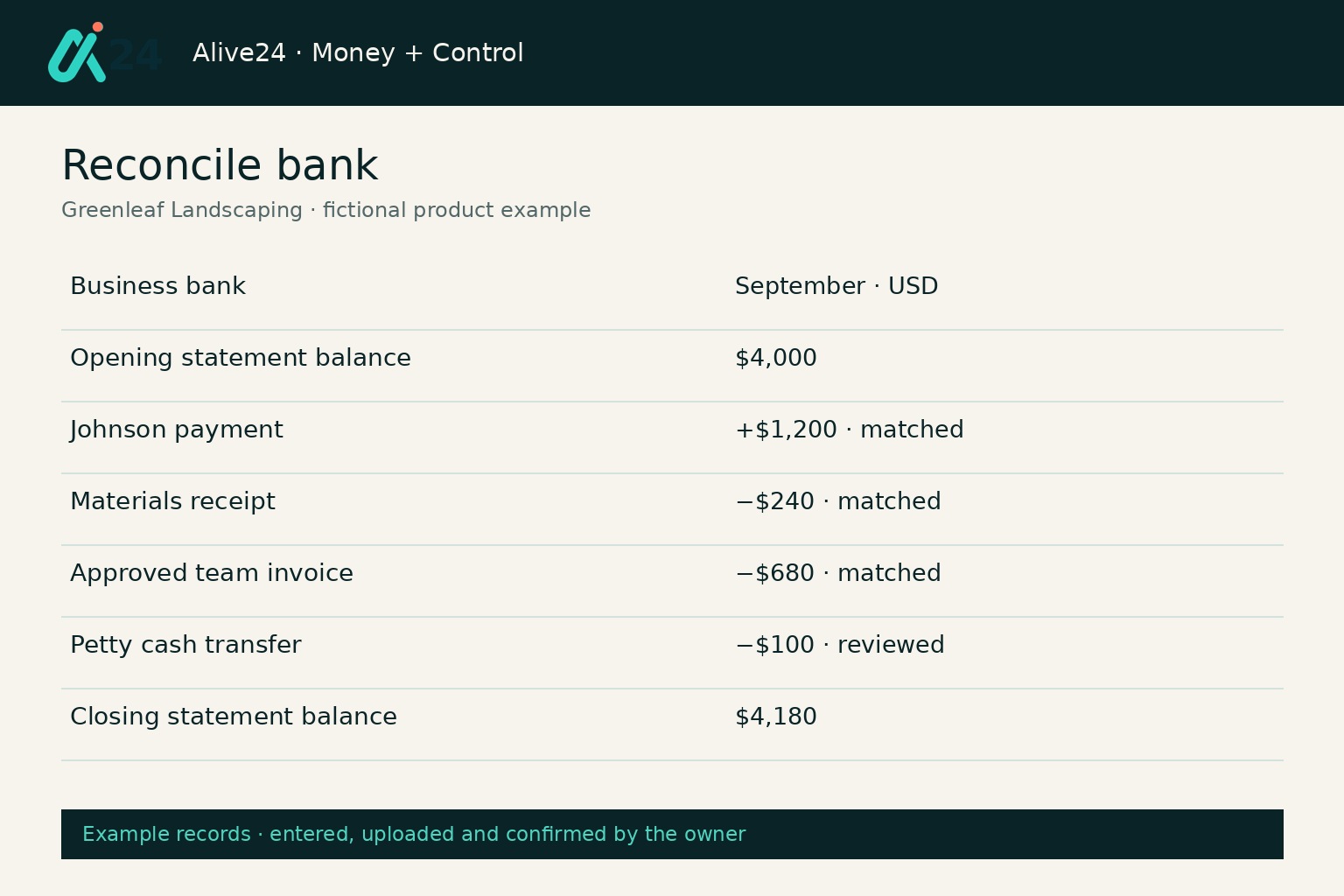 Statements
Uploaded, not a live feed
CSV transactions reviewed against recorded movements.
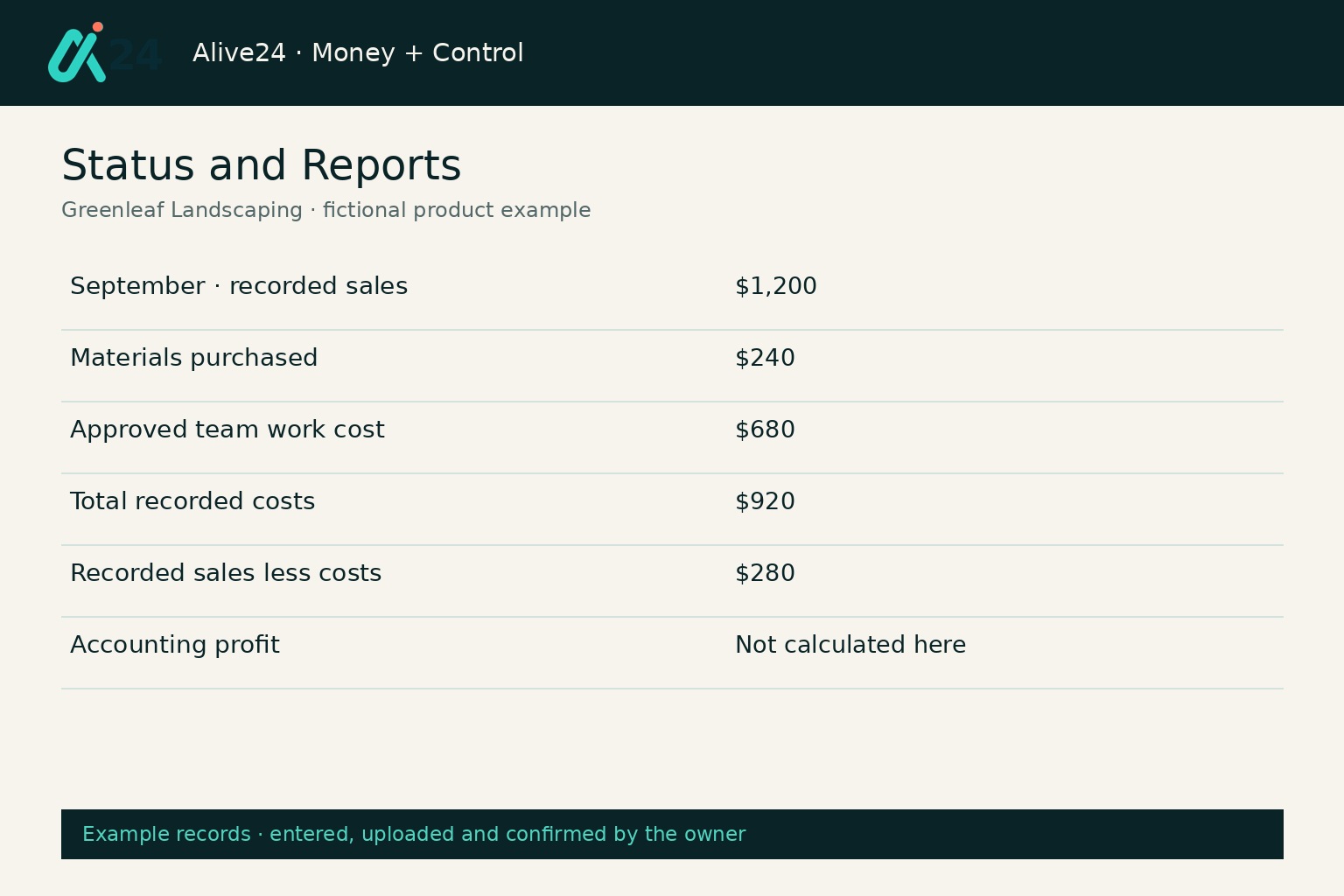 Recorded results
A recorded position in plain language
Sales less costs is not accounting profit.
Accountant handoverOrganised records for review
Dated CSV and supported PDF downloads.
Swipe or scroll for more
Prefer to speak to someone? Book a Live Walkthrough
Two connected areas
Money records the movement. Control shows what it means.
The daily record and the decision view stay distinct enough to understand and connected enough to be useful.
- Accounts
- Money in
- Money out
- Expenses
- Receipts
- Transfers
- Payments
- CSV statement uploads
- Transaction review
- Supporting records
See what moved, where it moved and the business reason behind it.
Greenleaf Landscaping records the Johnson payment, materials receipt and approved team payment against the same job.
- Business budgets
- Product and service costs
- Pricing
- Sales plans
- Actual records
- Recorded position
- Projections
- Status and Reports
- Capacity
- Business decisions
Use recorded information to see whether the business is on plan. Recorded position is not accounting profit.
The same business compares labour and materials with its quote and adjusts the next price before repeating an overspend.
See a real bookkeeping + accounting exampleReal proof
Real records. Real connections. No pretend bank feed.
Faithful, readable examples of the implemented record fields—not screenshots of private business data or a claim that these fictional records were saved.
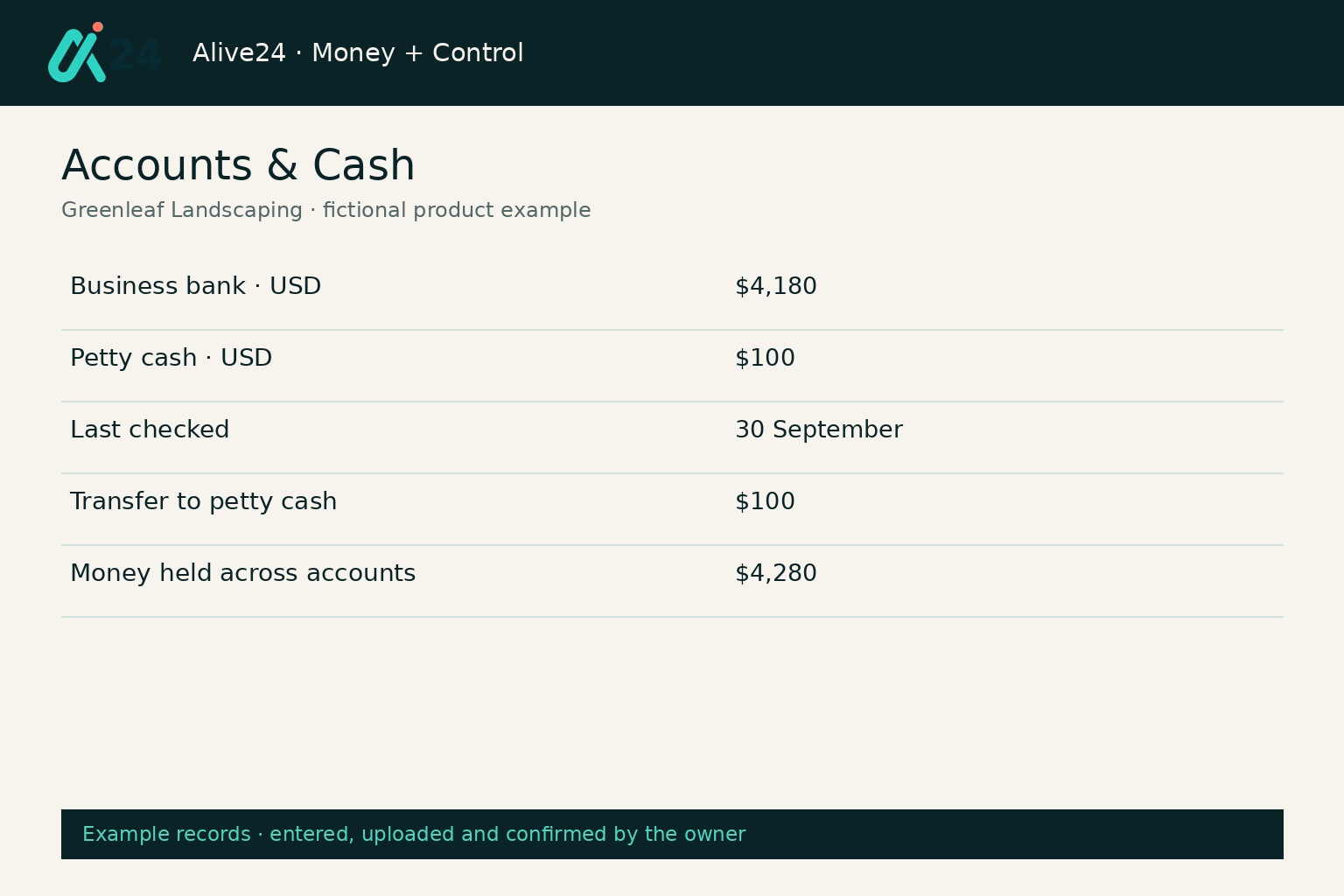
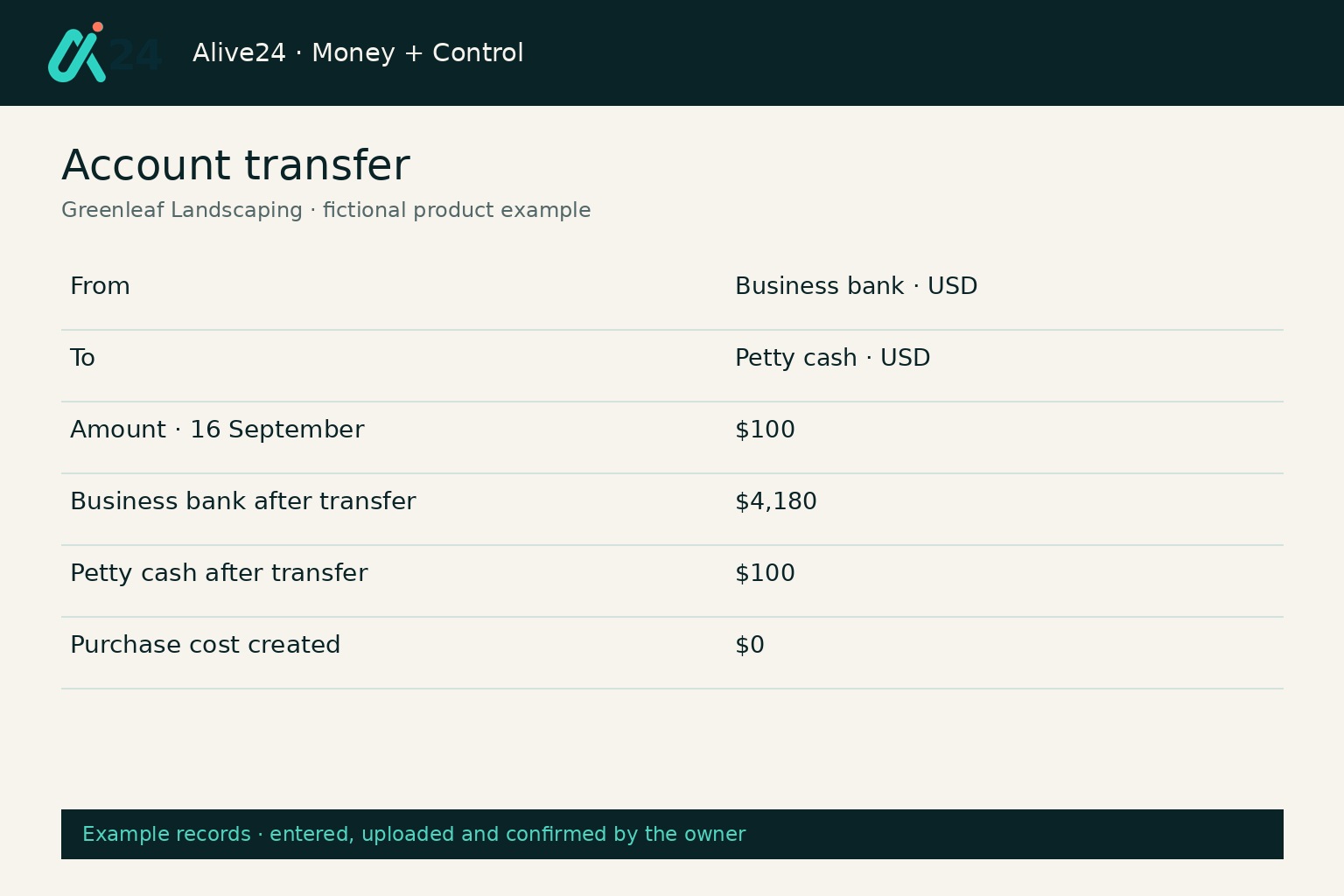
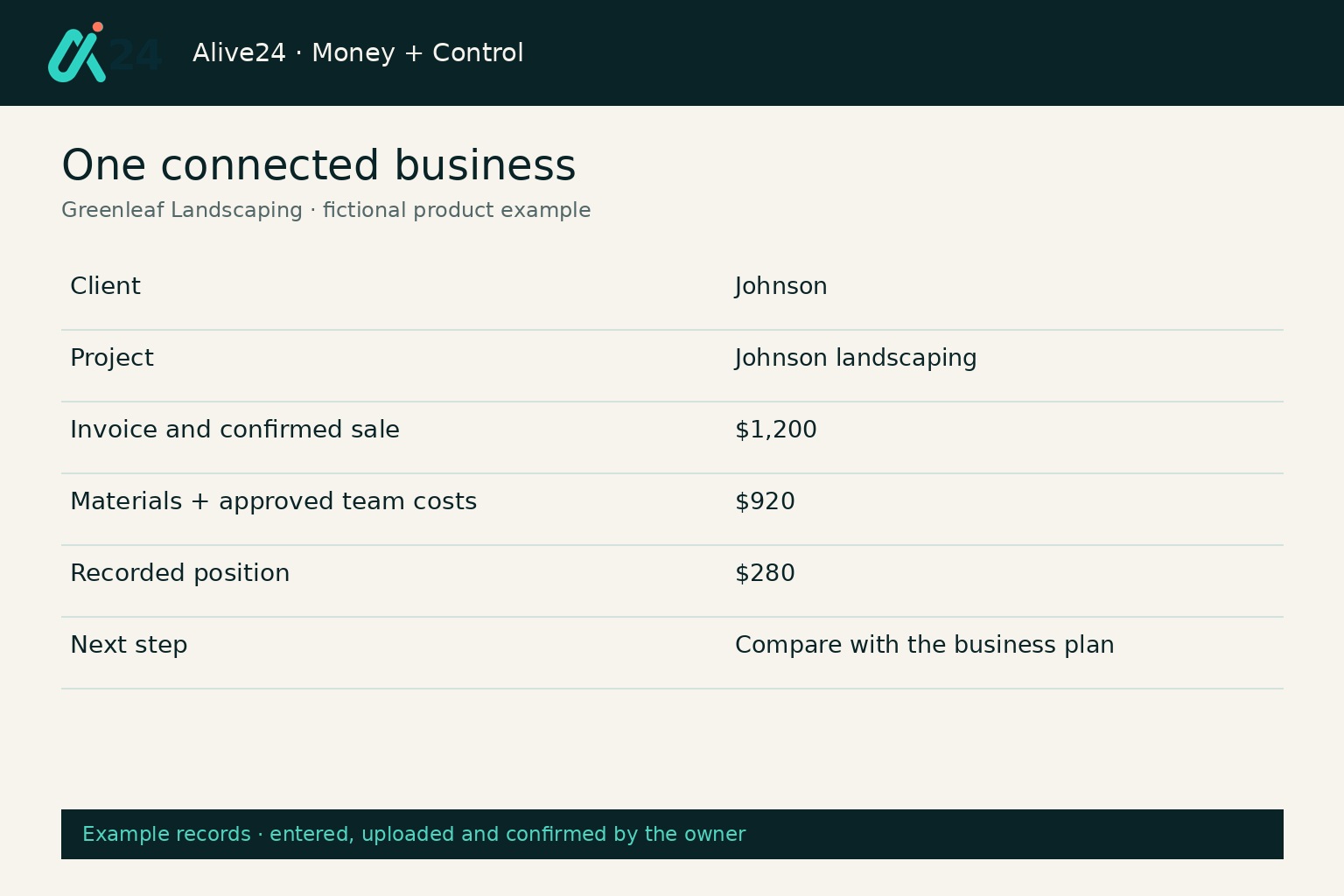
These are realistic Alive24 product examples for fictional Greenleaf Landscaping. Every record reflects information entered, uploaded and confirmed by the owner. Professional profit and loss remains with the accountant.
Prefer to speak to someone? Book a Live Walkthrough
Prefer to speak to someone? Book a Live Walkthrough
What you actually receive
The record, the context, the result and the handover.
One connected financial picture that remains useful before, during and after professional review.
The record
Capture what happened.
- Money in and money out
- Expenses and receipts
- Transfers and payments
- Uploaded statement transactions
- Notes and supporting records
The context
Keep the reason beside the number.
- Client and invoice
- Project or job
- Product or service
- Inventory purchase and team cost
- Category and account
The picture
See what the records add up to.
- Recorded sales and costs
- Recorded position—not accounting profit
- Account balances by currency
- Actual records against budgets
- Items requiring review
The handover
Give the accountant something usable.
- Organised transaction records
- Linked receipts and supporting notes
- Clear spending categories
- Dated CSV records and supported PDF reports
- Reconciliation and unresolved items visible
Prefer to speak to someone? Book a Live Walkthrough
A simple, readable view
See what came in, what went out and what still needs attention.
Enough detail to run the business—without forcing you through an accounting course.
“September · $1,200 recorded sales, $920 recorded costs, statement checked”
Greenleaf Landscaping · entered, uploaded and confirmed example records.
- 01
The daily record stays readable
Plain categories and connected context help the owner understand it.
- 02
Exceptions receive attention
Unmatched items and incomplete records remain visible for review.
- 03
The wider view stays connected
Budgets, pricing and projections use the same underlying records and owner assumptions.
- Account
- Date
- Description
- Money in
- Money out
- Category
- Client
- Project
- Receipt
- Review status
- Notes
- Reporting period

Alive24 is informed by more than 20 years of hands-on small-business experience—including knowing that a small business owner needs clear numbers they can read in five minutes, not an accounting course.
Prefer to speak to someone? Book a Live Walkthrough
From daily movement to a business you can control
See how Bookkeeping + Accounting connects the money to the work behind it.
The daily record stays connected to the decisions it should improve.
From daily movement to a business you can control
See how Bookkeeping + Accounting connects the money to the work behind it.
- 01
Sale or client work
A client purchase, booking, accepted project or job provides the source.
Work created
- 02
Invoice or payment
The amount due and recorded payment remain connected through supported flows.
Payment recorded
- 03
Expenses and receipts
Costs are recorded with reviewed proof and the relevant business context.
Costs organised
- 04
Inventory and team
Stock purchases and approved people costs enter the financial picture without another ledger.
Delivery costs visible
- 05
Accounts and statements
Uploaded CSV activity is reviewed against the saved records.
Records checked
- 06
Recorded result
Recorded sales less costs shows a recorded position, not accounting profit.
Position visible
- 07
Budgets and projections
Actual records are compared with plans and owner assumptions.
Context added
- 08
Accountant handover
Dated records and supported reports are reviewed and exported for professional advice.
Handover prepared
- No disconnected receipt folder
- No second expense spreadsheet
- Less statement archaeology
- Less rebuilding the story at tax time
Prefer to speak to someone? Book a Live Walkthrough
Connected, not bundled
Your bookkeeping connects to the business activity that created every number.
Bookkeeping + Accounting sits inside Money + Control while sales, clients, delivery, inventory, team costs and payments remain connected around it.
- 1Business DashboardOne clear view across the business.
- 2BudgetsWhat the business planned to earn and spend.
- 3Expenses + ReceiptsBusiness costs and their proof.
- 4Projections + ReportingOwner plans beside actual records.
- CRM + Sales Pipeline keeps the client and sale context
- Invoices + Payments keeps what was charged and paid
- Projects + Jobs keeps the delivery behind the money
- Team Scheduling and Team Management provide approved work costs
- Inventory supplies saved product and material movements
- Expenses + Receipts supplies daily cost records
- Budgets keeps the plan
- Business Dashboard adds whole-business context
- Projections + Reporting compares records with owner assumptions
- Accountant downloads support professional review
- Alive24 records and reports from information you enter, upload and confirm. It is not tax, financial or investment advice; requirements vary by business and location.
Protect your decisions
Find out which part of your bookkeeping is costing you the most time.
Ask Solomon what should be recorded, connected or cleaned up first.
Clean up the financial picture
Tell Solomon where the paperwork piles up and what you want to understand about your business.
Start with SolomonPrefer to speak to someone? Book a Live Walkthrough
Explore the connected system
See how bookkeeping + accounting connects across the rest of your business.
Bookkeeping + Accounting stays inside Money + Control while the leads, sales, client work and payments behind the numbers stay connected.
You
One voice note · review · confirm
Voice note → Sell updated
Prefer to speak to someone? Book a Live Walkthrough
Questions
Bookkeeping + Accounting—the questions small-business owners actually ask.
Still unsure? The full demo answers most of it in a few minutes, without a sales call.
Ready to see bookkeeping + accounting working inside one connected system?
Record money in, money out, expenses, receipts, transfers and payments—then see how those numbers connect to your sales, clients, projects, inventory, team costs and budgets. Alive24 gives you everyday bookkeeping in plain English and the wider business picture in the same connected system.
Book a Live Walkthrough
See bookkeeping + accounting used the way a small business owner actually uses it.
Book a Live WalkthroughSee How Money + Control Works
Explore how budgets, expenses, records, dashboards and projections connect.
See How Money + Control WorksGet Alive24
Own the complete connected system, including Bookkeeping + Accounting and every Solo money tool.
Get Alive24